
Last Updated on January 9, 2026 by
If you’ve ever Googled “Veo 3 pricing” and immediately got hit with $250/month, credits, 8-second limits, and three different places to click, you’re not alone. Reddit is full of people asking the same thing: How much does Veo 3 cost… like, in normal human terms?
Veo 3 Pricing Overview: The Official Cost at a Glance
Here’s the “featured snippet” answer you came for:
How much does Veo 3 cost?
- Pay-per-use (Gemini API): $0.40 per second for Veo 3 and $0.15 per second for Veo 3 Fast (both listed as video with audio pricing).
- Subscription access: Google AI Pro is $19.99/month; Google AI Ultra is $249.99/month, each with monthly AI credits that can be used for video generation in Flow and Whisk.
- Free (limited): some users with no membership get 100 monthly AI credits that reset monthly, usable in Flow/Whisk (availability varies by country/region).
Quick pricing table:
| What you’re doing | Official pricing model | What you’ll pay |
| Generate via Gemini API | Pay per second | $0.40/s (Veo 3) or $0.15/s (Veo 3 Fast) |
| Use Veo via Google AI Pro | Subscription cost + credits | $19.99/month, includes 1,000 monthly AI credits |
| Use Veo via Google AI Ultra | Subscription cost + credits | $249.99/month, includes 25,000 monthly AI credits |
| Try without paying | Free monthly credits (limited) | 100 monthly AI credits for some non-members |
Google Veo 3 Pricing 2025: Subscription Cost vs Pay-Per-Use
This is the core confusion behind most “Veo 3 pricing” threads: you can pay two totally different ways.
- Subscription cost (Google AI Pro / Google AI Ultra): You pay monthly and get AI credits you spend inside Google tools like Flow/Whisk.
- Pay per use (Gemini API): You pay by the second when you generate videos through the developer API.
Google AI Pro and Google AI Ultra Subscription Cost
- Google AI Pro: $19.99/month, includes 1,000 monthly AI credits, and mentions unlocking video generation with Veo 3.1 Fast plus limited access in Flow.
- Google AI Ultra: $249.99/month, includes 25,000 monthly AI credits, with the highest limits and video generation with Veo 3.1.
Credits are explicitly described as being used for video generation across Flow and Whisk, and they refresh monthly.
Google Veo 3 API Pricing and Pay-Per-Use Model
On the developer side, Google lists Veo 3 and Veo 3.1 pricing directly in the Gemini API pricing table:
- Veo 3 Standard (with audio): $0.40 per second
- Veo 3 Fast (with audio): $0.15 per second
- Veo 3.1 Standard / Fast: the same per-second pricing listed for the preview models.
Also important (and reassuring): Google notes you’re only charged if the video is successfully generated.
Google Veo 3 API Pricing: Cost Per Second and Per Video
“$0.40 per second” is clear… until you ask the real question: Okay, so what’s the cost per video?
Veo 3 Cost Per Second Explained
Use this formula:
Total cost = seconds × rate
Official rates:
- Veo 3 Standard = $0.40/s
- Veo 3 Fast = $0.15/s
Here’s what that means in practice:
| Clip length | Veo 3 cost | Veo 3 Fast cost |
| 8 seconds | 8 × $0.40 = $3.20 | 8 × $0.15 = $1.20 |
| 30 seconds | 30 × $0.40 = $12.00 | 30 × $0.15 = $4.50 |
| 60 seconds | 60 × $0.40 = $24.00 | 60 × $0.15 = $9.00 |
Veo 3 Credits Per Video: What an 8-Second Clip Really Costs
Now let’s talk about the messier part: credits.
Some users claim that an 8-second generation can cost something like:
- Veo 3 Fast = 20 credits
- Veo 3 Quality = 100 credits
…and references monthly plans like “$250/month” with “credits.”
Two critical notes:
- That credit breakdown is user-reported, not an official pricing table. Treat it as a clue about how some interfaces may meter usage—not a guarantee.
- Google does officially define how many credits you get per month on plans (Pro: 1,000; Ultra: 25,000) and that credits are used in Flow/Whisk.
If you want a fast “credit math” mental model, estimate value per credit:
- Pro: $19.99 / 1,000 credits ≈ $0.020 per credit
- Ultra: $249.99 / 25,000 credits ≈ $0.010 per credit
So if your UI shows something like “20 credits” for an 8-second fast clip (again: user-reported), that could land around:
- Pro: 20 × $0.02 ≈ $0.40
- Ultra: 20 × $0.01 ≈ $0.20
That’s why people get confused: credits can look “cheap” on paper, until you realize you’ll run multiple takes.

Is Google Veo 3 Free? What You Can Use Without Paying
Veo isn’t broadly “free,” but some access can be “no extra charge” via monthly credits.
Google’s own help page says that accounts with no Google AI membership plan may receive 100 monthly AI credits usable with Flow and Whisk to create videos (and notes that in some regions it may be 180). Credits reset monthly, and failed generations can be re-credited.
So yes—there is a “free-ish” on-ramp for some users. It’s just limited and region/eligibility dependent.
Pricing Trends and What Google Has Changed So Far
If you’re thinking, “Will Veo 3 get cheaper?”—there’s evidence it already has.
- In July 2025, Google’s developer blog post announced Veo 3 pricing at $0.75 per second for video and audio output.
- In September 2025, Google announced price reductions: $0.40/s for Veo 3 and $0.15/s for Veo 3 Fast.
That trend supports a reasonable expectation: pricing can move as models stabilize, competition increases, and Google shifts to broader adoption. But you should always check the current pricing table in the official docs before budgeting a project.
Google AI Pro Subscription Offer for Higher Access to Veo 3
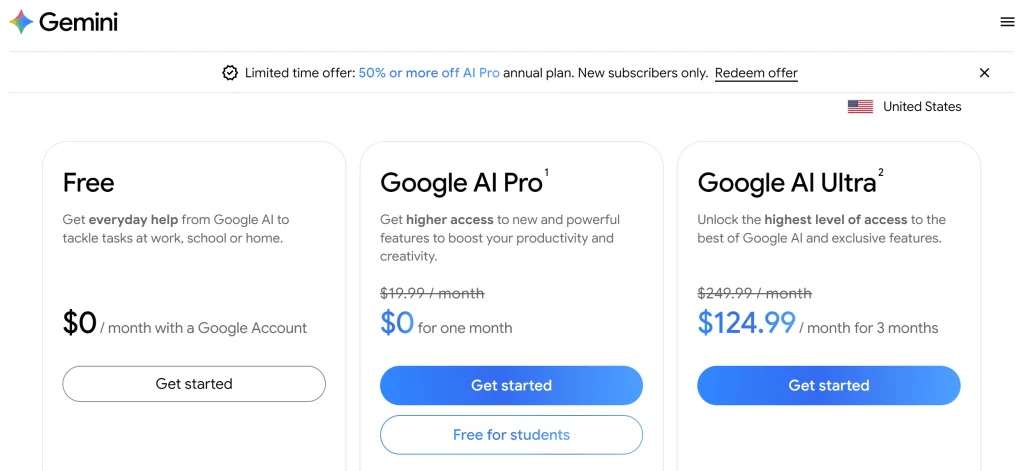
There’s a limited‑time promotional offer worth knowing about. annual Google AI Pro plans are offered at up to 50% off for new subscribers only. Right now Google is running a New Year deal through the Google One AI subscription page where new members can get significant discounts on the Google AI Pro plan, including an offer to try Google AI Pro for 1 month at no charge.
- 📅 Google AI Pro 1‑Month Trial: New subscribers can start a trial of Google AI Pro without paying for the first month, giving you expanded access to Gemini app features and Veo 3.1 Fast video generation during that period.
- 📅 Google AI Ultra 50% Off for First 3 Months: Google AI Ultra normally costs $249.99 per month, but new subscribers can get it at half price — $124.99 per month for the first three months.
- 🎓 Student Offer: Eligible students may be able to get Google AI Pro free for one year if they verify status through a student verification system.
Why Veo 3 Feels Expensive to First-Time Users
This is where the forums get brutally honest: people aren’t mad at the sticker price—they’re mad at the iteration tax.
One Reddit user describes the emotional math like: “It costs a few dollars to generate a video… and if your prompt isn’t good, you waste several dollars.”
Credits Burn Faster Than Expected
Creators don’t make one video. They make Version 1… Version 7… and “why is the character suddenly a toaster?”
Common first-timer burn patterns:
- You iterate prompts too early in high quality mode.
- You generate full clips when you only needed a 2–3 second test of the idea.
- You treat generations like “exports,” when they’re really more like “draft renders.”
A smarter workflow to reduce cost:
- Prototype the concept in Fast first (cheaper seconds / likely cheaper credit burn).
- Lock the prompt + shot description.
- Only then pay for higher-quality takes.
Subscription Cost vs Real Output Value
Subscriptions feel expensive when you’re not using them enough.
- If you generate two clips a month, even a $19.99 plan can feel like overkill.
- If you’re generating every day, the subscription may feel like a bargain—especially if you’re also using other AI features and you’re credit-limited rather than cash-limited.
This is why “What’s cheapest?” depends on your behavior, not just the price tag.
What’s the Cheapest Way to Use Veo 3?
Here’s the practical answer—split by user type.
Cheapest Option for Casual Users
If you only want to “try Veo” or make a couple short clips:
- Start with free monthly AI credits (where eligible) and treat it as your sandbox.
- If you need more, look at Google AI Pro (often with intro offers shown on the subscription page).
- Keep tests short and use Fast modes first so you don’t burn value on “draft thinking.”
Cheapest Option for Creators Who Iterate a Lot
If you’re the “I need 30 attempts to get the vibe” creator:
- Prefer Veo 3 Fast for iteration because it’s $0.15/s (vs $0.40/s).
- Only upgrade takes to higher quality after the prompt is stable.
- Consider Google AI Ultra only if you’re consistently using large credit volumes across Flow/Whisk and you actually benefit from the higher limits.
Cheapest Option When You Need API Access
If you’re building a workflow, integrating into an app, or need predictable billing:
- Use Google Veo 3 API pricing (Gemini API) because it’s the clearest: pay per use, per second.
- Budget with the simple formula: seconds × rate.
- And remember: Google notes you’re only charged for successful generation.
Final Note for Creators
Once you’ve generated AI video with Veo 3, most creators still need subtitles, translations, trims, and polishing before publishing.
Tools like GStory help handle that post-production stage—turning raw AI video into content that’s actually ready to share.
Leave a Reply