
Last Updated on January 14, 2026 by
After generating 500+ videos with Sora, I’ve discovered that 90% of failed outputs come down to one thing: poorly structured prompts. The good news? You can copy my exact templates to start your exploration of Sora.
This guide provides 25+ copy-paste prompt templates organized by use case, from cinematic film sequences to viral TikTok content. You’ll also learn a complete post-production workflow for transforming those 5-15 second clips into polished long-form videos. Whether you’re a beginner generating your first AI video or a seasoned creator looking to streamline your workflow, these battle-tested templates will transform your Sora experience.
Understanding Sora 2 Prompts: Why Structure Matters
Before diving into templates, you need to understand what separates prompts that generate stunning results from those that produce unusable output. This foundation will help you customize templates for your specific needs and troubleshoot issues when they arise.
The key insight from analyzing hundreds of successful Sora generations is this: the AI responds best to organized, specific information delivered in a consistent format. Vague prompts like “a person walking in a city” give Sora too much freedom, resulting in unpredictable outputs. Structured prompts tell Sora exactly what to render.
The CAST Framework for Sora Prompts
The most effective Sora prompts follow what I call the CAST framework—a systematic approach that covers all the elements Sora needs to generate professional-quality video.
C – Camera (angle and movement)
Specify your shot type and any camera motion. Examples: “wide establishing shot,” “close-up,” “slow dolly in,” “tracking shot following subject.”
A – Action (what’s happening)
Describe the primary motion or event in the scene. Be specific about timing and progression. Examples: “woman turns to face camera,” “leaves falling in slow motion.”
S – Subject (who or what)
Define your main subject in detail. Include physical characteristics, clothing, positioning, and expressions. The more specific, the more consistent your results.
T – Tone (lighting, mood, and style)
Set the atmosphere with lighting conditions, color palette, and visual style. Examples: “golden hour lighting,” “moody noir aesthetic,” “warm earth tones.”
Here’s the framework in action:
[Camera] Slow dolly shot moving forward
[Action] A man in his 30s walks through a rainy city street, stopping to look up at the sky
[Subject] He wears a dark overcoat, has short brown hair, and carries a black umbrella
[Tone] Nighttime, neon signs reflecting on wet pavement, cinematic film grain, blue and orange color palette
Common Prompt Mistakes That Ruin Your Videos
Understanding what NOT to do is just as important as knowing what works. These are the most common mistakes based on Reddit discussions and my own testing.
Mistake #1: Multiple camera movements in one prompt
Sora struggles when you ask for “pan left then zoom in then track forward.” Stick to one primary camera movement per generation. If you need multiple movements, generate separate clips and stitch them together.
Mistake #2: Vague subject descriptions
“A person” gives Sora no direction. “A woman in her late 20s with shoulder-length black hair, wearing a white linen shirt and blue jeans” gives Sora everything it needs for consistency.
Mistake #3: Missing lighting specifications
Without lighting direction, Sora defaults to generic, flat lighting that looks amateur. Always specify your light source and quality: “soft window light from the left,” “harsh midday sun with strong shadows.”
Mistake #4: Overloading with details
While specificity is good, cramming 200 words of detail into one prompt confuses the model. Aim for 50-150 words—enough to be specific, not so much that key elements get lost.
Cinematic & Film-Style Prompt Templates (8 Templates)
These templates produce professional, movie-quality footage perfect for trailers, mood pieces, and high-production content. Each template follows the CAST framework and has been tested for consistent results.
Epic Landscape & Establishing Shots
Template #1: Aerial Sweeping Mountain Shot
Aerial drone shot slowly pushing forward over a vast mountain range at sunrise. Snow-capped peaks stretch to the horizon, low-hanging clouds drift between valleys. Golden morning light catches the ridgelines, creating dramatic shadows. Shot in the style of a nature documentary, 4K film quality, slight film grain for organic texture.Template #2: Golden Hour Coastal Establishing Shot
Wide establishing shot of a Mediterranean coastal village at golden hour. White-washed buildings cascade down hillside toward turquoise water. Fishing boats bob gently in the harbor. Camera slowly cranes up to reveal the full scope of the scene. Warm amber lighting, soft shadows, cinematic color grade with lifted blacks.Character-Focused Dramatic Scenes
Template #3: Emotional Close-Up Portrait
Extreme close-up of a woman's face, early 30s, with subtle tears forming in her eyes. Soft Rembrandt lighting from a window on the left side. She takes a slow breath, her expression shifting from sadness to resolve. Shot on 85mm lens with shallow depth of field, background completely blurred. Muted color palette, dramatic but natural.Template #4: Silhouette Backlit Sequence
A lone figure stands silhouetted against a massive floor-to-ceiling window at dusk. City skyline visible behind them, out of focus with bokeh lights. They slowly turn from the window, face remaining in shadow. Chiaroscuro lighting, strong contrast between light and dark. Cinematic widescreen aspect ratio, moody atmospheric tone.Action & Motion Sequences
Template #5: Slow-Motion Dramatic Action
Slow-motion shot of a man sprinting through rain, water droplets suspended in air around him. He wears a dark suit, tie flying behind him. Camera tracks alongside him at the same speed. Streetlights create lens flares and reflections on the wet ground. High frame rate smoothness, slight motion blur on background, high contrast night cinematography.Template #6: Dynamic Chase Through Market
Handheld tracking shot following a young woman weaving through a crowded marketplace. Colorful fabric stalls and hanging lanterns blur past. She glances back over her shoulder, expression urgent. Chaotic energy but controlled camera work. Natural daylight, saturated colors, documentary-style realism with cinematic composition.Atmospheric & Moody Footage
Template #7: Film Noir Detective Scene
Medium shot of a man in a fedora and trench coat standing under a single streetlamp on an empty street. Fog rolls slowly past his feet. He lights a cigarette, the flame briefly illuminating his weathered face. Heavy shadows, desaturated color with hint of teal, 1940s film noir aesthetic. Static camera, letting the atmosphere speak.Template #8: Mysterious Forest Fog
Slow dolly forward through an ancient forest shrouded in thick morning mist. Massive tree trunks emerge from the fog, shafts of pale light filtering through the canopy. No people, just the forest breathing. Ethereal and mysterious mood, cool blue-green color palette, fantasy film aesthetic. Sound of silence, visual ASMR pacing.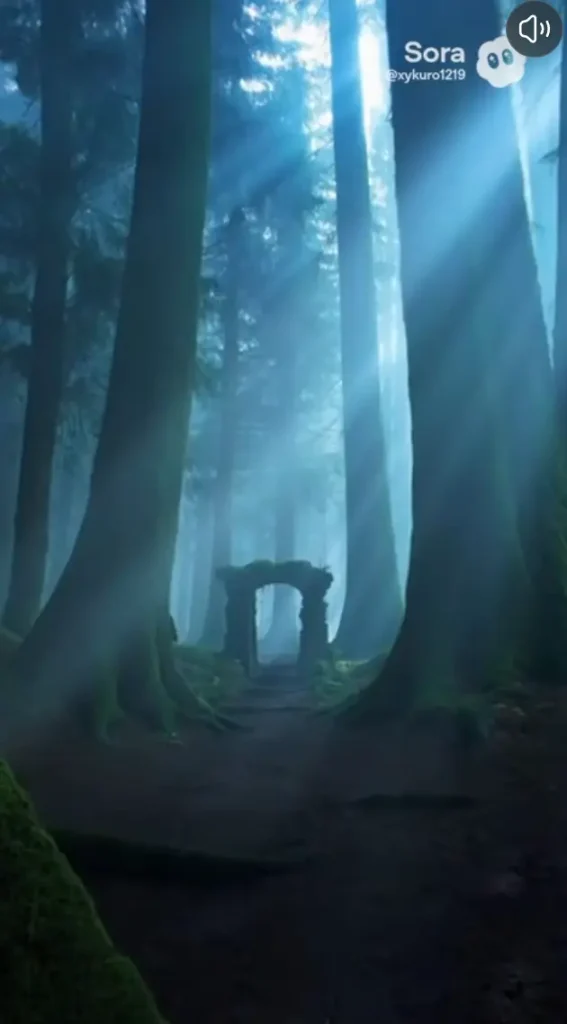
Social Media & Short-Form Content Templates (8 Templates)
These templates are optimized for TikTok, Instagram Reels, and YouTube Shorts. They’re designed to grab attention in the first second and keep viewers watching.
Product Showcase & Unboxing Style
Template #9: Floating Product Reveal
A sleek smartphone slowly rotates in center frame, floating against a pure white background. Soft studio lighting from multiple angles eliminates harsh shadows. Camera slowly dollies around the product, revealing all sides. Clean minimal aesthetic, no distractions, luxury brand commercial style. Product fills 60% of frame.Template #10: Satisfying Unboxing Sequence
Top-down shot of hands carefully opening a premium packaging box. The lid lifts to reveal a watch nestled in velvet. Fingers gently lift the product, bringing it toward camera. Soft warm lighting, ASMR-satisfying pacing. Clean workspace, minimal background. Trending unboxing video aesthetic, high production value.Trending Visual Effects
Template #11: Surreal Transformation Effect
A person in casual clothes stands center frame. As they snap their fingers, their outfit instantly transforms into an elegant evening gown/suit. The transformation ripples outward like a wave. Seamless morph effect, satisfying visual magic. Neutral background, bright even lighting, social media viral style.Template #12: Infinite Zoom Loop
Camera zooms into a painting on a wall, which contains another room with another painting. The zoom continues seamlessly, each painting revealing a new scene. Infinite recursive loop effect. Surreal and mesmerizing, vivid colors, smooth continuous motion. Designed for seamless loop playback.Lifestyle & Aesthetic Content
Template #13: Cozy Atmosphere Scene
Close-up of hands wrapping around a steaming mug of coffee. Slow tilt up to reveal a person in an oversized sweater sitting by a rain-streaked window. Soft natural light, warm earth tones—cream, caramel, forest green. Hygge aesthetic, comfort and calm mood. Slight camera movement for organic feel.Template #14: Day in the Life Morning Routine
A young woman stretches awake in a sunlit bedroom, white sheets, plants on windowsill. She walks to the kitchen, pours fresh juice. Smooth tracking shot following her movement. Bright airy lighting, clean modern interior. Aspirational lifestyle content aesthetic, warm and inviting color grade.Text-Ready Background Videos
Template #15: Clean Gradient Background Loop
Abstract flowing gradient background, soft pastel colors slowly morphing—pink to lavender to soft blue. Gentle organic movement, never static. No subjects, pure background plate. Designed for text overlay, leaves generous safe zone in center. Calming, professional, versatile. Perfect loop for stories and reels.Template #16: Subtle Office Background
Soft focus view of a modern office space with large windows. People move slowly in the background, completely blurred. Gentle natural light shifts. Designed as background for talking head overlays or text. Neutral professional aesthetic, non-distracting movement. Corporate content ready.Business & Marketing Video Templates (5 Templates)
Professional templates for corporate content, advertisements, and brand storytelling. These are suitable for commercial use and maintain a polished, trustworthy aesthetic.
Explainer & Concept Visualization
Template #17: Abstract Data Visualization
Abstract representation of data flowing through a network. Glowing nodes connect with streaming light particles. Camera slowly pulls back to reveal a vast interconnected system. Dark background with vibrant blue and white accents. Tech company aesthetic, clean and sophisticated. Represents AI, cloud computing, or digital transformation.Template #18: Process Flow Visualization
Minimalist animation of geometric shapes transforming and connecting. A circle becomes a square, connects to triangles, forming a larger pattern. Represents process, workflow, or transformation. Clean white background, single accent color. Corporate explainer video style, professional and clear. Smooth 60fps motion.Testimonial & Interview Backgrounds
Template #19: Professional Bokeh Background
Soft focus view of an upscale office lobby with warm lighting. Large windows create natural bokeh circles in background. Subtle movement—plants swaying, distant figures walking. Designed for picture-in-picture testimonial overlays. Shallow depth of field, creamy background blur. Professional, trustworthy, warm.Real Estate & Property Tours
Template #20: Interior Walkthrough Sequence
Smooth gimbal shot moving through a modern luxury apartment. Camera glides from living room toward floor-to-ceiling windows with city view. Natural daylight floods the space, highlighting architectural details. Real estate showcase style, wide lens capturing space. Clean, bright, aspirational. No people.Template #21: Exterior Property Establishing Shot
Drone shot slowly approaching a contemporary home at sunset. Landscaped gardens, pool reflecting sky colors. Camera descends gradually, revealing the property's scale and setting. Warm golden hour lighting, high-end real estate aesthetic. Cinematic but commercial, designed to sell.[Image: Screenshot of Template #20 output showing smooth interior walkthrough]
Creative & Experimental Templates (4 Templates)
Push Sora’s creative boundaries with these surreal, artistic, and experimental prompts. For creators wanting content that stands out from the algorithmic feed.
Surreal & Dreamlike Sequences
Template #22: Gravity-Defying Room
A woman sits calmly reading a book while furniture floats around her—chairs, lamps, books suspended mid-air. She is unaffected, completely at peace. Room rotates slowly, perspective shifting. Salvador Dali inspired surrealism, impossible physics. Warm lighting despite impossibility. Dreamlike but coherent.Template #23: Infinite Staircase
Camera follows a figure climbing an Escher-inspired staircase that loops impossibly. Each flight leads to another, defying geometry. The architecture shifts subtly as they walk. Impossible architecture, MC Escher tribute. Muted tones, dramatic shadows, philosophical mood. Hypnotic continuous movement.Animation & Stylized Looks
Template #24: Anime-Inspired Dramatic Moment
A young warrior stands on a cliff edge, wind blowing through their hair and cape dramatically. Cherry blossom petals drift past. They slowly draw a sword, blade catching the light. Anime art style, Studio Ghibli color palette. Dramatic but beautiful, epic fantasy mood. 2D animation aesthetic rendered in motion.Template #25: Stop-Motion Craft Aesthetic
A small clay figure walks across a handmade paper landscape. Trees made of wire and felt, sky of painted cardboard. Movement has slight stop-motion jerkiness. Claymation tribute, Aardman studios style. Warm tungsten lighting, visible craft materials. Charming and tactile, handmade feel.Prompt Customization Cheat Sheet
Now that you have 25 templates, here’s how to modify them for unlimited variations. Mix and match these elements to create your own signature style.
Camera Movement Vocabulary
| Movement | Description | Best For |
| Dolly in/out | Camera moves toward/away from subject | Building tension, reveals |
| Pan left/right | Camera rotates horizontally on axis | Following action, establishing space |
| Tilt up/down | Camera rotates vertically on axis | Reveals, showing scale |
| Crane shot | Camera rises or descends vertically | Grand reveals, establishing shots |
| Tracking shot | Camera moves alongside moving subject | Action sequences, following characters |
| Orbital shot | Camera circles around subject | Product showcases, dramatic moments |
| Handheld | Slight natural shake and movement | Documentary style, urgency |
| Static | No camera movement | Dialogue, letting action speak |
Lighting & Mood Modifiers
| Lighting | Mood | Use Case |
| Golden hour | Warm, romantic, nostalgic | Lifestyle, emotional scenes |
| Blue hour | Melancholy, mysterious, calm | Contemplative moments |
| Harsh midday | Raw, unforgiving, documentary | Realism, conflict |
| Window light | Natural, soft, intimate | Portraits, indoor scenes |
| Neon glow | Urban, edgy, futuristic | Night city, cyberpunk |
| Candlelight | Intimate, warm, historical | Period pieces, romance |
| Overcast diffused | Neutral, soft, even | Product photography, clean looks |
| Backlight/silhouette | Dramatic, mysterious, artistic | Mood pieces, reveals |
Style & Era Keywords
Add these modifiers to any template to shift the visual aesthetic:
- “1970s film grain” – Warm, organic, nostalgic texture
- “1990s VHS aesthetic” – Lo-fi, glitchy, vintage
- “Modern clean” – Sharp, minimal, contemporary
- “Vintage sepia” – Timeless, historical, warm
- “Cyberpunk” – Neon, dystopian, high-tech
- “Cottagecore” – Natural, pastoral, cozy
- “Minimalist” – Reduced, essential, sophisticated
From Short Clips to Long-Form: The Post-Production Workflow
You’ve mastered prompt templates. Now let’s tackle the challenge that trips up even experienced creators: transforming multiple 5-15 second Sora clips into cohesive long-form videos. This section provides a complete production workflow.
Planning Your Long-Form Project
Success with long-form Sora content starts before you generate a single clip. You need to plan with Sora’s limitations in mind.
Step 1: Create a shot list
Break your video into individual scenes. For a 60-second video, plan for 6-12 separate clips depending on pacing. Write a specific prompt for each shot, following the templates above.
Step 2: Define your visual bible
Document the consistent elements across all shots:
- Subject descriptions (exact wording to reuse)
- Color palette keywords
- Lighting conditions
- Camera style
- Era/aesthetic modifiers
Step 3: Plan your transitions
Identify where clips will connect and plan shots that make transitions easier. Ending one shot on a close-up and starting the next on a wide shot creates natural edit points.
Generating Consistent Clips for Continuity
The #1 frustration from Reddit users: keeping the same character looking consistent across multiple generations. Here’s how to maximize consistency.
Use identical subject descriptions
Copy-paste your subject description exactly for every prompt where that character appears. Even small variations like “brown hair” vs “dark brown hair” can cause inconsistencies.
Maintain lighting and color palette
Every prompt should include the same lighting and color keywords. If shot 1 says “warm golden hour lighting, earth tone palette,” shots 2-10 should include that exact phrase.
Consider image-to-video for characters
If character consistency is critical, generate or find an image of your character and use Sora’s image-to-video feature. This gives Sora a reference and dramatically improves consistency.
Generate options
Create 2-3 versions of each shot. You’ll have options during editing and can choose the most consistent takes.
Stitching Clips: Editing Software Recommendations
Once you have your clips, you need to combine them. Here are the best options for different skill levels.
CapCut (Beginner-Friendly)
Perfect for creators new to video editing. Drag-and-drop interface, built-in transitions, and easy export. Available on mobile and desktop.
Workflow: Import clips > Arrange on timeline > Add transitions > Export
Descript (AI-Powered, Transcript-Based)
Unique approach where you edit video like a text document. Great for content with voiceover. Automatic transcription and editing by deleting words.
Workflow: Import with voiceover > Edit transcript to edit video > Polish transitions > Export
DaVinci Resolve (Professional, Free Tier)
Industry-standard color grading and professional editing tools. Steep learning curve but unlimited capability. The free version handles everything most creators need.
Workflow: Import to media pool > Edit on timeline > Color grade for consistency > Export
Transition Techniques That Hide AI Artifacts
Smart transitions can hide inconsistencies between Sora clips that would otherwise be jarring.
Match cuts
End one shot on a specific element (a hand reaching, a face turning) and start the next with a similar motion. The visual similarity bridges any AI inconsistencies.
L-cuts and J-cuts
Let audio from the next clip start before the video cuts, or let audio from the previous clip continue into the next shot. Audio continuity distracts from visual jumps.
Motion blur transitions
Add a 0.5-second motion blur effect at the cut point. The blur masks any jarring differences between clips.
Creative wipes
Use graphic elements, light flares, or objects passing the camera to create hard transitions that feel intentional rather than hiding problems.
Enhancing Sora Output Quality
Sora outputs at 720p (Plus) or 1080p (Pro). For some users, higher resolution for YouTube or other platforms are needed. Post-production enhancement bridges this gap.
Upscaling for resolution
AI upscaling tools can take Sora’s 1080p output to 4K without significant quality loss. This is essential if you’re targeting YouTube or large displays. Tools like GStory Video Enhancer offer one-click 4K upscaling specifically designed for AI-generated content.
Noise reduction
Sora outputs sometimes have subtle noise, especially in darker scenes. Light denoising in post cleans this up without losing detail.
Color grading for consistency
Even with consistent prompts, Sora clips may have slight color variations. Apply the same color grade across all clips in your timeline to unify the look. DaVinci Resolve’s free tier includes professional-grade color tools.
Adding Audio, Music & Sound Effects
Audio is often more important than video for keeping viewers engaged. Sora generates silent video, so audio is entirely your responsibility.
Music sources
- Epidemic Sound (subscription, high quality)
- Artlist (subscription, cinematic)
- YouTube Audio Library (free, decent selection)
- Pixabay (free, varied quality)
Sound effect layering
Add ambient sound (city noise, nature sounds, room tone) under your video. Then layer specific sound effects for actions. This makes AI video feel real.
AI voiceover integration
If your video needs narration, AI voice tools can generate natural-sounding voiceover. Time your clips to match the voiceover pacing.
Subtitle & Caption Generation
Captions increase engagement by 80% on social platforms and make your content accessible. Don’t skip this step.
Auto-caption tools
Most editing software includes auto-captioning. For dedicated subtitle generation with high accuracy, GStory Subtitle Generator offers 95% accuracy across 100+ languages and exports in standard formats (SRT, VTT).
Caption styling
Match your caption style to your content aesthetic. Social media content often uses bold, centered captions. Professional content uses traditional bottom-of-screen subtitles.
Timing adjustments
Auto-generated captions often need timing tweaks. Review and adjust so words appear exactly when spoken—this small detail separates amateur from professional content.
FAQs About Sora Video Generation Prompts
What is the best prompt length for Sora?
The optimal prompt length is 50–150 words. Shorter prompts lack detail, while longer ones dilute key instructions—focus on the CAST framework: Camera, Action, Subject, Tone.
Can I use the same prompt to generate consistent characters?
Full character consistency isn’t available yet. Use identical detailed descriptions, consistent lighting/color terms, image-to-video when possible, and generate multiple takes to improve results.
How do I make Sora videos look more professional?
Use film-specific terms in prompts (lens, lighting, color grade), limit to single camera movements, and apply post-production like color grading, upscaling, and audio enhancement.
What’s the difference between Sora Plus and Pro for prompt generation?
Plus ($20): 720p, 5–10s clips—good for testing.
Pro ($200): 1080p, up to 20s, far higher limits—best for professional workflows.
How many Sora clips do I need for a 1-minute video?
Typically 6–12 clips depending on pacing. Always generate more than needed to allow selection during editing.
Conclusion
Sora success comes from structured prompts, not trial and error. Use the CAST framework, stay concise, and rely on post-production to elevate results. Start with a proven template, iterate based on outcomes, and build a workflow that turns short AI clips into polished, professional videos.
Leave a Reply