Last Updated on February 5, 2026 by Xu Yue
Believe it or not, AI-generated UGC is rapidly transforming the advertising and marketing landscape, building deeper connections with audiences through social media. I’ve noticed that many videos that once required on-location filming—even government propaganda content—are now being produced with AI.
However, for non-professional small business owners, creating brand marketing videos on their own is far from easy. It often takes multiple rounds of prompt tweaking to generate a clip that truly meets expectations—burning through credits much faster than initially anticipated. Meanwhile, a low-quality 720p video can be swiped past in seconds on TikTok. If your goal is higher-quality output, pairing an AI video enhancer with your AI video generator may be more cost-effective than subscribing premium plan and spending twice the credits to generate a 1080p video from scratch.
The AI UGC Cost Dilemma: Why Higher Quality Drain Your Budget
Understanding how AI video generators price their services reveals why so many creators overpay for quality.
How AI Video Generators Price Their Quality Tiers
Most AI UGC platforms use tiered pricing models where higher resolution is locked behind premium plans. Whether they use credit-based systems or monthly subscriptions, the pattern is consistent: 720p comes cheap, but 1080p costs significantly more.
Platforms like Arcads charge ~$110+/month for access to their best features. Credit-based models add another layer of uncertainty—you pay upfront without knowing if a specific avatar or scene will work until you’ve spent those credits.
The Hidden Costs of Generating HD Videos Directly
The real cost per video becomes staggering when you factor in testing. Community feedback consistently mentions spending “$500+ on Arcads, Creatify” just experimenting with different hooks and avatars.
As one Reddit user put it: “These are tools. Not magic. If your script sucks, the ad will too.” You need to test multiple variations before finding winners—and paying premium prices for each test video drains your budget fast.
Case Study: Kling’s Pricing Structure Breakdown
Consider Kling’s pricing as a representative example. Generating a 1080p video directly might cost 3-4x more credits than generating the same content at 720p. For creators producing 20-30 test videos monthly, this difference adds up to hundreds of dollars.
The math is simple: if you’re testing hooks at premium quality, you’re burning budget on videos that might never convert.
The Smarter Alternative: Generate Low, Enhance High
There’s a cleaner way to scale AI UGC without paying “premium quality tax” on every experiment: separate ideation (generation) from finishing (4K/master output).
Understanding the Two-Step Workflow
The workflow is simple, but it works because it mirrors how real creative teams operate (rough cut → final master):
Step 1 — Generate Low (cheap, fast, high volume)
Use a lower tier to generate lots of variants quickly—typically 720p/1080p, shorter durations, simpler settings.
At this stage, you’re not judging “cinema quality.” You’re judging whether the content works:
- Hook strength (first 1–2 seconds)
- Script clarity (does it land instantly?)
- Avatar delivery (emotion, pacing, believability)
- Offer + CTA clarity (can viewers repeat what you’re selling?)
That’s why lower-res testing is fine: a strong hook at 720p is still a strong hook, and a weak script won’t magically convert in 4K.
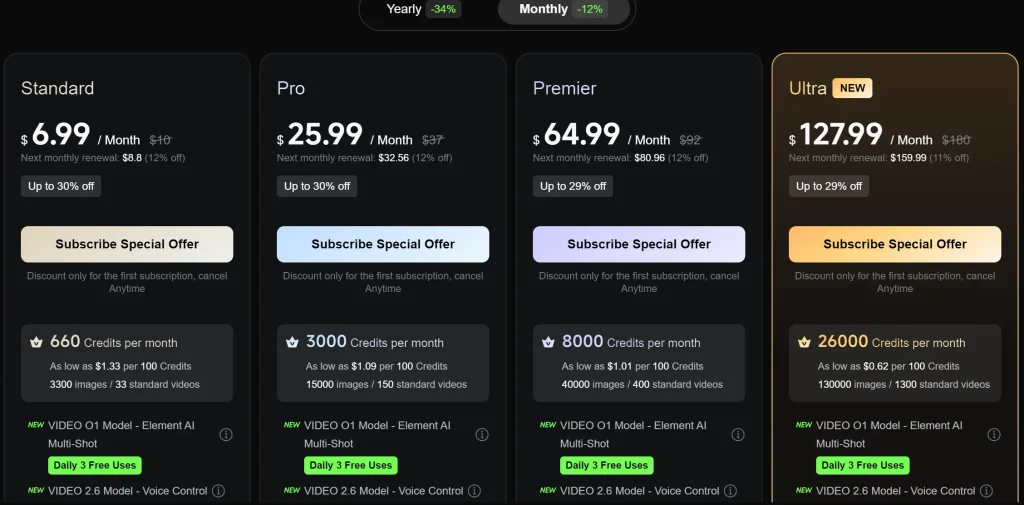
Kling pricing context: Kling’s paid tiers are commonly reported as starting around $6.99/month for Standard (660 credits), then $25.99/month for Pro (3,000 credits), and $64.99/month for Premier (8,000 credits).
(You’ll also see $10 / $37 / $92 listed in some app-store style pricing contexts, which is why it’s safest to treat pricing as “plan-level ranges” rather than one immutable number. )
Step 2 — Enhance High (only for winners)
Once you identify winners, you finish them at “deliverable quality”:
- Upscale to 4K
- Denoise / sharpen
- Fix compression artifacts
- Export a clean master for TikTok/Shorts/Reels + ads
Some ecosystems treat 4K access as a higher-tier capability. For example, multiple third-party breakdowns describe Kling’s higher tiers as unlocking higher output quality, with Premier often referenced as the tier associated with 4K access (while lower tiers focus on HD/2K).
The key idea: you don’t need 4K to discover what works—you need 4K to scale what already works.
2) Why Generation and Quality Enhancement Should Be Separate
Bundling “generation + top quality output” forces you to pay premium pricing during the most wasteful part of the process: testing. Separating them gives you three concrete advantages:
A) You can test more hooks for the same budget
Testing is inherently messy: different hooks, different angles, different pacing. If you pay for “high-quality output” for every draft, you burn budget before you even know what’s good.
With a two-step approach, you can:
- run 10–50 variations
- see what holds attention
- keep only the winners
B) You invest only after you have proof
Most creators don’t fail because their video wasn’t 4K. They fail because:
- hook is generic
- offer is unclear
- pacing drags
- delivery feels robotic
So you should spend money like an operator:
- Cheap volume → find signal
- Expensive polish → amplify signal
C) It matches the natural “UGC funnel”
UGC-style content is judged on:
- authenticity
- clarity
- emotion
- speed to value
Resolution helps with perceived quality, but it’s usually a multiplier—it multiplies what’s already there. It can’t rescue a weak message.
3) Real Cost Comparison (Using Kling AI Pricing as the Example)
Because Kling’s resolution/output capabilities are tiered in many plan summaries, a practical way to model “Direct HD/4K” vs “Generate Low, Enhance High” is to compare:
- Staying on a higher tier every month (even while you’re still testing), vs
- Using a low tier for testing most months, and only upgrading in the months you’re finalizing winners
Below is a 90-day (3-month) example—because it avoids pretending you can “pro-rate” upgrades inside a month.
Assumptions (simple and realistic)
You do heavy testing in the first month, so you choose Pro plan this month, getting 3000 credits.
Kling plan prices used: Pro: $37/month usually($25.99 in the first month with 30% off, $32.56 in the second month). Let’s take the average of the subscription fees for the previous three months: $31.85/month
GStory plan prices used: the average cost per credit varies depending on your chosen subscription plan, ranging from $0.018/credit to $0.030/credit.
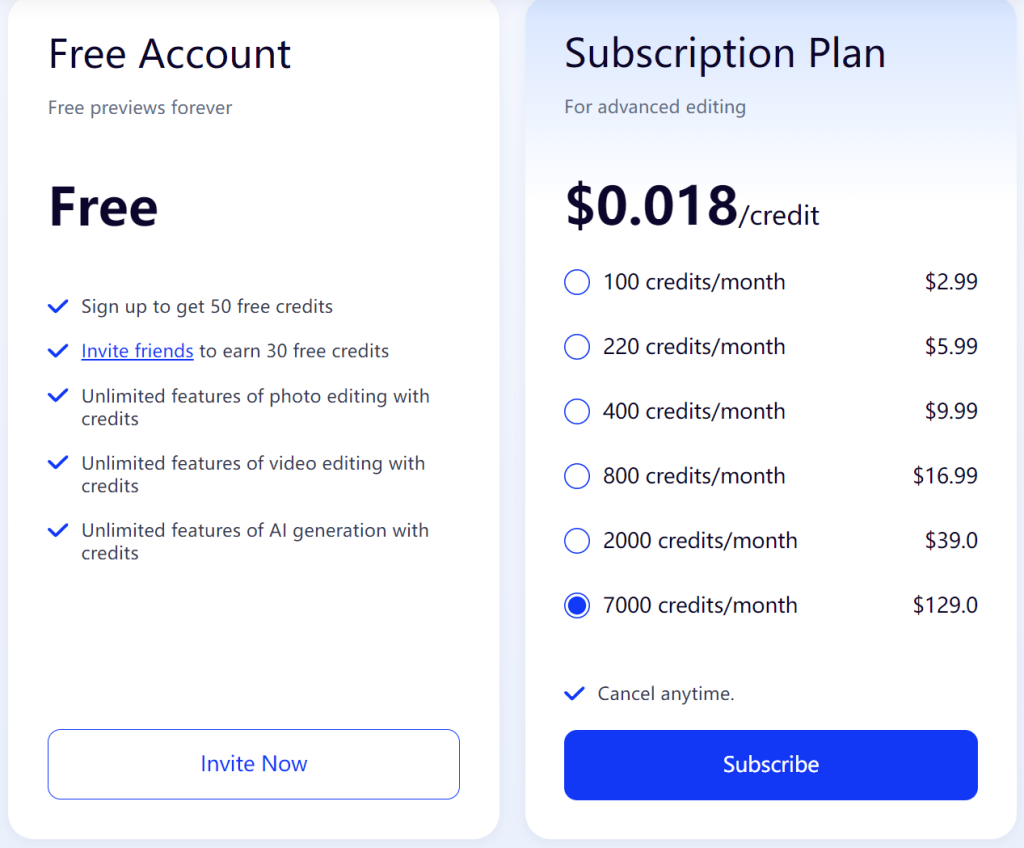
Table: Cost per “Final 1080p/4K-ready” Video (5s clip)
| Workflow | Kling credits used(models vary) | Kling cost (USD) | GStory enhancer credits | GStory cost (USD) | Total cost (USD) |
| A) Direct 1080p HQ in Kling (3 attempts) | 115~150 (3 × 35~50) | $1.22~$1.59 | 0 | $0.00 | $1.22~$1.59 |
| B) Generate 720p in Kling (3 attempts) + Enhance in GStory (1 run) | 45~60(3×15~20) | $0.48~$0.64 | 10 for a 5s clip | $0.18~$0.30 | $0.66~$0.94 |
Result: Under these assumptions, generate 720p + upscale to 1080p is cheaper by about:
- vs $1.22 (best-case direct): ~23% cheaper
- vs $1.59 (worst-case direct): ~58% cheaper
Important note: Kling’s exact plan pricing and which tier maps to which maximum output/resolution can vary by region/platform and change over time, so treat this as a planning model—not a promise.
How AI Video Enhancers Improve UGC Quality
AI video enhancers use sophisticated neural networks to transform lower-quality footage into professional-grade content.
AI-Powered Resolution Upscaling (SD to 4K)
Unlike traditional upscaling that simply stretches pixels (creating blur), AI upscaling uses neural networks trained on millions of video frames to intelligently add detail. The AI predicts what additional pixel information should exist, resulting in genuinely sharper, more detailed output.
Modern AI enhancers can upscale videos to 4K at 30fps, making even 720p source material look professional.
Noise Reduction and Artifact Removal
AI-generated content often carries subtle compression artifacts and digital noise that create the telltale “AI look.” AI enhancers identify and remove these artifacts while preserving genuine detail—crucial for making UGC feel authentic rather than synthetic.
Motion Blur Correction and Frame Smoothing
AI can reduce motion blur and create smoother playback through frame interpolation. This is particularly valuable for UGC where avatar movements sometimes appear jerky or unnatural.
Low-Light and Night Video Enhancement
AI capabilities for brightening dark footage and enhancing shadow details prove useful for product demos or testimonials shot in suboptimal lighting conditions.
Step-by-Step: The Cost-Effective AI UGC Workflow
Here’s how to implement the generate-then-enhance workflow.
Step 1 – Choose Your AI UGC Generator Wisely
Select an AI UGC tool based on avatar quality and script capabilities—not output resolution. Start with free tiers or basic plans from platforms like Creatify, Tagshop AI, or MakeUGC to test content before investing.
Focus on finding avatars with realistic expressions and good lip-sync. Resolution can be fixed later; wooden performances cannot.
Step 2 – Generate at Optimal (Not Maximum) Quality
Generate at the sweet spot where avatar expressions and lip-sync are good, but you’re not overpaying for resolution. 720p is often sufficient as the base for enhancement.
Export at the highest quality compression settings available—this gives enhancers more data to work with.
Step 3 – Enhance with an AI Video Enhancer
Upload your generated video to an AI enhancer and select your options: upscale to 4K, noise reduction, motion blur correction. Tools like GStory’s Video Enhancer offer credit-based pricing without subscription lock-in, supporting files up to 500MB and 10 minutes—perfect for UGC content.
Step 4 – Quality Check and Iterate
Review enhanced videos against this checklist:
- Resolution clarity – Sharp edges, no pixelation
- Natural movement – Smooth motion, no judder
- Audio sync – Lips match speech
- Lighting consistency – No artifacts in shadows
If issues persist, consider regenerating the source rather than re-enhancing.
Comparing AI Video Enhancer Options for UGC Creators
Not all enhancers are equal. Here’s what to look for.
Key Features to Look for in an AI Video Enhancer
- Maximum output resolution (4K preferred)
- Supported input formats (MP4, MOV, WEBM)
- Processing speed
- Noise reduction quality
- Pricing model (subscription vs. credits)
GStory Video Enhancer: Browser-Based 4K Upscaling
GStory Video Enhancer offers compelling advantages for UGC creators:
- Upscale to 4K at 30fps
- Reduce noise and motion blur
- Night video enhancement
- Old video restoration
- Credit-based pricing (no subscription required)
- Browser-based (no downloads)
- Supports MP4, WEBM, MOV, M4V, MKV, GIF
The pay-per-use model is particularly valuable for creators who don’t need daily enhancement.
Other Enhancement Tools Worth Considering
- TensorPix – AI upscaling to 4K, solid all-rounder
- Topaz Video AI – Desktop software, maximum control
- CapCut – Built-in enhancement features, good for mobile
FAQs About AI Video Enhancement for UGC
Does AI upscaling really improve AI-generated video quality?
Yes. AI upscaling significantly improves perceived quality by adding detail, reducing artifacts, and sharpening edges. However, it enhances resolution—not performance. The source material needs good content quality (expressions, movement) for best results.
How much can I actually save using the enhance workflow?
Creators typically report 40-60% cost reduction. Generating 10 test videos at basic tier ($2-3 each) then enhancing only the 2 winners ($1-2 each) costs far less than generating all 10 at premium tier ($8-10 each).
Will the enhanced video look as good as natively generated HD?
Modern AI enhancers produce results often indistinguishable from native HD, especially for social media platforms that compress video anyway. The difference is only noticeable on large screens or when pixel-peeping.
What video formats work best for AI enhancement?
Most AI enhancers support common formats (MP4, MOV, WEBM). For best results, use the highest quality export option from your AI generator to give the enhancer more data to work with.
Conclusion
The premium subscription trap isn’t the only path to high-quality AI UGC. By separating content generation from quality enhancement, you can test more ideas, spend less money, and still deliver professional-looking videos.
The two-step workflow—generate affordably, enhance to 4K—represents the smart approach to AI UGC in 2026.
Ready to try this approach? Start by generating your next AI UGC video at a basic tier, then enhance it with an AI video enhancer. With credit-based tools, you can experience the quality difference without committing to another expensive subscription.
Leave a Reply