Last Updated on January 6, 2026 by Leslie
You know that feeling. You’ve spent the last hour feeding your 45-minute podcast into an AI clip generator, watching it work its magic, picking out the perfect moments. You hit export, grab a coffee, come back—and there it is. A fat watermark sitting right where your face should be. Lovely.
Here’s the thing: most “free” AI clip makers aren’t really free. They’re free to use, sure, but the moment you want to actually do something with your clips, they want your credit card. The watermark is basically a ransom note.
But not all tools play this game. After digging through Reddit threads, Quora discussions, and testing a bunch of options myself, I’ve found the AI clip makers that genuinely let you create clips automatically from a video without slapping their logo on your work.
Let’s cut through the noise.
Why Most Free AI Clip Makers Add Watermarks
Before we get to the good stuff, it helps to understand why this happens.
Running AI costs money. These tools use machine learning to analyze your video, identify key moments, generate captions, and package everything into short clips. That compute power isn’t cheap.
So most platforms use a freemium model: let users try the AI clip generator for free, but add watermarks to exports. Want clean videos? Pay up.
This isn’t necessarily evil—companies need revenue. But it is frustrating when tools advertise as “free” without mentioning the watermark until you’ve already invested time.
What “Free Tier” Usually Means
- Credit-based systems: You get X clips per month, then pay
- Export restrictions: Watermark, lower resolution, or limited duration
- Feature gates: Basic AI on free, smart features behind paywall
One Reddit user put it perfectly: “The monthly subscription only gives you like 10 clips per month. That’s not free, that’s a trial.”
The AI Clip Makers That Actually Have No Watermark
After testing multiple platforms, here are the clipping AI tools free of watermarks that genuinely deliver:
1. GStory AI Clip Maker
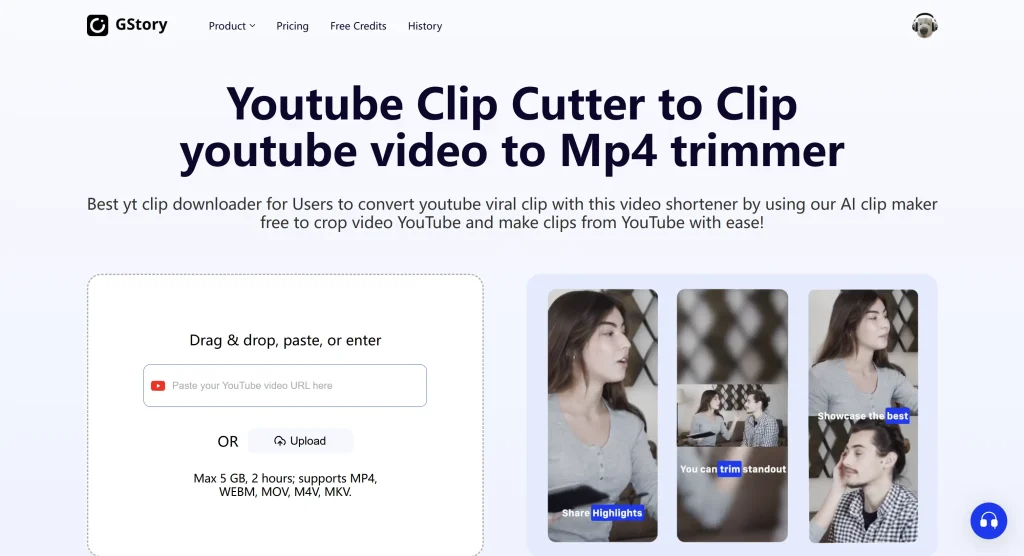
If you’re looking for a capable free AI video editor no watermark, GStory AI Clip Maker handles the full workflow: upload long-form content, let the AI identify highlight moments, add captions, and export clean clips.
What makes it practical:
- Auto clip AI detection that finds engaging moments without manual scrubbing
- Caption generation built-in
- Multiple aspect ratios for YouTube Shorts, TikTok, and Reels
- No watermark on free exports
The platform understands that creators need clean exports to actually use their content. If you’re converting a long video to short video format, this is a solid starting point.
2. Powder
Recommended frequently on Reddit as “completely free,” Powder focuses on gaming and streaming clips. The AI identifies exciting moments from gameplay footage.
Best for: Streamers, gaming content creators
3. CapCut
CapCut’s AI video generator has become popular for good reason. The free tier exports without watermarks, and it includes a surprisingly robust editing toolkit.
Best for: Mobile-first creators, TikTok content
4. VN Video Editor
Explicitly noted across multiple forums as ai video maker free no watermark. It’s mobile-first but capable. The AI features are more basic, but for straightforward clip creation, it works.
Best for: Mobile users who want simplicity
5. VLLO
Free with ads. Watch a short ad, export without watermark. Some users find this annoying, but if you’re creating a few clips per week, it’s a fair trade.
Best for: Occasional creators who don’t mind ads
Tools That Add Watermarks (Skip Unless Paying)
To save you time, these popular tools do add watermarks on their free tiers:
| Tool | Watermark on Free? | Notes |
| OpusClip | Yes | Great AI, but free tier is limited |
| InVideo | Yes | Watermark on all free exports |
| Kapwing | Yes | Clean exports require subscription |
| Pictory | Yes | Blog-to-video focus, paid for clean |
| FlexClip | Yes | Limited free tier |
These aren’t bad tools—OpusClip’s “ClipAnything” feature is genuinely smarter than most, actually watching the video rather than just parsing transcripts. But if you need AI clip generator from video outputs without watermarks today, they’re not your answer on a free plan.
How to Create Clips Without Watermarks: Quick Workflow
Here’s a practical workflow using a free AI clip maker:
Step 1: Upload Your Source Video
Start with your podcast, livestream, or long-form content. Most AI tools accept MP4, MOV, and common formats.
Step 2: Let AI Identify Key Moments
The auto clip AI scans your video—usually analyzing audio peaks, visual changes, and sometimes transcript highlights—to suggest clip-worthy segments.
Step 3: Review Suggested Clips
Don’t blindly trust the AI. Review each suggestion. The best tools let you adjust start/end points, merge segments, or reject clips that missed the mark.
Step 4: Add Captions and Formatting
Captions aren’t optional anymore—most viewers watch on mute. Good clipping AI tools free include auto-generated captions you can style and correct.
Step 5: Export Clean
Choose your aspect ratio (9:16 for Shorts/TikTok/Reels, 16:9 for YouTube, 1:1 for Instagram feed) and export. With the right tool, no watermark attached.
Frequently Asked Questions
Is there a 100% free AI clip maker with no watermark?
Yes—tools like GStory, Powder, and CapCut offer watermark-free exports on free tiers. Limitations exist (credits, features), but clean exports are possible.
How do I remove a watermark from AI-generated videos?
Honestly? Use a tool that doesn’t add one. Watermark removal tools exist, but they often degrade quality or violate terms of service. Start clean instead.
What’s the best AI clip maker for YouTube Shorts?
For Shorts specifically, you want 9:16 aspect ratio support and caption generation. GStory and CapCut both handle this well.
Can I use these clips commercially?
Check each tool’s terms. Most allow commercial use on paid tiers; free tiers vary. When in doubt, read the fine print.
Which AI clip maker has the best automatic detection?
OpusClip’s ClipAnything is widely praised for accuracy, but requires payment for clean exports. Among free options, GStory’s AI Clip Maker offers solid detection without the watermark tax.
The Bottom Line
The “free AI clip maker no watermark” search exists because creators are tired of bait-and-switch. You shouldn’t need to discover watermarks after spending time creating content.
Tools that respect this—like GStory AI Clip Maker, Powder, and CapCut—understand that creators need usable outputs to build trust.
Start with a free ai clip maker that exports clean. If you outgrow the free tier and the tool proves valuable, then consider paying. But you shouldn’t have to pay just to avoid a logo.
Your content deserves better than a watermark. Go make clips.
Leave a Reply