Last Updated on December 12, 2025 by Leslie
If you’re wondering how to use CapCut in today’s AI‑powered world, this guide is for you. CapCut has evolved far beyond a simple video editor — it now offers powerful AI tools that help you create videos faster, smarter, and more creatively than ever before.
In this blog, we’ll explore CapCut’s AI features step by step — from generating videos from scripts to using AI avatars and auto captions. Whether you’re a beginner with no editing experience or someone curious about the new AI tools CapCut offers, this tutorial will help you understand how AI can make your videos look professional with minimal effort.
What Makes CapCut’s AI Tools Special
CapCut’s AI tools are designed to help anyone — even complete beginners — create awesome videos with just a few clicks. Unlike traditional editing, AI tools can generate content, add voiceovers, or even turn text into entire videos automatically. CapCut’s AI video maker features are part of this trend, and they allow you to skip many manual steps and focus on your creativity.
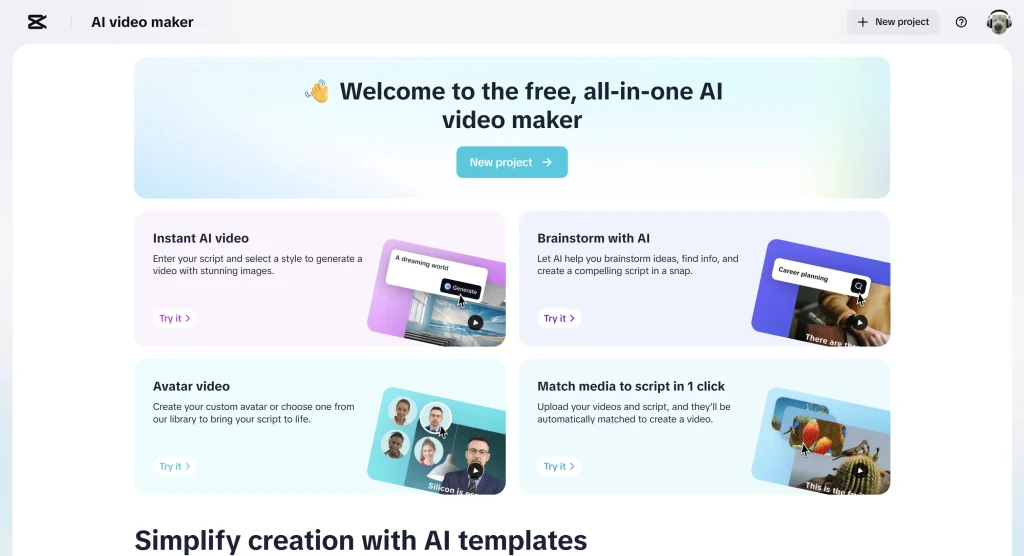
1. Instant AI Video Generation
One of the most exciting ways how to use CapCut to edit videos today is with the AI video maker.
✨ What It Does
With CapCut’s AI video maker, you can:
- Enter a script or idea in text form.
- Choose a style for your video: cartoon, realistic film, photo collage, etc.
- Generate a full video with visuals, clips, background music, and voiceovers — all automatically created by AI.
Here’s how it works in simple steps:
- Open CapCut and tap AI video maker.
- Type your script or paste your idea.
- Pick a style and voice you like.
- Click Create and watch CapCut build your video in seconds.
This feature is amazing if you ever wondered whether a video editor can be creative for you — CapCut’s AI does most of the editing work automatically.
2. Brainstorming With AI
Before you even start making your video, CapCut helps you generate ideas using an AI Brainstorm tool.
💡 What It Does
- Helps you think of video topics
- Suggests story outlines
- Creates script drafts and scenes for you to build on
This feature is great for anyone struggling with “what to make.” You can type in a topic — like “make a YouTube intro video” — and CapCut’s AI suggests a whole plan you can turn into a video.
3. AI Avatars and Custom Characters
Have you ever wanted a host or presenter in your video but didn’t know how to record one? CapCut’s AI solves this with AI avatars.
🤖 What You Can Do
CapCut lets you:
- Choose from 100+ digital avatars
- Customize an avatar’s appearance
- Make the avatar speak your script using AI voice
This means you can have a virtual presenter in your videos without filming a real person. Just type the script and let your avatar read it — perfect for educational videos, intros, or storytelling.
4. Auto‑Generated Subtitles and Transcription
One of the best CapCut tutorial for beginners AI tools is automatic subtitles.
📝 Why It’s Useful
- CapCut transcribes your audio into text automatically
- Subtitles are synchronized with speech
- This is helpful for making videos more understandable and accessible
Video platforms like TikTok, YouTube, and Instagram benefit from captions because many viewers watch with sound off — so auto captions help boost engagement without extra work.
5. Text‑to‑Speech (AI Voiceover)
CapCut’s AI Text‑to‑Speech tool turns written words into natural‑sounding voice narration — no microphone needed!
🗣️ What You Can Do
- Type your script
- Select a voice out of 1000+ AI voices
- Choose language, tone, and speed
- Generate voiceovers that sound real
This is great for making tutorial videos, vlogs, or promos without recording your own voice. And if you want to be more unique, CapCut even lets you generate a custom voice clone from a short recording!
6. Scene and Auto‑Cut Detection
CapCut’s AI can automatically detect key moments in your video and help you split them with Auto‑Cut or Scene Detection tools. This means less manual trimming and more smart editing suggestions — especially useful for longer footage.
7. Auto‑Reframe & Intelligent Editing Suggestions
CapCut uses AI to help with tasks like:
- Auto reframe — adjust your video to different aspect ratios for TikTok, YouTube, or Instagram
- AI movement — stabilize shaky footage
- Smart suggestions — the AI can propose edits, pacing, and highlights for your clip
This makes it easier to prepare the same video for multiple platforms without extra work.
8. Script‑to‑Video and Story Script Tools
CapCut doesn’t just edit — it can help you create the story too.
📖 Story Generator
You can enter a basic idea and let CapCut’s story script generator produce a full narrative script with scene ideas and dialogue. This helps beginners who struggle with planning what to say or show in their video.
9. Matching Media to Script in One Click
Another AI trick CapCut offers is matching your uploaded media to your written script. Just upload your clips and script, and CapCut’s AI will automatically place clips where the content makes the most sense — saving you hours of arranging by hand.
Why CapCut AI Is Great for Beginners
If you’re new to video editing, AI features make CapCut super friendly:
- You don’t need experience to create a video
- AI tools handle most hard work automatically
- You can generate scripts, voices, visuals, and subtitles without advanced skills
This means even first‑time users can quickly make impressive videos, which is exactly why CapCut’s AI tools are often recommended in CapCut video editing tutorials for beginners.
Bonus Tip: Use GStory to Enhance Your CapCut Projects
If you want to go beyond CapCut’s capabilities, tools like GStory can help you improve your videos with AI video enhancement and automatic subtitle correction. You can use GStory to clean up video quality, remove noise, or refine subtitles generated by CapCut — combining the strengths of both platforms.
Final Thoughts: The Future of AI Video Editing
AI is changing the way we make and edit videos. With tools like CapCut’s AI video maker, AI avatars, auto captions, text‑to‑speech options, and script‑to‑video generation, editing is no longer a technical chore — it’s creative and fun. Whether you want to produce social media content, educational videos, or clips for YouTube, CapCut’s AI tools bring your ideas to life with less effort and more polish.
Now you know how to use CapCut with its newest AI features — go try them out and create your first AI‑powered video today!
Leave a Reply