Last Updated on February 13, 2026 by Xu Yue
As 2026 opened and Chinese New Year arrived, Seedance 2.0 was released by ByteDance—and suddenly, the global AI video landscape was shifted.
Most guides bury you in endless text when all you need is a quick, visual understanding. This guide gives you the most important information in under 5 minutes with a clear mind map, and explains: where Seedance 2.0 dominates, how to create your first video, common pitfalls to avoid, and real pricing breakdowns across regions.
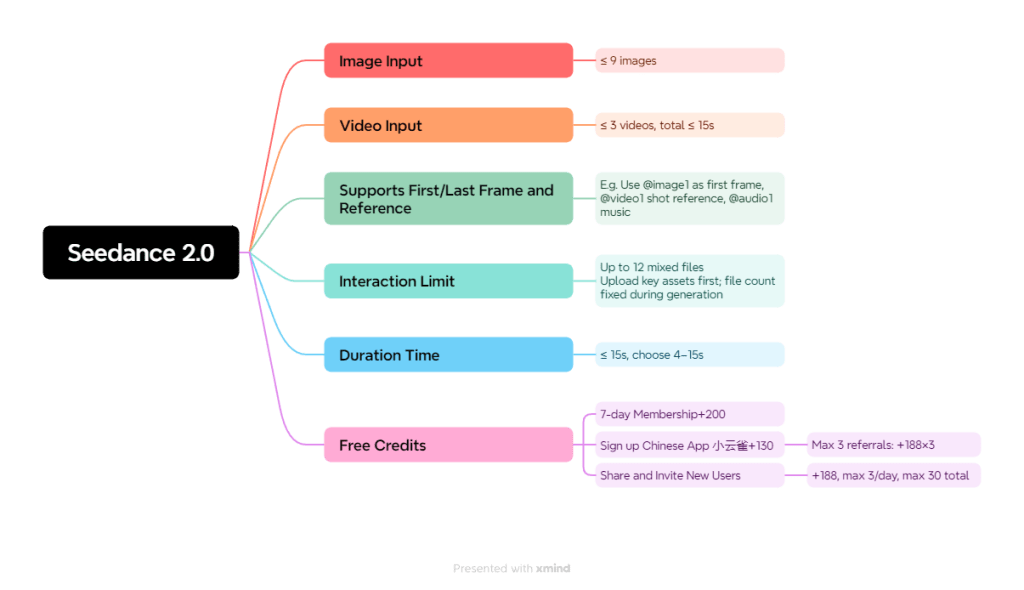
Where Does Seedance 2.0 Truly Excel? (The Mind Map)
This is where Seedance 2.0 separates itself from the pack. Unlike competitors that rely heavily on text-only prompts, Seedance 2.0’s reference-driven workflow (All-Round Reference) makes results dramatically more predictable. You show it what you want—it delivers.
Fight Scenes & Action Sequences
Why it wins: Seedance 2.0 excels at fast, complex motion—combat, stunts, choreography—when you provide strong references and clear action beats.
- Movement coherence stays readable even in chaotic sequences
- Characters maintain proper physics during rapid movements
- One Reddit post showcasing fight scene generation hit hundreds of upvotes
- Professional filmmaker perspective: “Seedance 2.0 is the best atm” for action
Anime-Style Generation
Why it wins: The model performs exceptionally well on anime/manga styles when you lock the look with consistent references.
- Transforms single manga panels into fully animated sequences
- Maintains cel-animation timing and exaggeration
- Handles dramatic poses and action lines naturally
- Community favorite for manga-to-video workflows
The anime generation capability alone drove massive community engagement, with users posting transformation results that went viral across multiple subreddits.
Native Audio Generation
Why it wins: Some Seedance 2.0 interfaces generate and sync audio with visuals automatically—dialogue, sound effects, and ambience included.
- Turns “silent AI video” into a complete first draft
- Lip sync quality impressed users: “One Photo Can Talk” post hit 300 upvotes
- Reduces post-production workflow significantly
- Limitation: Audio sometimes doesn’t match perfectly—use clear reference images
Multimodal Input Power
Why it wins: This is the standout advantage. Combine text + images + video + audio (up to 12 total reference files) to guide every aspect of your generation.
| Input Type | Max Files | What It Controls |
| Images | 9 | Identity, style, composition |
| Videos | 3 | Motion, timing, camera |
| Text | Unlimited | Actions, descriptions |
This multimodal approach gives you tighter control than any competitor currently offers. You’re not guessing—you’re directing.
“Director Mode” Control
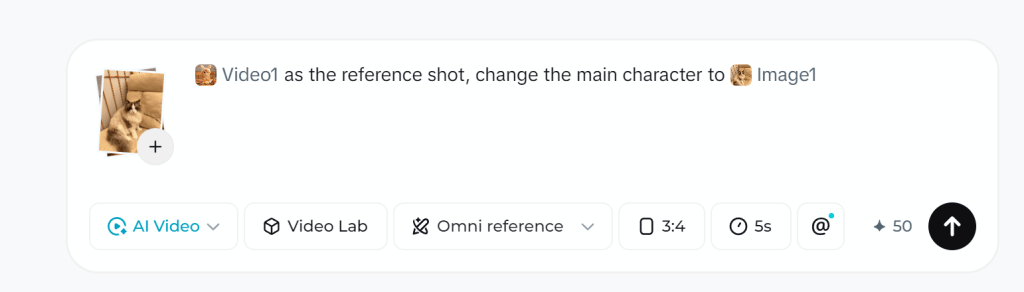
Why it wins: Previously, when we wanted tomake the model imitate the movement, camera work, or complex actions in movies, we either had to write a bunch of detailed prompt words or simply couldn’t do it. Now, all we need to do is upload a reference video. Use @-tagging to assign each reference a specific role, then steer cinematography like an actual director.
Combine these with camera language in your prompts (pan, dolly, tracking shot) for professional-level continuity that other AI video tools struggle to achieve. Video editing can also be realized with your prompts, but I will recommend GStory to save your credits of Dreamina.
Step-by-Step Tutorial: Your First Seedance 2.0 Video
Getting started is simpler than most guides suggest. Here’s the no-fluff path to your first generated video.
Choose Your Access Point (3 Options)
| Platform | Best For | Free Tier |
| Dreamina | Global users, beginners | Yes |
| Jimeng/JiMeng | Full features (Chinese) | Yes |
Create Your Account & Get Free Credits
- Visit your chosen platform
- Sign up with email or social login
- Most platforms offer generous trial credits
- Verify your account to unlock full features
Prepare Your Input (Text, Image, or Video)
Quick checklist for optimal inputs:
- Images: High resolution, clear subjects, consistent style
- Videos: Short clips (2-5 seconds) with clear motion
- Text: Specific action beats, not vague descriptions
Generate Your First Video (Settings Walkthrough)
Beginner-friendly settings:
- Aspect ratio: 16:9 for standard, 9:16 for social media
- Duration: Start with 5 seconds (conserves credits)
- Quality: Standard for testing, High for final output
Download & Iterate
- Download immediately—generations may expire
- Save successful prompts for reuse
- Use each output to inform your next attempt
- Iteration is key to mastering any AI video tool
Common Issues Users Face and Solutions
These problems surfaced repeatedly across Reddit, YouTube, and forums. Learn from others’ mistakes.
“I Can’t Access Seedance 2.0 in My Region”
Solution matrix:
- Dreamina: Works globally—try this first
- BytePlus: Requires business verification for some features
- Jimeng: May need VPN + Chinese phone number
“Uploading Realistic Human Face Creatives Fails”
Even though the official manual states: “Due to platform compliance requirements,currently, uploading creatives that contain realistic human facesis not supported(neitherimage norvideo creatives are allowed),” this doesn’t necessarily mean you’re completely unable to generate results in practice. Workaround: Explicitly state in your prompt that the face is “AI-generated” or a “CG-rendered character”—this may improve approval rates.
“Credits Disappear Too Fast”
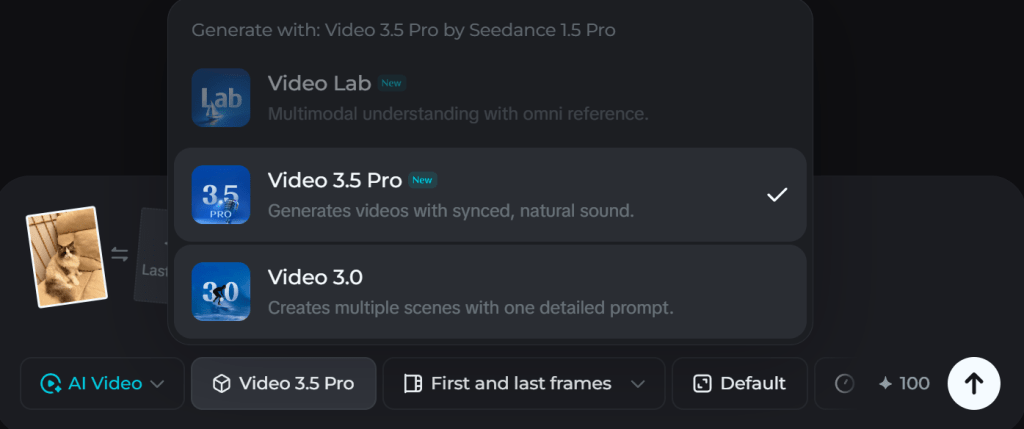
The Omni reference function costs nearly 2x compared to using only First and last frames. Solution: Use First and last frames or Multiframes instead of Omni reference when possible—more economical approach.
“The Option of Seedance 2.0 Are Not Found”
If you don’t find the Seedance 2.0 option like the screenshot when configuring the settings, you may need to paid for subscription or redeem a 7-day free trial.
Pricing Comparison: China vs. United States
Real numbers. At current exchange rates, if you have a Chinese phone number and a VPN, the China version is well worth a try—just be prepared for a small workout for your Chinese skills.
Dreamina Pricing (Global Access)
| Basic | Standard | Advanced | |
| Yearly(60% off) | $58/year | $134/year | $268/year |
| Monthly(40% off) | 7 days free, $9/month, then $15/month | $21/month | $42/month |
Jimeng Pricing (China)
| Basic | Standard | Advanced | |
| Yearly(50% off) | ¥329/year≈$48/year | ¥949/year | ¥2,599/year |
| Monthly(40% off) | 7 days free, ¥41/month, then ¥69/month | ¥119/month | ¥299/month |
*Tip: It’s important to note that once you redeem the 7-day free trial, that account will not be eligible for the significant discounts on monthly or yearly subscriptions. In this case, I would suggest using one account to try out Seedance 2.0’s powerful features first, then registering a new account to subscribe and enjoy the discounts.
FAQs About Seedance 2.0
Is Seedance 2.0 better than Kling 3.0?
For action/anime: Seedance wins with superior motion coherence. For photorealism: Kling 3.0 edges ahead. Choose based on your use case.
Can I use Seedance 2.0 commercially?
Platform-specific licensing applies. Check each platform’s terms before commercial use.
How long does generation take?
Typical wait: 1-5 minutes depending on queue and settings. Peak hours may be longer.
Will Seedance 2.0 replace traditional video editing?
No—it’s a powerful tool, not a replacement. Best results come from hybrid workflows combining AI generation with traditional editing.
Is there an API for developers?
Yes, through BytePlus. Documentation available for integration.
Conclusion and Future Outlook
Seedance 2.0’s accuracy makes AI video generation feel less like pulling a blind box—and more like landing the perfect shot on the first try.
Seedance 2.0 raises the bar by combining strong motion coherence, multimodal reference control, and a more “director-like” workflow where you can steer what each input contributes (often via @-style tagging). For creators making action-heavy sequences (fight choreography, fast camera movement) or stylized anime/manga motion, this reference-driven approach is exactly why so many users describe it as “insane”—it simply feels more controllable than text-only generation.
Another standout is the push toward video + sound as a single generation step (where supported), reducing the “silent clip first, audio later” workflow that still dominates most consumer tools.
Looking ahead, the direction seems clear: broader capabilities, but also tighter guardrails. Recent moves to limit certain face-related features suggest future upgrades will likely arrive alongside stronger compliance controls and review systems.
Leave a Reply