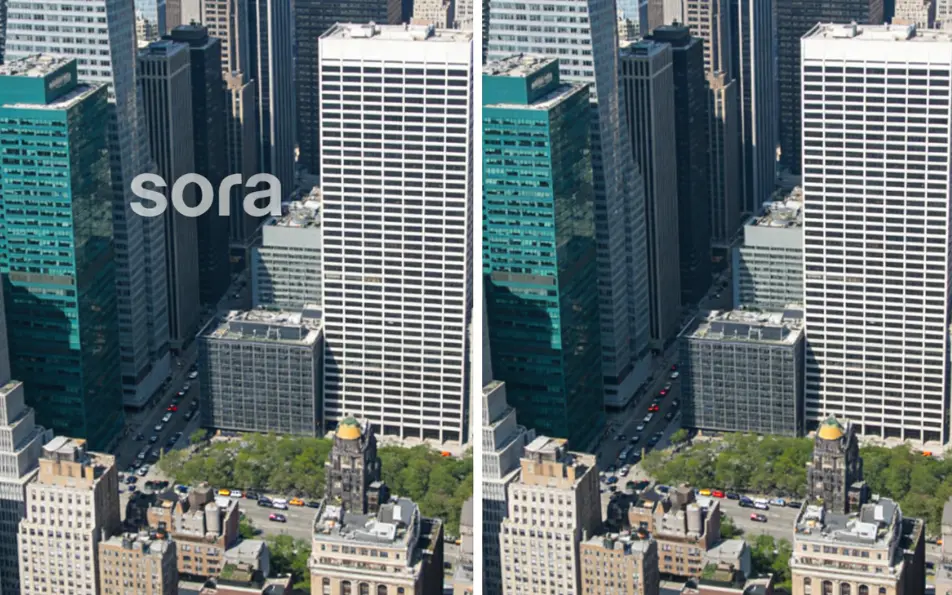
Last Updated on March 12, 2026 by gaojie
Over 60,000 YouTube views on Sora watermark removal tutorials prove one thing: creators are desperate for a solution that actually works.
If you’ve tried removing Sora 2 watermarks, you know the frustration. Tools go down randomly. Free trials run out. Quality suffers with ugly blur patches. And here’s the most confusing part—even $200/month Pro subscribers are dealing with watermarks on certain videos.
This guide shows you exactly how to use Sora 2 watermark remover Bylo, explains why watermarks appear (even for Pro users), and gives you the workflow content creators use to publish clean videos every time.
Why Sora 2 Videos Have Watermarks (And Why Pro Users Still Get Them)
Before diving into removal tools, understanding why watermarks appear helps you avoid them in the first place—and explains why paying for Pro doesn’t always solve the problem.
OpenAI’s Watermark Policy Explained
OpenAI adds watermarks to Sora-generated videos through the consumer app regardless of your subscription tier. This policy exists for content authenticity and AI transparency. The watermark typically appears as a dynamic, semi-transparent overlay that moves throughout the video.
There’s also invisible C2PA metadata embedded in every Sora video, which differs from the visible watermark most users want to remove. The visible watermark is what affects your content’s professional appearance.
When Watermarks Appear (Reference Images, Cameos, etc.)
Specific scenarios trigger watermarks even when you might not expect them:
- Reference images: Using any reference material in your prompt
- Remix features: Modifying or extending existing videos
- Certain prompt types: Some creative directions automatically add watermarks
- Consumer app usage: All videos generated through the web interface
Reddit users frequently express confusion about this. One thread in r/OpenAI captures the frustration: users paying premium prices still encounter watermarks on videos they assumed would be clean.
Consumer App vs API: The Key Difference
Here’s the critical distinction most users miss: only API access allows watermark-free generation.
As one Reddit user explained: “It will always be watermarked via the consumer app. You have to use the API if you want it without.”
The API requires technical setup and separate pricing, which isn’t practical for most content creators. That’s why watermark removal tools have become essential for the Sora community.
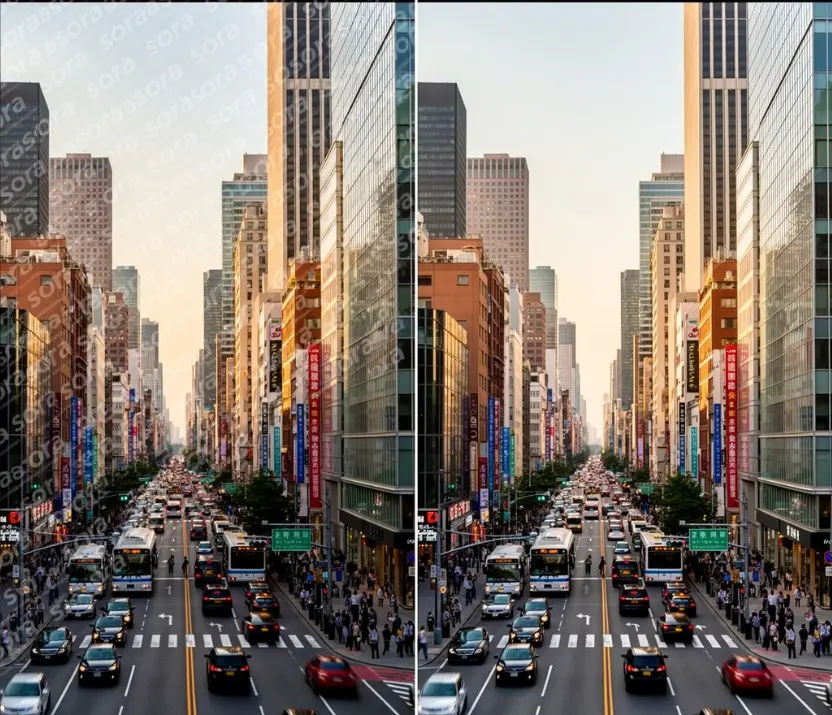
Best Sora 2 Watermark Remover Tools Compared (2026)
The market for Sora watermark removers has exploded, but quality varies dramatically. Here’s an honest comparison of what actually works.
Bylo AI (Our Top Pick)
The Sora 2 watermark remover Bylo has emerged as a reliable choice for Sora 2 watermark removal. Key advantages include:
- No signup required: Start removing watermarks immediately
- No quality loss: AI preserves original video quality without blur artifacts
- Fast processing: Videos processed in seconds, not minutes
- Reliable uptime: Stays online when other tools go down
- Part of broader ecosystem: Integrated with comprehensive AI editing tools
The platform handles Sora’s challenging dynamic watermark effectively, addressing the main complaint users have with competing tools.
Alternative Tools Overview
Several other tools serve the Sora watermark removal market:
Kie.ai offers an API-first approach at $5 per 100+ generations—ideal for developers and high-volume users who need automation capabilities.
Magic Eraser provides free browser-based removal with manual brush selection. However, user reviews consistently mention blur issues where the watermark was removed. One YouTube commenter noted it “only downloads 5 seconds of 10 second video.”
FineShare features AI automatic detection with one-click removal, though it operates on a freemium model with usage limits.
For creators who prefer local processing, GStory.ai’s Video Watermark Remover offers AI-powered removal that works on videos up to 2 hours long. It analyzes surrounding frames for seamless removal without blur or artifacts—particularly useful for TikTok and YouTube content where quality matters.
ComfyUI workflows provide open-source, local solutions for technical users with GPUs (8GB+ VRAM required). The tradeoff: processing takes hours instead of seconds.
Why Tools Keep Going Down (And Why Bylo Stays Reliable)
Reddit threads regularly discuss mass tool outages. Users report: “Anyone else notice none of the watermark removal services work today?”
The likely cause: OpenAI actively works to block removal services. Tools that rely on specific technical approaches get shut down when OpenAI updates their systems.
Bylo’s architecture differs from many competitors, which explains its consistent uptime. When choosing a watermark remover, reliability should factor heavily into your decision—the fastest tool means nothing if it’s down when you need it.
Free vs Paid Options: What You Actually Get
| Feature | Free Tools | Paid Tools |
| Daily Limits | 2-5 videos | Unlimited |
| Quality | Often leaves blur | Better preservation |
| Signup Required | Usually yes | Varies |
| Processing Speed | Varies | Typically faster |
| Reliability | Inconsistent | More stable |
For occasional use, free tools suffice. Content creators processing multiple videos daily benefit from paid solutions or tools with generous free tiers like Bylo AI.
Step-by-Step: Remove Sora 2 Watermark with Bylo AI
The actual removal process takes seconds once you know the steps.
Method 1: URL-Based Removal (Fastest)
This method works for publicly accessible Sora videos:
- Copy your Sora video URL from the OpenAI platform
- Navigate to Bylo AI’s watermark remover tool
- Paste the URL into the input field
- Click “Remove Watermark” and wait for processing
- Download your clean video file
Processing typically completes in under 30 seconds for standard-length Sora videos.
Method 2: Video Upload (For Private Videos)
If you’ve already downloaded your Sora video or don’t want it publicly accessible:
- Download your Sora video as MP4 from OpenAI
- Upload the file directly to Bylo AI
- Process and download the watermark-free version
This method addresses a common Reddit complaint: “Don’t want to publish videos publicly, need MP4 upload capability.”
Pro Tips for Best Results
- Process original quality: Avoid re-uploading already compressed videos
- Check the full video: Some tools miss frames—scrub through to verify complete removal
- Save immediately: Don’t let processed videos sit in temporary storage
- Vertical and horizontal: Both orientations work, though some tools handle one better than the other
Common Issues and How to Fix Them
Based on community feedback, these problems appear most frequently.
Blurry Results After Removal
The #1 complaint across Reddit and YouTube: visible blur where the watermark was. This happens when tools use basic inpainting that doesn’t match surrounding pixels properly.
Solution: Use AI-powered tools like Bylo AI that analyze surrounding frames rather than simply blurring the watermark area. If blur appears, try a different tool rather than processing the same video repeatedly.
Moving Watermark Challenges
Sora’s dynamic watermark positioning makes removal harder than static watermarks. The watermark shifts throughout the video, requiring frame-by-frame processing.
Quality tools track the watermark movement and process each frame accordingly. Cheaper solutions often miss frames or create inconsistent results where the watermark flickers in and out.
Quality Preservation Tips
Maintain maximum quality with these approaches:
- Process once: Each re-encoding reduces quality slightly
- Export at original resolution: Don’t downscale during export
- Avoid additional compression: Upload directly to social platforms rather than converting formats
- Check before deleting originals: Keep source files until you’ve verified removal quality
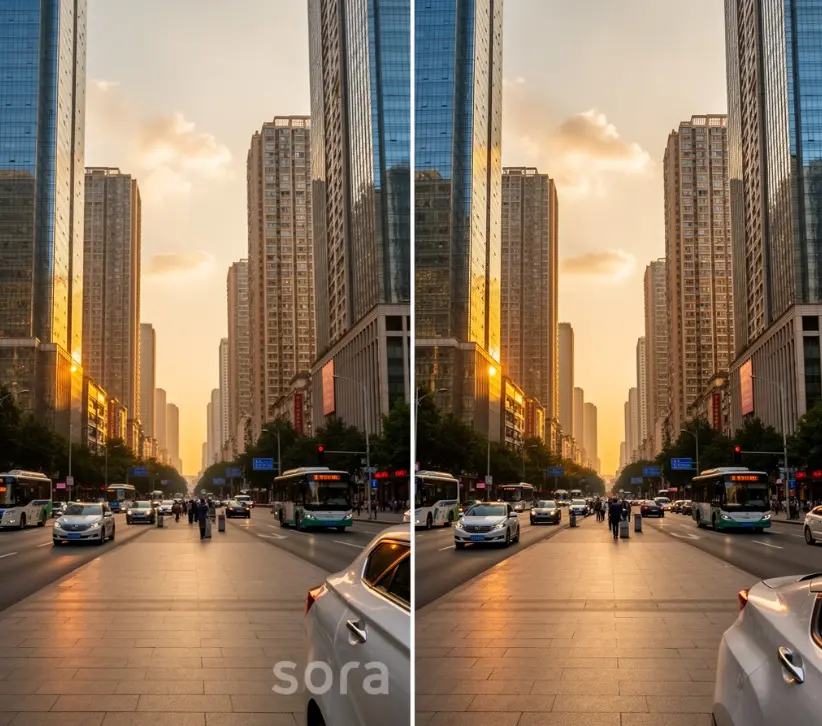
Content Creator Workflow: From Sora to Social Media
For creators publishing multiple Sora videos daily, efficiency matters as much as quality.
The optimized workflow:
- Generate videos in Sora
- Batch-download MP4 files
- Process through watermark remover
- Add to your editing software or upload directly
High-volume users (those processing 20+ videos daily, as mentioned in Reddit discussions) should consider tools with batch processing or generous daily limits. Bylo AI’s approach works well for this use case.
For TikTok and YouTube Shorts, ensure your vertical videos process correctly. Some tools designed for landscape content handle portrait formats poorly, causing cropping or quality issues.
FAQs of Sora 2 Watermark Removal
Is it legal to remove Sora 2 watermarks?
This falls into a gray area. You’re modifying AI-generated content you created, which differs from removing copyright watermarks from others’ work. OpenAI’s Terms of Service discourage removal, but enforcement appears limited for personal use. Commercial users should consider the ethical implications.
What is the best free Sora 2 watermark remover?
Sora 2 watermark remover Bylo stands out for free Sora 2 watermark removal. It requires no signup, preserves video quality without blur, and maintains reliable uptime when other tools go down. Processing completes in seconds for standard videos.
Why does my $200/month Sora Pro still have watermarks?
Sora Pro removes watermarks only for videos generated through the API, not the consumer web app. All videos created through OpenAI’s standard interface include watermarks regardless of subscription tier. To generate without watermarks, you need API access and technical implementation.
Does removing the watermark reduce video quality?
Quality depends entirely on the tool used. Basic inpainting creates visible blur patches. AI-powered tools like Bylo AI analyze surrounding pixels and temporal data across frames, preserving original quality. The watermark area looks natural rather than obviously edited.
Conclusion
Sora 2 watermarks are unavoidable through OpenAI’s consumer app, regardless of subscription tier. Rather than waiting for OpenAI to change this policy, quality removal tools solve the problem now.
Sora 2 watermark remover Bylo provides what most creators need: fast, free watermark removal without signup requirements or quality loss. When tools like Magic Eraser leave blur patches and services randomly go offline, reliability becomes the deciding factor.
Try Bylo AI’s free Sora 2 watermark remover now—no signup required. Remove your first watermark in seconds and see the quality difference for yourself.
Leave a Reply