Last Updated on January 15, 2026 by gaojie
Video editor AI tools promise to cut hours from your workflow, but the market is flooded with options making bold claims. Content creators face a real problem: dozens of video editor AI platforms all claim to be “the best” while burying their limitations in marketing speak. Meanwhile, forums are filled with warnings about bait-and-switch pricing and content ownership concerns when choosing a video editor AI.
This guide provides honest, experience-based comparisons of the leading video editor AI options, organized by use case. You’ll find transparent pricing information, real limitations that marketing pages won’t mention, and practical guidance for choosing the right video editor AI for your specific workflow. Whether you’re a podcaster, YouTuber, or social media manager, this article helps you cut through the noise and make an informed decision about which video editor AI suits your needs.
How Video Editor AI Technology Works
Before diving into specific video editor AI recommendations, it helps to understand what video editor AI actually means in practice. The technology has evolved significantly, but knowing its foundations will help you set realistic expectations for any video editor AI you choose.
Core Technologies Behind Video Editor AI
Modern video editor AI platforms rely on several key technologies working together. Speech recognition powers transcription features in every video editor AI, converting spoken words into editable text.
Computer vision enables scene detection, helping video editor AI software identify when shots change or when specific objects appear on screen.
Machine learning models handle the heavy lifting for features that make each video editor AI powerful—automatic cuts, identifying silence, and suggesting clip-worthy moments from longer videos. These models have been trained on millions of video examples, allowing each video editor AI to recognize patterns that indicate engaging content.
It’s worth noting what video editor AI cannot do: it cannot understand context the way humans do, make creative judgments about story pacing, or know what your audience specifically wants. A video editor AI excels at repetitive, pattern-matching tasks but struggles with anything requiring genuine creativity or nuanced decision-making.
Video Editor AI-Assisted vs Traditional Editing
The distinction matters more than most marketing pages suggest. A video editor AI handles mechanical tasks—removing filler words, generating captions, identifying highlight clips—while you retain creative control.
Traditional editing in software like Premiere Pro or Final Cut requires manual execution of every cut, transition, and adjustment. This gives you complete control but demands significantly more time than using a video editor AI.
The sweet spot for most creators: use video editor AI tools to handle the rough cut and repetitive tasks, then apply human judgment for creative decisions, pacing refinements, and quality control. Many professional editors now use this hybrid approach with video editor AI, letting the video editor AI handle 60-70% of the mechanical work while reserving their attention for the 30-40% that truly requires human creativity.
Best Video Editor AI Tools by Use Case
Rather than ranking video editor AI tools arbitrarily, the more useful approach is matching each video editor AI to specific creator needs. Every video editor AI option below has genuine strengths and honest limitations.
CapCut: A Powerful Free Video Editor AI for Beginners
Best for: Social media creators, beginners, TikTok/Reels content
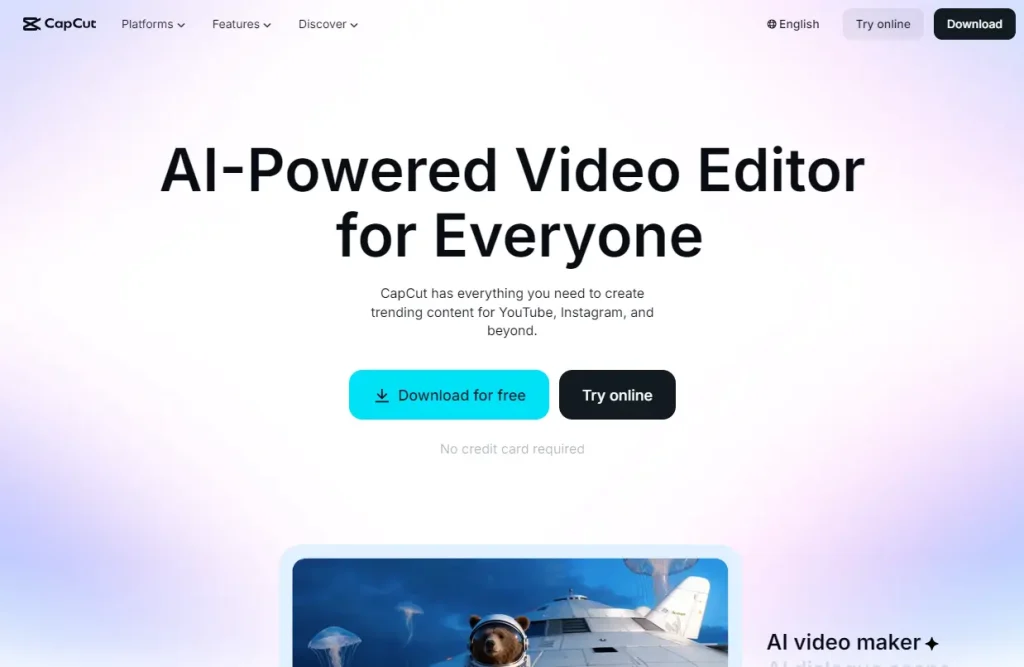
CapCut offers the most feature-complete free video editor AI tier in the market. This video editor AI’s capabilities include auto captions, smart cut for removing silence, B-roll matching, and background removal. The video editor AI interface is intuitive enough that complete beginners can produce polished content within hours.
The video editor AI Video Maker feature, highlighted in tutorials with over a million views, generates video from scripts with scene suggestions and caption automation. For basic social media content, this video editor AI delivers impressive results without cost.
The important caveat: This video editor AI’s Terms of Service grant ByteDance broad usage rights over content you create. Users on Reddit have raised legitimate concerns about content ownership with this video editor AI, and creators working with sensitive or proprietary material should read the ToS carefully before uploading to this video editor AI.
Descript: Best Video Editor AI for Podcast and Interview Content
Best for: Podcasters, YouTubers doing talking-head content, course creators
Descript pioneered the text-based editing paradigm as a video editor AI: edit the transcript, and the video automatically updates. This video editor AI approach feels revolutionary for anyone working with dialogue-heavy content. The learning curve exists for this video editor AI, but once you adjust, editing becomes dramatically faster.
Key features of this video editor AI include filler word removal (eliminating “um,” “uh,” and repetitive words automatically), Studio Sound for audio enhancement, and Overdub voice cloning that lets you correct mistakes without re-recording through the video editor AI.
The video editor AI eye contact correction feature genuinely works, adjusting video so subjects appear to look at the camera even when reading from a script. For podcasters and interview-style content creators, this video editor AI’s features solve real workflow problems.
Pricing: This video editor AI free tier has limits; Creator plan at $12/month and Pro at $24/month unlock full video editor AI functionality. Some advanced video editor AI features remain English-only.
Opus Clip: Best Video Editor AI for Long-Form to Short-Form Repurposing
Best for: YouTubers repurposing long videos, podcast clip creators
Opus Clip specializes as a video editor AI in one task and does it well: transforming long-form videos into short-form clips optimized for YouTube Shorts, TikTok, and Reels. This video editor AI analyzes your video, identifies potentially viral moments, and assigns virality scores to each suggested clip through its video editor AI algorithms.
The video editor AI auto caption feature produces styled subtitles matching current social media trends, and the video editor AI multi-platform export adjusts aspect ratios automatically.
Honest limitation: This video editor AI works best for talking-head content. If your videos rely heavily on B-roll, action sequences, or visual storytelling, the video editor AI clip selection becomes less reliable. The video editor AI virality scoring also can’t guarantee viral success—it identifies patterns from existing viral content but this video editor AI cannot predict audience response.
Pricing: This video editor AI free tier limits clip exports; Starter at $19/month and Pro at $49/month for full video editor AI capabilities. High-volume creators may find this video editor AI subscription costs add up quickly.
DaVinci Resolve: Best Video Editor AI for Professional-Grade Editing
Best for: Professional editors, serious hobbyists, colorists
DaVinci Resolve stands apart as the only industry-standard NLE with a genuinely free video editor AI version. The free video editor AI tier includes full editing capabilities, Fusion for VFX, Fairlight for audio, and the industry-leading color grading suite.
Video editor AI features in the Neural Engine include face tracking, magic mask (isolating subjects without manual rotoscoping), and speech-to-text transcription. These video editor AI features require the Studio version ($295 one-time purchase), but even the free video editor AI version outperforms most paid alternatives in raw capability.
The trade-offs are real: this video editor AI learning curve is steep, hardware requirements are significant, and the video editor AI interface can overwhelm beginners. This is professional video editor AI software that happens to have a free tier, not simplified editing for casual users.
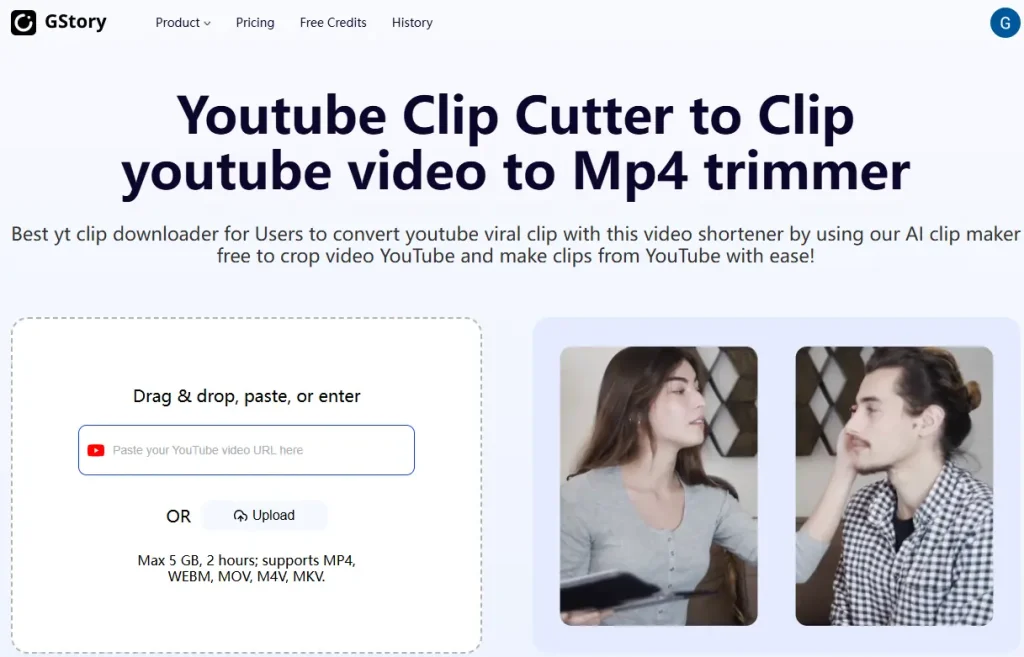
GStory.ai: Free Video Editor AI Online for Browser-Based Workflows
Best for: Users wanting browser-based video editor AI tools, video enhancement, subtitle generation
GStory.ai takes a different approach as a browser-based video editor AI platform combining multiple AI-powered tools. Key video editor AI features include video enhancement with upscaling to 4K resolution, an AI clip generator for identifying highlight moments, background removal, and automatic subtitle generation with claimed 95% accuracy through this video editor AI.
The browser-based video editor AI approach means no downloads and cross-platform compatibility. This video editor AI’s credit-based pricing model offers flexibility without ongoing subscription commitments—you pay for what you process with this video editor AI rather than monthly fees.
Limitations to consider: This browser-based video editor AI generally handles shorter videos better than very long projects, and video editor AI processing speed depends on your internet connection. The video editor AI credit system requires monitoring usage to avoid unexpected costs.
[Image: Screenshot showing browser-based video editor AI interface]
Key Features to Evaluate in Any Video Editor AI
When comparing video editor AI platforms, certain features consistently determine whether a video editor AI saves time or creates new frustrations.
Automatic Captions and Subtitles in Video Editor AI
Caption generation is the most common video editor AI feature, but quality varies significantly. The best video editor AI tools achieve 90-95% accuracy, but that remaining 5-10% matters in any video editor AI: errors in names, technical terms, and accented speech are common even in advanced video editor AI platforms.
Export formats matter when choosing a video editor AI: ensure your video editor AI exports to SRT or VTT formats if you need to upload captions separately. Styling options vary from basic to highly customizable across each video editor AI—social media creators often prioritize trending caption styles when selecting a video editor AI.
Never publish video editor AI captions without review. Even small errors from your video editor AI damage credibility, and accessibility requirements often mandate accuracy standards that a video editor AI alone cannot guarantee.
Smart Cuts and Silence Removal in Video Editor AI
These video editor AI features automatically detect and remove pauses, “dead air,” or silent sections from recordings. For podcasters and talking-head creators, a good video editor AI can reduce editing time by 30-50%.
The caveat: No video editor AI can distinguish between unintentional pauses and dramatic pauses. Automatic silence removal in a video editor AI often cuts moments where silence was intentional. Treat these video editor AI features as a starting point, then manually adjust for pacing.
Video Enhancement and Upscaling with Video Editor AI
Video editor AI-powered upscaling can improve 1080p footage to 4K resolution, reduce noise, and stabilize shaky footage. These video editor AI features genuinely work for improving adequate footage.
What video editor AI enhancement cannot do: create detail that was never captured. Badly lit, blurry, or severely compressed source video won’t magically become professional quality through any video editor AI. Think of video editor AI enhancement as polishing, not rescuing.
Audio Enhancement Through Video Editor AI
Video editor AI noise removal, echo reduction, and voice isolation have improved dramatically. Video editor AI tools like Descript’s Studio Sound can make bedroom recordings sound professional.
Best results come from reasonable source quality when using a video editor AI. A video editor AI can remove consistent background noise effectively but struggles with intermittent sounds or severe audio problems. Recording in a quiet environment remains the best strategy, even with powerful video editor AI enhancement.
Pricing Realities and Hidden Costs of Video Editor AI
One of the biggest frustrations in the video editor AI space is confusing pricing structures and features that quietly move behind paywalls in various video editor AI platforms.
Free Tiers and Their Limitations in Video Editor AI
Most “free” video editor AI platforms come with significant restrictions:
- Watermarks on exported video from the video editor AI (renders unusable for professional work)
- Export resolution limits in the video editor AI (often 720p or 1080p with compression)
- Feature restrictions in the video editor AI (advanced features frequently reserved for paid tiers)
- Time or project limits in the video editor AI (monthly caps on processing)
Genuinely useful free video editor AI options:
- CapCut: Most video editor AI features available free, with watermark on some AI generations
- DaVinci Resolve: Full NLE free; advanced video editor AI features require Studio version
- GStory.ai: Free credits to start with this video editor AI; credit-based system for ongoing use
Subscription Fatigue and Video Editor AI Alternatives
The proliferation of monthly video editor AI subscriptions creates real budget pressure for creators. Using three video editor AI tools at $15-25/month each adds up to $540-900/year.
Alternatives to consider for video editor AI costs:
- One-time purchases: DaVinci Resolve Studio video editor AI ($295), Filmora perpetual license
- Credit-based systems: Pay-per-use video editor AI without ongoing commitments
- Annual plans: Often 30-40% cheaper than monthly video editor AI billing
Before subscribing to a video editor AI, honestly assess which video editor AI features you’ll actually use regularly versus which seem exciting but won’t change your workflow.
Workflow Integration Tips for Video Editor AI
The most effective approach treats video editor AI as a tool within your process, not a replacement for editorial judgment.
The Video Editor AI as Assistant Approach
Think of video editor AI tools as handling the work of a capable assistant. Let the video editor AI:
- Generate rough cuts and identify potential clips
- Handle repetitive tasks like captioning and silence removal
- Enhance audio quality and stabilize footage
Reserve your attention for what no video editor AI can do:
- Final creative decisions about pacing and story
- Quality control and error correction
- Anything requiring understanding of your specific audience
This division with video editor AI typically captures 50-70% efficiency gains while maintaining the quality that builds audience trust.
Combining Multiple Video Editor AI Tools
Many successful creators use specialized video editor AI tools together rather than relying on one platform:
- Opus Clip as a video editor AI for identifying short-form clips from long videos
- Descript as a video editor AI for transcript-based editing and audio cleanup
- DaVinci Resolve or Premiere as a video editor AI for final polish and export
The key is building a workflow where video editor AI tools complement each other without creating redundant subscription costs. Start with one video editor AI that solves your biggest pain point, then add other video editor AI tools only when they address specific problems.
FAQs About Video Editor AI
Can a video editor AI completely replace a human video editor?
Not for quality content. A video editor AI excels at automating repetitive tasks—captioning, silence removal, basic cuts—but no video editor AI can replicate creative judgment, storytelling instincts, or nuanced timing decisions. Professional editors increasingly use video editor AI to handle mechanical work, freeing time for creative decisions that require human understanding beyond any video editor AI.
Are video editor AI-generated captions accurate enough to publish without review?
No. Even the best video editor AI caption tools have error rates around 5-10%. Names, technical terms, slang, and accented speech are particular weak points for any video editor AI. Always review and correct video editor AI captions before publishing, especially for accessibility compliance or professional contexts.
What should I look for in video editor AI Terms of Service?
Key areas to review before uploading content to any video editor AI:
- Content ownership: Do you retain rights to your videos when using this video editor AI?
- Usage rights: Can the video editor AI platform use your content for training AI models?
- Data retention: How long is your content stored in the video editor AI, and can you delete it?
- Third-party sharing: Is your content shared with other services from this video editor AI?
Read carefully before uploading proprietary, client, or sensitive content to any cloud-based video editor AI tool.
Is browser-based video editor AI as capable as desktop software?
Browser-based video editor AI platforms have improved significantly and handle most creator workflows well. A browser-based video editor AI offers advantages in accessibility and cross-platform compatibility.
However, desktop video editor AI software still has advantages for very long projects (2+ hours), complex VFX work, and processing massive file sizes. For typical social media and YouTube content, browser-based video editor AI options are increasingly viable.
Conclusion
Video editor AI tools genuinely save time on repetitive tasks like captioning, rough cuts, and basic enhancements. Video editor AI technology has matured enough that every content creator can benefit from incorporating some video editor AI assistance into their workflow.
The key is matching the right video editor AI to your specific needs rather than chasing the flashiest features. Podcasters will find Descript’s video editor AI approach to text-based editing transformative. YouTubers repurposing long content should explore Opus Clip as their video editor AI. Budget-conscious creators can accomplish impressive work with CapCut’s free video editor AI tier, provided they accept the terms of service trade-offs.
Most importantly, treat your video editor AI as an assistant rather than a replacement. A video editor AI handles mechanical work; you provide the creativity and judgment that audiences connect with—something no video editor AI can replicate.
Start here: Identify your single biggest editing pain point—whether that’s generating captions, creating short-form clips, or enhancing video quality—and try the recommended video editor AI for that specific use case. Most video editor AI platforms offer free tiers or trials, letting you test before committing financially to a video editor AI.
Leave a Reply