Last Updated on November 26, 2025 by gaojie
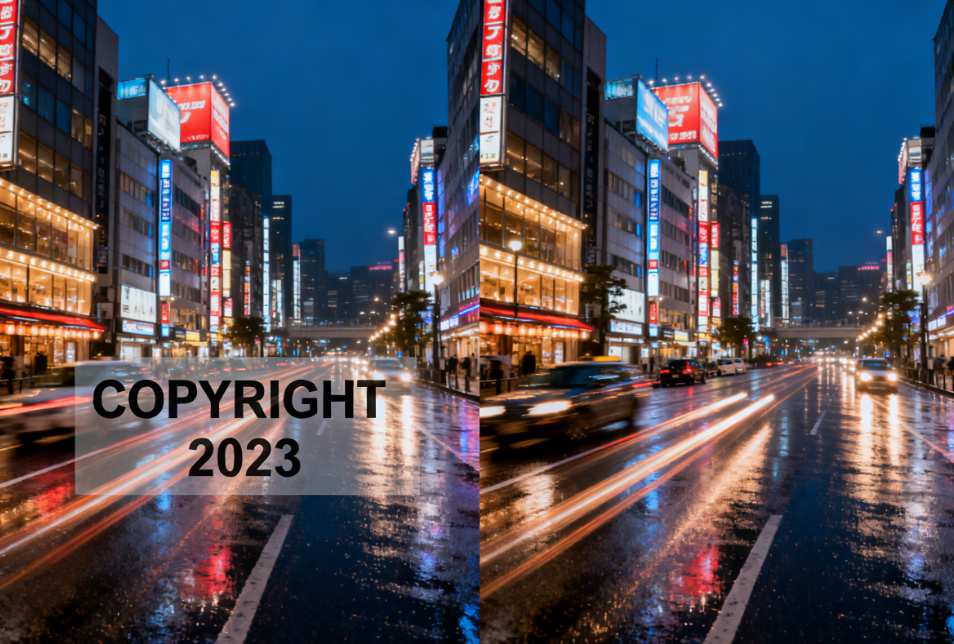
In today’s digital world, images and videos are everywhere. Whether you’re sharing on social media, writing a blog, or creating marketing content, visual materials are key to capturing attention. However, when using images from the web, one common challenge arises: watermarks. Watermarks, logos, timestamps, or copyright marks can interfere with your creative projects. Knowing how to remove them effectively without compromising image quality is essential for creators, educators, and professionals alike. In this comprehensive guide, we explore WatermarkRemover.io, GStory Photo Watermark Remover, and other approaches, providing practical tips, case studies, and step-by-step instructions.
Why Watermarks Exist
Watermarks are visual indicators embedded in images or videos to protect intellectual property, promote a brand, or discourage unauthorized use. Common types include:
- Text watermarks: For example, “© Company Name” or “Sample”.
- Logo watermarks: Brand logos or platform marks.
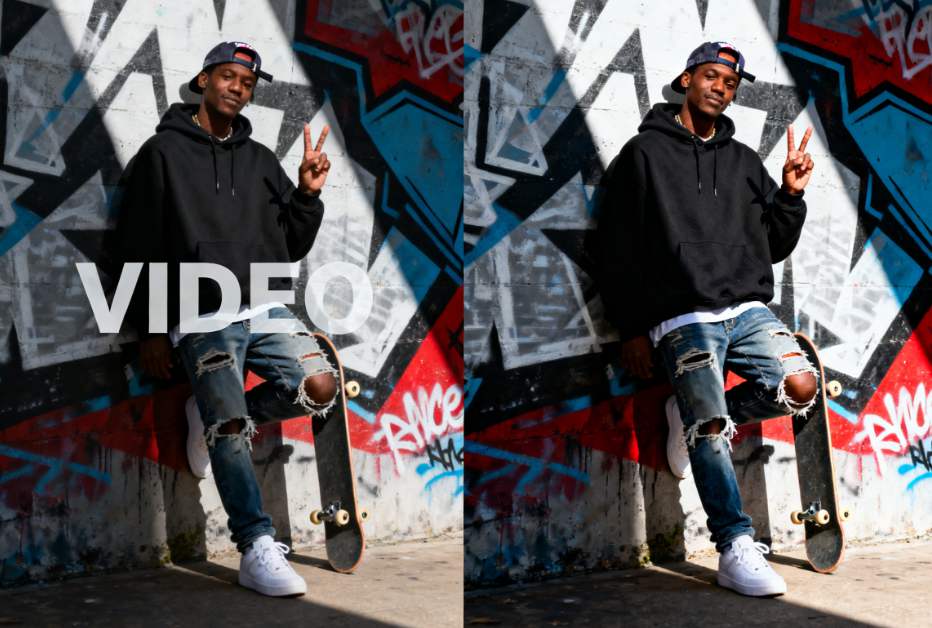
- Timestamps or other identifiers: Often seen in photography or security footage.
Watermarks serve an important purpose: they protect creators’ work. However, in legitimate scenarios such as educational content, personal projects, or presentations, removing watermarks can enhance clarity and professionalism.
Understanding WatermarkRemover.io
WatermarkRemover.io is an AI-driven online tool designed for removing watermarks from images and videos quickly. Its key features include:
- Automatic watermark detection: AI analyzes pixels and identifies watermark regions.
- Fast processing: Images are cleared of watermarks in seconds without manual editing.
- Support for multiple formats: JPEG, PNG, WebP, and more.
- User-friendly interface: Suitable for photographers, social media creators, designers, and casual users.
While effective for small or simple watermarks, users have reported occasional blurriness with complex backgrounds or large watermark overlays, which may require minor manual adjustments.

Introducing GStory Photo Watermark Remover
For users seeking more advanced functionality, GStory Photo Watermark Remover provides an enhanced AI-based solution. According to the official GStory page, this tool offers:
- Seamless watermark removal
AI algorithms generate natural-looking fixes by analyzing surrounding pixels, preserving details while clearing watermarks. - Time-saving efficiency
Process images in seconds without manual intervention, freeing creators to focus on projects. - Enhanced aesthetics
Retains original colors and details, making images suitable for presentations, social media, or publications. - Simple steps
Upload an image, highlight the watermark, and click to process—no Photoshop skills required. - Free credits for new users
Users receive 50 free credits upon signup, with options to earn more through referrals. - Professional-grade results
Trusted by over 1,500 users, reviews praise its ease of use and high-quality output. - Additional creative tools
GStory also provides background removal, video watermark removal, AI image upscaling, and other photo/video editing features, offering a comprehensive creative toolkit.
How to Use GStory Photo Watermark Remover
Even beginners can remove watermarks effortlessly with GStory:
- Upload Your Photo
Supported formats include PNG, JPG, JPEG, and WebP. Maximum size: 10MB. - Mark the Watermark Area
Use your mouse to highlight the watermark or text that you want to remove. - AI Processing
GStory analyzes surrounding pixels and generates a clean, natural fix. - Download the Result
Within seconds, you get a watermark-free image, ready for social media, presentations, or design work.
This simplified workflow eliminates tedious manual editing, making it accessible for all skill levels.
Comparing WatermarkRemover.io and GStory
| Feature | WatermarkRemover.io | GStory Photo Watermark Remover |
| AI watermark removal | ✅ | ✅ |
| Ease of use | ✅ | ✅ (more intuitive interface) |
| Supported formats | JPEG, PNG, WebP | JPEG, PNG, WebP |
| Free usage | Limited | 50 credits for new users + referral bonuses |
| Video watermark removal | ✅ | ✅ + extended video editing features |
| Quality of output | Good | Excellent, natural-looking results |
| User ratings | 4.5/5 | 5.0/5 |
| Ideal users | General users | Creators, designers, social media professionals |
GStory’s combination of high-quality results, multi-functionality, and intuitive interface makes it ideal for users who need more than simple watermark removal.
Legal and Ethical Considerations
While watermark removal tools are technically legal, ethical and legal risks exist:
- Copyright protection
Many images are copyrighted. Removing watermarks without permission for commercial use can constitute infringement. - Fair-use scenarios
- Educational presentations
- Personal photos or images you have the rights to
- Creative experiments or edits for learning purposes
- Responsibility and awareness
Users should always ensure they have the legal right to modify content. Using AI tools responsibly is crucial to avoid legal disputes.
In short, watermark removal should be applied ethically, respecting creators’ rights and copyright laws.
Real-World Case Studies
Social Media Creators
Emma, a TikTok influencer, wanted to repurpose her content for Instagram Reels and YouTube Shorts. TikTok watermarks made the videos appear unprofessional. By using GStory Photo Watermark Remover, she quickly removed the logos, enabling polished, shareable content.
Graphic Designers
John, a freelance designer, often needed images without logos for commercial mockups. WatermarkRemover.io helped remove small watermarks, while GStory provided cleaner, higher-quality results for complex images, saving hours of manual editing.
Educational Use
Michael, a teacher, needed images for classroom slides. Removing distracting watermarks with GStory allowed him to create visually clean materials that maintained student attention.
These examples illustrate how selecting the right tool can save time, enhance professionalism, and maintain high-quality visuals.
Choosing the Right Watermark Removal Tool
- Purpose-driven choice
- Casual sharing → Free online tools like WatermarkRemover.io are sufficient
- Professional use → GStory for quality output and multiple features
- Watermark complexity
- Small text or simple logos → Any AI tool can work
- Large or complex watermarks → Tools like GStory produce natural results
- Ease of use
Intuitive interfaces save time and reduce learning curves for beginners. - Privacy and security
Ensure platforms respect uploaded content and do not misuse or store images without consent.
Tips for Best Results
- Highlight precisely
Mark the watermark fully to allow AI to generate accurate fixes. - Use high-resolution images
High-resolution inputs yield cleaner, more professional results. - Consider post-processing
For complex backgrounds, minor touch-ups in software like Photoshop or GIMP may help. - Batch processing
Tools supporting batch processing (like GStory) save time for multiple images.
Future Trends in Watermark Removal
AI-based watermark removal is evolving rapidly:
- Improved inpainting technology: Outputs increasingly match original images seamlessly.
- Automated copyright detection: Platforms may identify protected content to prevent misuse.
- All-in-one creative platforms: Integration of watermark removal, background editing, and enhancement tools streamlines the workflow.
GStory is an example of this trend, combining photo/video watermark removal with editing tools to create a complete creative suite.
Conclusion
Selecting the right watermark removal tool depends on your needs:
- WatermarkRemover.io: Quick, simple, and effective for casual or small-scale tasks.
- GStory Photo Watermark Remover: Professional, high-quality, and versatile for creators, designers, and social media professionals.
Regardless of the tool:
- Respect copyright and use content legally.
- Highlight watermark areas accurately to improve results.
- Match the tool to your project for maximum efficiency and quality.
By understanding the options, tools, and best practices, you can enhance your images and videos while maintaining ethical standards and professional results.
Leave a Reply