Last Updated on November 14, 2025 by
Watching movies is one of the easiest ways to learn a language, enjoy stories from other cultures, or simply relax after a long day. But sometimes, you need subtitles—maybe the movie is in a foreign language, the audio is unclear, or you just want to follow every line without missing anything. Luckily, downloading subtitles for movies has become easier than ever, and anyone can do it, even with zero technical experience.
This guide will walk you through everything you need to know about how to download subtitles for movies, how to add them, how to save them permanently, and which tools you can trust. I’ll keep the explanations simple and friendly so that even a middle-school student can understand. Let’s get started.
Why Subtitles Matter
Subtitles are lines of text displayed at the bottom of a movie or video. They show what characters are saying and sometimes include extra information, like background sounds or speaker names. Subtitles help in several situations—language learning, watching foreign films, or understanding fast dialogue.
When you download subtitles, you usually get them as a file. The most common subtitle formats include:
- SRT — the simplest and most widely supported format
- VTT — commonly used for online videos
- ASS — supports fancy styling, colors, and fonts
These formats contain timed text, meaning each sentence is matched with the exact moment it should appear during the movie.
Some subtitles are displayed automatically on streaming platforms, but when you watch downloaded movies or offline videos, you often need to get the subtitles yourself. That’s where learning to download subtitle files becomes very useful.
Can You Download Subtitles for Movies?
Yes — you absolutely can. Many websites, apps, and video players allow you to download subtitles for free. Some streaming sites even provide subtitles directly. As long as you are using subtitles for personal viewing and not redistributing copyrighted material, you’re completely fine.
There are also many legal sources that offer subtitles for free because users around the world voluntarily upload translations. Subtitles exist for thousands of movies in dozens of languages, so you’ll almost always find the one you need.
Best Ways to Download Subtitles for Movies
There isn’t just one way to download subtitles. Depending on where you watch your movies, you may prefer different methods. Here are the easiest and most reliable options that anyone can use.
1. Download Subtitles from Streaming Platforms
If you watch movies on platforms like YouTube or uploaded videos on Vimeo, the subtitles may already exist. On YouTube, you can usually download subtitles using a “YouTube subtitle downloader,” which is a tool that extracts the subtitles into an SRT or TXT file. Many websites offer this service. You simply paste the video link and click download.
This is a great method for educational videos, documentaries, or YouTube movies with auto-generated captions. Just remember that auto captions aren’t always perfect, especially for songs or fast speech.
2. Use Free Subtitle Websites
There are well-known subtitle sites where people upload subtitles for movies in almost every language. These sites have been around for years and are trusted by millions of users.
Common examples include:
- Subscene
- OpenSubtitles
- YIFY Subtitles
All you need to do is search for the title of your movie and choose the language you need. These sites usually have multiple versions of the same subtitle file, because movies often have different releases. If one subtitle file doesn’t match your movie perfectly, don’t worry—you can try a different one.
When downloading from these sites, choose subtitles with good “ratings” or comments because that usually means the timing is accurate.
3. Use Media Players Like VLC to Download Subtitles Automatically
VLC Media Player is one of the most popular free video players in the world. It can also help you download subtitles directly while you are watching your movie.
If you play a movie in VLC, you can open the “Subtitle” menu and choose the option to download subtitles. VLC will search from several subtitle databases and show you available options. You just select one, and VLC loads it instantly.
This method is simple because you don’t need to visit any websites or rename files. Everything happens inside VLC itself.
How to Get Subtitles for Any Movie
If you have rare or older movies, finding subtitles may seem difficult, but you still have several good options.
Some communities create subtitles for rare films and share them on subtitle platforms. You can also use AI tools to generate subtitles automatically by analyzing the audio of the movie. These tools are still improving, but they work surprisingly well for many languages.
Another option is relying on fansub communities, where movie lovers translate films out of interest. These translations are often high-quality and available in multiple languages.
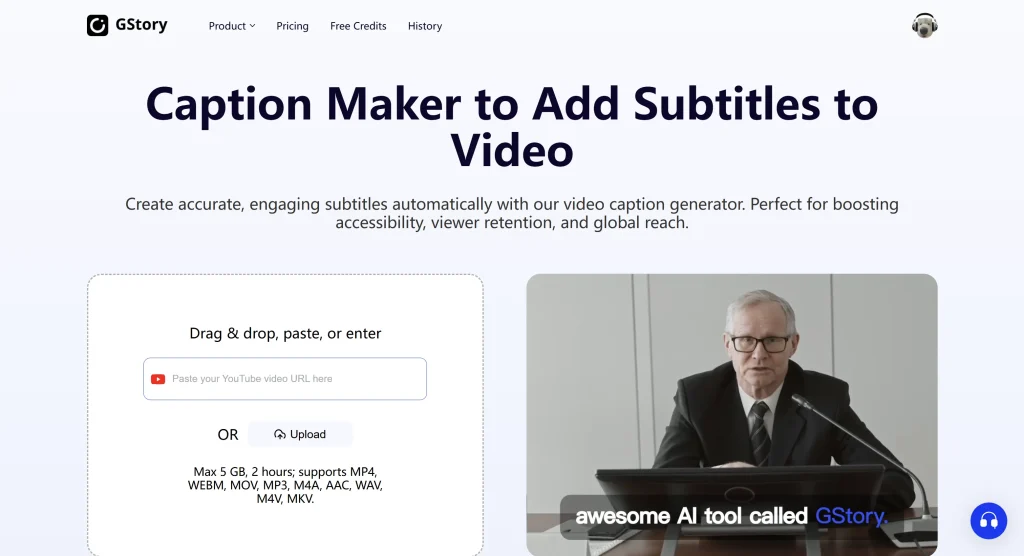
A strong example of useful AI tools is GStory Subtitle Generator, which:
- Detects speech automatically
- Generates accurate subtitles
- Supports many languages
- Exports SRT files
- Works even when the video has no captions
This is extremely helpful when no subtitles exist online, or when you are working with interviews, tutorials, or foreign-language clips.
How to Download Subtitles From YouTube
A lot of users want subtitles specifically for YouTube videos, which is why the keyword YouTube subtitle downloader is so popular. The good news is that downloading YouTube subtitles is actually much easier than most people think.
If the YouTube video already has subtitles
When a YouTube video comes with its own subtitles, you can download them in just a few minutes. Simply open the video and click the three dots or the “Show transcript” option. You’ll see the entire subtitle text on the side. Copy everything, paste it into a text file, and save it. After that, use any free online subtitle converter to turn your text file into an SRT file. Once converted, you can load the subtitle file into any video player.
This method gives you a clean subtitle file without needing extra tools.
If the video has auto-generated captions
Even when the captions are automatically generated, you can still download them. Online YouTube subtitle downloaders can detect the captions directly from the video link. You just paste the URL, and the tool will let you save the subtitles as an SRT file. The accuracy depends on the video, but this is one of the easiest ways to get captions quickly.
If the YouTube video has no subtitles at all
Sometimes a YouTube video simply doesn’t offer any subtitles. In that case, the fastest solution is to generate them with an AI subtitle tool.
GStory Subtitle Generator is especially helpful here because it can listen to the audio, detect speech automatically, and generate accurate subtitles even when the original video provides nothing. It also supports multiple languages and lets you export a clean SRT file that works with all major players.
This method solves the biggest challenge YouTube users face—getting subtitles when the video has no captions at all.
Frequently Asked Questions
Why do some subtitles not match the timing of my movie?
Movies often have different releases or FPS versions, so a subtitle created for one version may appear too early or too late on another. Most video players allow you to manually adjust the subtitle delay by a few milliseconds until it matches the dialogue.
What should I do if the subtitles I downloaded show strange characters or symbols?
This usually happens because the subtitle file uses the wrong encoding (such as ANSI instead of UTF-8). You can open the file in a text editor and re-save it as UTF-8, which fixes most display issues instantly.
Are free subtitle websites safe to use?
Most well-known subtitle sites are safe, but some may include ads or pop-ups. Avoid downloading ZIP or EXE files—subtitles should always be plain text formats like SRT, ASS, or VTT. If a site forces extra downloads, skip it.
What if the subtitle file doesn’t load in my video player?
Check that the file name matches your movie’s file name and is in the same folder. If it still doesn’t work, convert the subtitle to SRT using an online converter, since SRT is the most universally supported format.
How can I download subtitles in a different language?
Sites like Subscene and OpenSubtitles offer subtitles in dozens of languages. If the language you want isn’t available, you can use an AI subtitle generator like GStory to translate existing subtitles or produce new ones directly from the audio.
Can I download subtitles for a movie that isn’t online anymore?
Yes. Even if the movie is removed from streaming platforms, you can usually find its subtitles on subtitle archive sites or fan communities. If no subtitles exist, AI tools can generate them from the offline video file.
Do AI-generated subtitles work for noisy audio or accents?
Modern AI subtitle tools handle background noise and accents surprisingly well. If the recording is too noisy, you can improve accuracy by cleaning the audio first or running the file through a noise-reduction tool before generating subtitles.
Is it possible to download subtitles for YouTube Shorts or TikTok-style videos?
Yes. You can use online subtitle downloaders that support short-form URLs, or upload the video to an AI subtitle generator. These tools can extract and convert captions even from very short clips.
Can I extract subtitles directly from a video file?
If the file already contains embedded subtitles (MKV files often do), you can extract them using tools like MKVToolNix. If the video has no embedded captions, an AI subtitle generator is the simplest way to create new subtitles.
How do I choose the most accurate subtitle file from a website?
Look for files with high ratings, detailed descriptions (e.g., “BluRay x265 version”), and user comments. Versions with notes like “fixed timing” or “synced to WEB-DL” usually work best.
Final Thoughts
Downloading subtitles for movies is no longer a complicated task. Whether you want to understand a foreign film, learn a new language, or simply enjoy clearer dialogue, subtitles make your movie experience smoother and more enjoyable. With the many free tools available today—subtitle websites, YouTube subtitle downloaders, and media players like VLC—anyone can download and add subtitles in just a few minutes.
Subtitles give you more control over how you watch movies, and once you know how to download them, you’ll never struggle to follow a film again. If you use the steps in this guide, you’ll be able to download subtitles for any movie you want, quickly and safely.
If you ever can’t find subtitles for a movie or YouTube video, GStory Subtitle Generator can analyze the audio and create accurate subtitles automatically.
Leave a Reply