Last Updated on December 8, 2025 by
TikTok has taken the world by storm with its short, engaging videos, but many users find the watermark, which includes the app’s logo and creator’s username, a distraction when trying to share or repurpose videos. Whether you’re looking to save your own creations, share others’ content, or repurpose videos across multiple platforms, saving TikToks without the watermark can make the process much smoother. In this guide, we’ll walk you through various ways to download TikTok videos without watermarks, including some effective tools like GStory’s video watermark remover.
Why Watermarks Are Added to TikTok Videos — And What This Means for Saving
Watermarks are used by TikTok to ensure creators are properly credited for their content, making it easy for viewers to recognize who the video belongs to. While watermarks are great for protecting the intellectual property of creators, they can be problematic for users who want to save or share the videos without any distractions.
If you’re wondering how to save TikTok without watermark, it’s important to remember the legal and ethical considerations involved. Always respect the content creator’s rights and avoid using their videos commercially without permission.
4 Ways to Save TikTok Without Watermark
There are several methods to save TikTok videos without the watermark, each with its own advantages depending on your needs:
Method 1: Built‑in Save Feature (For Your Own Videos)
If you’re uploading your own content to TikTok, you have the option to save the video without the watermark before posting it. This is the easiest way to ensure a clean copy of your video. TikTok allows users to save their creations directly from the app, without the watermark being applied. This method is perfect for creators who want to keep a backup or share content elsewhere without the distraction of the TikTok logo.
Method 2: Screen Recording (iPhone / Android / PC)
Another simple approach is to use the built-in screen recording feature on your device. This method works on both iPhone and Android, as well as PC. By recording the TikTok video as it plays on your screen, you can bypass the watermark entirely. However, note that this method may result in a slight decrease in video quality. It’s a good option if you need a quick solution and don’t mind a bit of quality loss.
Method 3: Online TikTok Downloader / Watermark Remover Tools (URL‑Based)
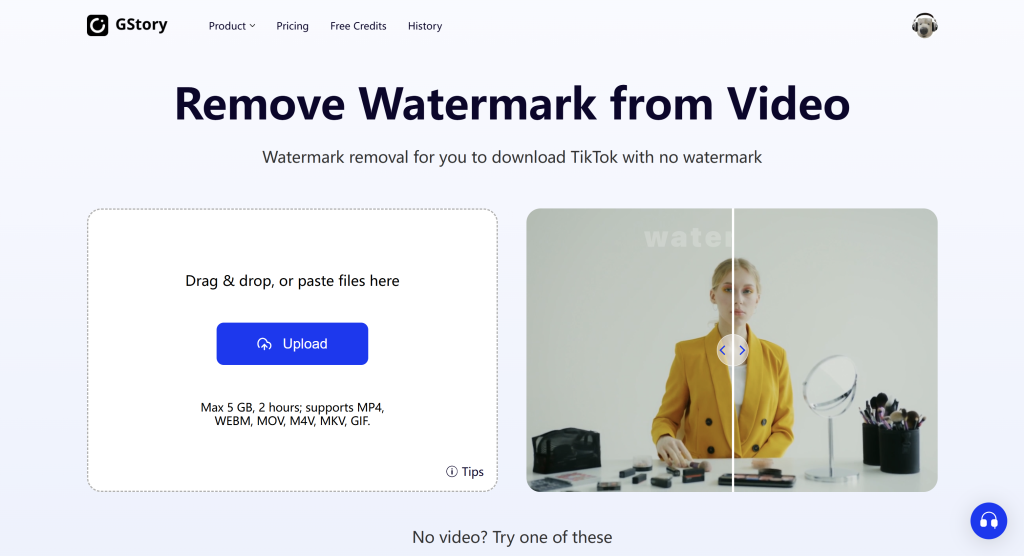
Online tools like SnapTik, SSSTikTok, and GStory’s TikTok downloader allow you to easily remove watermarks by simply pasting the TikTok video URL into the tool. These tools work quickly and don’t require any software installation, making them a convenient option for those looking to download TikTok videos without a watermark. It’s a straightforward process that doesn’t take much time or effort, making it ideal for users who want to save videos with minimal hassle.
Method 4: Post-Processing with Video Editing Software or Watermark Removal Tools
If you’ve already saved a video with a watermark, you can remove watermark from video using video editing software or a dedicated watermark removal tool. Software like Adobe Premiere or Final Cut Pro allows you to manually edit out the watermark, or you can use specialized tools like GStory’s watermark remover. This method is perfect for those who want more control over the final video and are comfortable with video editing.
Comparing the Pros and Cons of Each Method
| Method | Pros | Cons |
| Built‑in Save | Simple, high quality, works for your own videos. | Only available for your own content before posting. |
| Screen Recording | Doesn’t need third-party apps, quick to use. | Potential quality loss, less flexible. |
| Online Downloaders / Watermark Removers | Fast, easy to use, works with any video. | Some tools may have ads, concerns about privacy or stability. |
| Video Editing / Post‑Processing | Precise, high-quality output, flexible. | Requires video editing skills and software. |
Step-by-Step Guide: How to Save TikTok Without Watermark
Each device has its own method for saving TikTok videos without a watermark. Here’s a quick breakdown of what you need to do:
For iPhone / Android:
- Using Online Downloader: Simply copy the TikTok video URL, paste it into an online tool like SSSTikTok or GStory, and the tool will generate a clean download link without the watermark.
- Screen Recording: Use your phone’s built-in screen recording feature to capture the video. This works well if you’re in a pinch, but keep in mind that the video quality might not be as good as a direct download.
For PC / Mac:
- Web-based Tools: Use online tools like SnapTik or SSSTikTok by pasting the video URL into the tool.
- Video Editing Software: If you’ve already downloaded the video and it contains a watermark, use editing software like Adobe Premiere or a dedicated tool like GStory’s watermark remover to clean up the video.
Can You Download TikTok Music (MP3) Without Watermark?
If you’re interested in downloading only the audio from a TikTok video, many online tools, including GStory’s downloader, allow you to save TikTok audio as an MP3 file without the watermark. This is useful for those who want to keep the audio but not the video. Just be aware that TikTok’s music is often copyrighted, so make sure to check the permissions before using it for commercial purposes.
Legal and Ethical Considerations: When Not to Remove Watermarks
While removing a watermark from a TikTok video is technically possible, it’s important to consider the legal and ethical implications. Removing watermarks and re-uploading content without permission could violate copyright laws and the creator’s intellectual property rights. Always seek permission from the original creator or use content that is licensed for reuse.
Additionally, be sure to check the copyright laws in your region and adhere to TikTok’s terms of service. Using videos without watermarks can be tempting, but it’s essential to respect the work of others.
How to Use Watermark-Free TikTok Videos Responsibly
- Ask for Permission: Always reach out to the creator and ask for permission before using their content without a watermark.
- Non-Commercial Use: Avoid using watermarks-free videos for commercial purposes unless you have explicit permission from the creator.
- Respect Copyright: If you’re the creator, save watermark-free versions of your videos for personal use, and only remove watermarks from videos you’ve created or have permission to edit.
- Use Safe Tools: Be cautious when using third-party tools for removing watermarks. Stick with reliable and safe options like GStory to ensure your privacy and security.
Conclusion
Removing watermarks from TikTok videos is easier than ever, thanks to a variety of methods and tools. Whether you use built-in features, online downloaders, or video editing software, each option offers a different level of convenience and quality. However, always keep in mind the importance of respecting copyright and intellectual property laws, and only remove watermarks from videos you own or have permission to edit.
By following the tips and methods outlined in this guide, you can enjoy TikTok videos without watermarks, while ensuring you’re using content responsibly.
FAQ
Q: Is it legal to download TikTok videos without a watermark?
A: It depends on how you plan to use the content. If it’s for personal use, it’s typically fine, but always seek permission from the creator if you intend to use it commercially.
Q: Can I download TikTok audio without the watermark?
A: Yes, many tools like SSSTikTok and GStory allow you to download TikTok music as MP3 files without the watermark.
Q: Does removing the watermark affect the video quality?
A: Not significantly, especially when using reliable tools like GStory. However, recording via screen capture might result in a slight loss of quality.
Leave a Reply