
Last Updated on January 30, 2026 by
Your caption tool just crashed mid-export again. Sound familiar?
We’ve all been there. You’ve spent hours obsessing over the perfect edit, matching every cut to the beat, only for your AI subtitle generator to hand you a laggy, unusable file at the finish line.
This isn’t just a “technical glitch”—it’s the soul-crushing daily reality for thousands of creators.
Between unreliable exports, laggy playback, and the creeping dread of subscription fatigue, the content community is hitting a breaking point. Captions.ai, once the undisputed “gold standard,” has plummeted to a dismal 1.6 out of 5 on Trustpilot. Meanwhile, CapCut has nearly tripled its Pro pricing, effectively ghosting the casual creators who built its popularity. The very tools that promised to save us time are now the biggest obstacles in our workflow.
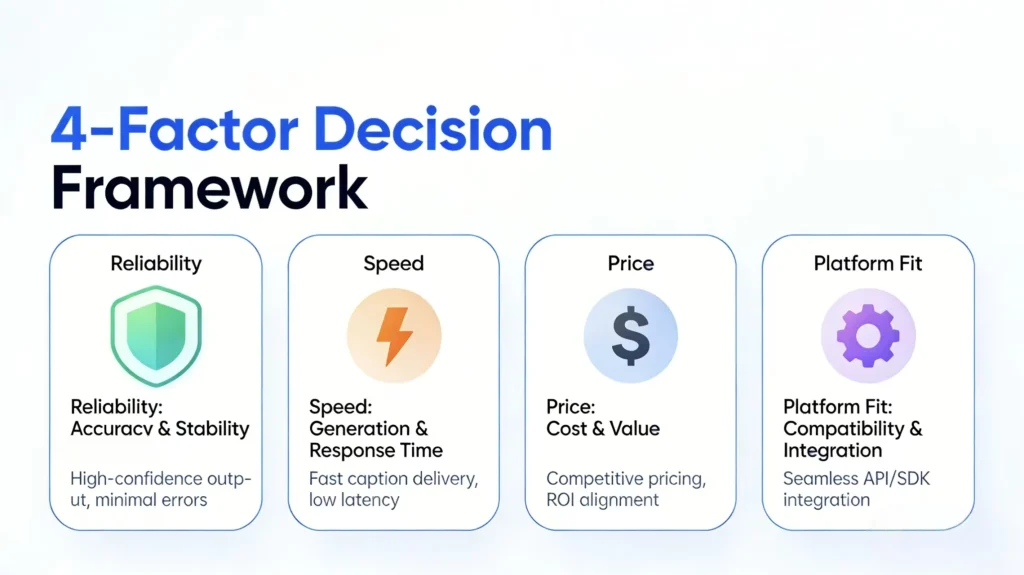
But here’s the reality check: you don’t have to settle for “good enough.” This guide breaks down a 4-factor decision framework to help you cut through the marketing fluff. It’s time to find a tool that actually fits your workflow, your budget, and your sanity.
Why Creators Are Abandoning Their Current Captions AI Tools
Before we look at the alternatives, let’s be honest about why you’re even reading this. The tools we once loved have changed, and not for the better.
The Captions AI Decline – Why Free AI Captions Alternatives Matter
The numbers don’t lie: Captions.ai currently holds a 78% one-star rating on Trustpilot. Since the Mirage merger, the “darling” of the industry has become a headache of audio sync errors and painfully slow processing.
“It generates subtitles well, but the export is a disaster. The files are laggy, low quality, and half the time they just freeze. In the end, the video is unusable.” — Trustpilot Review
The sentiment on Reddit is even blunter. One user summarized the decline perfectly: “After the Mirage merger, the app is absolute trash… it was doing so well, but now it’s going nowhere.” When export failures become a “feature” rather than a bug, it’s time to move on.
The CapCut Price Shock
CapCut’s free tier used to be the ultimate hack for mobile creators. Then, the “Pro” hammer dropped. CapCut nearly tripled its subscription price, and the desktop version—the one serious editors actually need—now gates basic caption features behind a paywall.
As one Reddit user famously put it: “CAPitalismCUT has tripled the price for Pro. As a casual creator, it’s just not financially feasible anymore.” This price hike has left creators scrambling for alternatives that don’t feel like a second mortgage.
The 4-Factor Decision Framework for Caption AI Alternatives
Stop falling for flashy feature lists. When you’re evaluating your next tool, use these four criteria to see if it actually deserves a spot in your toolkit.
Reliability (Does It Actually Export?)
It sounds basic, but this is the number one complaint in the industry right now. A tool with 100 features is worth zero if it fails at the 99% export mark.
“The best caption generator is the one that gives you a usable draft in 10 seconds, not a headache in 10 minutes.” — Reddit User
The Test: Before you pay a dime, run a sample export. If it stutters, lags, or crashes on a 60-second clip, walk away.
Speed (Time to Usable Output)
If you’re pumping out 3 to 5 videos a day, every minute of “processing time” is time you aren’t creating. You need to factor in the total loop: upload, transcription, and export.
Browser-based tools that handle processing locally are often the winners here, as they skip the “waiting for upload” bottleneck. A fast transcription is useless if the export takes as long as a feature-length film.
Price (Free Tier vs. Subscription)
Creators are tired of paying $15/month for “just a tool.” Look closely at the model:
- True Free Tiers: Do they have watermarks?
- Credit-based: Perfect for “pay-as-you-go” creators.
- Subscription: Only worth it if you’re a high-volume power user.
Platform Fit – Finding the Right AI Generator Captions Tool
Don’t buy a chainsaw to cut a piece of paper. Match the tool to your platform:
- Are you a mobile-first TikToker or a desktop-based YouTuber?
- Do you need flashy “Alex Hormozi style” animations or clean, professional subtitles?
- Do you need to translate your content into five languages?
Top AI Subtitle Alternatives Compared
We applied our framework to the current market leaders. Here is how they stack up.
Quick Comparison Table
| Tool | Best For | Free Tier | Reliability | Speed | Price |
| GStory | Free + Reliable | 50 credits on signup | High | Fast | Credit-based |
| VEED | Accuracy | Very Limited | High | Medium | $29/mo |
| Opus Clip | Repurposing | Limited | High | Fast | $19-99/mo |
| Zeemo | Budget-Conscious | Limited | High | Fast | Lower Tier |
| Descript | Podcasters | Limited | High | Medium | $12-40/mo |
| CapCut | Mobile Shorts | Yes (Mobile) | Medium | Fast | $9.99/mo Pro |
Best Free Option: GStory
GStory is currently winning over creators with its credit-based system. It solves the “subscription fatigue” problem by giving you 50 free credits on signup—no credit card, no strings. With 95% accuracy and multi-format export (SRT, VTT, MP4), it’s a browser-based powerhouse for those who want professional results without a recurring bill.
Best for Accuracy: VEED
If your content is high-stakes or professional, VEED is the heavy hitter. It boasts 99.9% accuracy across 125 languages. The catch? It’s a full video editing suite, meaning you’re paying for a lot of features you might not need if you just want captions.
Best for Repurposing: Opus Clip
If your workflow involves slicing long-form podcasts into viral shorts, Opus Clip is the specialist. It uses AI to find “viral moments” and captions them automatically. It’s not a general editor, but for the “repurposing army,” it’s a massive time-saver.
Best Budget Alternative: Zeemo
Zeemo has become a Reddit favorite for its balance of price and accuracy. Its standout feature is bilingual subtitle support, making it the go-to for creators targeting global audiences. It’s fast, affordable, and gets the job done without the bloat.
Best for Podcasters: Descript
Descript is essentially “editing for people who hate editing.” You edit the video by editing the text transcript. It’s a godsend for long-form creators who need to cut out “ums,” “ahs,” and dead air. It has a steeper learning curve, but the time savings on a 30-minute video are unparalleled.
Which Tool Should You Choose?
- “I need FREE and reliable right now” → Try GStory. The 50-credit signup is the easiest way to get started without a commitment.
- “I make 5+ shorts a day on my phone” → Stick to the CapCut mobile free tier until you outgrow it.
- “Accuracy is non-negotiable” → Go with VEED.
- “I need to turn one video into ten” → Opus Clip is your best friend.
- “I have a global audience” → Zeemo handles the dual-language heavy lifting.
- “I’m a podcaster” → Descript will change your life.
FAQs About AI Caption Tools
Is Captions AI still worth it in 2026?
For most, no. Unless you specifically need AI-eye contact correction or avatars, the export reliability is too big of a risk for a professional workflow. With a 1.6-star rating, the consensus is clear: look elsewhere.
What’s the most accurate AI subtitle generator?
VEED and Descript lead the pack. However, most tools now hit the 95% mark. For casual content, the difference between 95% and 99% accuracy isn’t worth a 300% price premium.
Are there truly free AI caption tools?
Yes, but watch for the “catch.” GStory offers a genuine credit-based free start. CapCut mobile is free but limited. Always avoid “free trials” that demand credit card info upfront—they’re usually a trap.
Conclusion
The “best” tool isn’t the one with the biggest marketing budget—it’s the one that doesn’t crash when you’re 5 minutes away from a deadline.
The market has shifted. You no longer have to put up with Captions.ai’s lag or CapCut’s price hikes. Use the 4-factor framework: prioritize reliability first, then figure out your speed, price, and platform needs.
Ready to stop fighting your software? Start with a low-risk option. GStory’s credit model lets you test the waters without a subscription or a credit card.
Leave a Reply