Last Updated on February 3, 2026 by
With AI creative tools multiplying at breakneck speed in 2026, Krea AI has carved out a unique position as an all-in-one platform for image and video generation. But beneath the sleek interface and impressive demos lies a more complicated reality.
Content creators and designers face a frustrating challenge: finding AI tools that deliver good value, consistent quality, and reliable support. Many only discover the hidden costs—credit limitations, quality inconsistencies, and non-existent customer service—after they’ve already committed to a subscription.
This comprehensive review cuts through the marketing hype to give you an honest assessment of Krea AI’s features, real pricing calculations, and community feedback. We’ll also compare it with cost-effective alternatives so you can make an informed decision.
What is Krea AI? Platform Overview
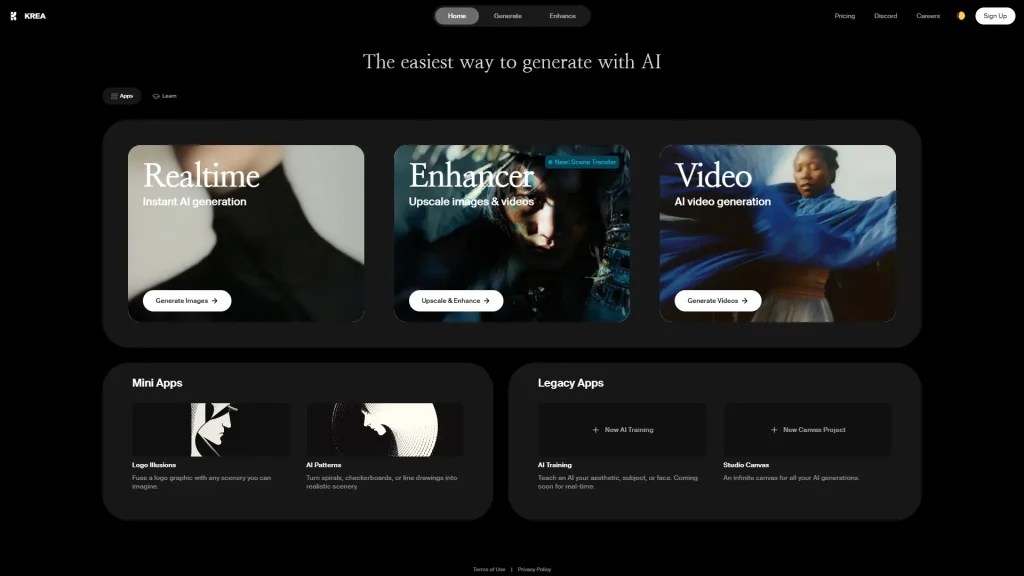
Krea AI positions itself as an all-in-one AI creative platform that combines image generation, video creation, enhancement tools, and 3D capabilities under one roof. Unlike single-purpose tools, it aims to be a complete creative suite powered by artificial intelligence.
The platform has gained attention for its innovative real-time generation feature and access to multiple AI models. But it’s also faced growing criticism from users who feel the pricing doesn’t match the value delivered.
Core Features
Image Generation: Krea AI offers access to multiple models including Flux Krea, ChatGPT Image, Ideogram, and Imagen. Users can generate images from text prompts, perform image-to-image transformations, and train custom models.
Video Generation: The platform provides access to video models like Kling and Minimax Hailuo, along with video restyling, motion control, and lip-sync animation features.
Enhancement Tools: AI-powered upscaling using GaN-based technology can output images up to 4K resolution with noise reduction and quality improvements.
Real-Time Editing: The standout feature—live canvas updates as you type prompts, eliminating the traditional submit-wait-regenerate workflow.
Target Users
Krea AI targets designers and artists seeking rapid visual iteration, architects converting 3D renders to photorealistic visualizations, content creators producing social media visuals, and marketing professionals needing quick creative assets. However, whether Krea AI delivers sufficient value depends heavily on usage volume and specific needs.
Krea AI Real-Time Generation: The Standout Feature
If there’s one thing that sets Krea AI apart from competitors, it’s the real-time generation capability. This fundamentally changes how you interact with AI image generation.
How It Works
Traditional AI image generators follow a frustrating loop: type a prompt, hit generate, wait 10-30 seconds, evaluate the result, then repeat. Krea AI Realtime eliminates this friction entirely.
As you type or modify your prompt, the image updates continuously on a live canvas. There’s no submit button, no loading spinner, no waiting. Users describe it as “a creative instrument rather than a generator.” This continuous feedback allows for much faster creative exploration.
Practical Limitations
Despite the impressive technology, there are significant limitations:
Hardware Requirements: Running Krea AI Realtime locally requires high-end hardware. The B200 GPU needed for real-time performance isn’t accessible to most creators.
Cloud Dependency: Most users rely on Krea AI’s cloud service, subject to their pricing and server-side issues.
Server Reliability: Community reports mention generation times stretching to 2-3 hours during peak loads, with server issues causing features to break “for days.”
Krea AI Enhancer & Upscaler: Quality Assessment
Image enhancement was once a key selling point for Krea AI. The question is: does it still hold up in 2026?
Enhancement Features
Krea AI’s enhancer uses GaN-based (Generative Adversarial Network) upscaling technology, offering 4K output capability, noise reduction, detail enhancement, and quality improvement for low-resolution source images. The technology analyzes image patterns and intelligently fills in missing detail.
Quality Concerns
Here’s where things get concerning. Long-time users report that Krea AI enhancer quality has significantly decreased after recent updates:
“It used to be mind blowing… Since the updates, it seems to distort, add grunge”
Specific issues include yellow/warm tinting in enhanced outputs, increased graininess, blurrier results than older versions, and distortion artifacts. These represent a pattern of user frustration with what was once Krea AI’s strength.
Enhancement Alternatives
If you’re experiencing quality issues with Krea AI’s enhancer, consider Adobe Firefly for higher quality upscaling within the Adobe ecosystem, or Topaz for reliable standalone enhancement.
For a straightforward browser-based solution, GStory.ai Photo Enhancer offers AI-powered upscaling to 4K with noise reduction and old photo restoration—accessible without software installation and with 50 free credits to start.
Krea AI Video Generation Capabilities
Video generation is where AI tools are rapidly evolving. Krea AI provides access to several video models, but how does the value compare?
Available Models
Krea AI aggregates access to multiple video generation engines including Kling, Minimax Hailuo, video restyling, lip-sync animation, and motion control (though users report motion control is unreliable).
Credit Cost Comparison
This is where Krea AI’s value proposition cracks. At the ~$30/month Pro tier:
| Platform | Kling 2.6 Videos | Minimax Hailuo Videos |
| Krea AI | 37 | 97 |
| Higgsfield | 120 | 200 |
| OpenArt | 125 | — |
| Freepik AI | — | 255 |
Krea AI offers roughly one-third the output of competitors at the same price point. Community members have asked: “Is Krea AI’s pricing just broken or am I missing something?”
Video Enhancement Options
If video enhancement is your priority, GStory.ai Video Enhancer provides AI-powered video upscaling to 4K at 30fps with pay-per-use pricing—no monthly subscription burning credits whether you use them or not.
Krea AI Pricing: Is It Worth the Cost?
Pricing determines whether any tool delivers real value. Let’s break down what you actually get.
Pricing Tiers
| Plan | Monthly Cost | Notes |
| Free | $0 | Limited daily credits, restricted features |
| Basic | ~$10 | Entry-level paid tier |
| Pro | ~$30 | Most popular tier |
| Higher Tiers | $50+ | For heavy usage |
Value Analysis
Based on community research testing identical projects across platforms, Krea AI ranked 5th out of 8 platforms tested, with a total cost of $457 for the same output other platforms delivered more affordably.
At the $30/month tier, Krea AI delivers 37 Kling videos while Higgsfield delivers 120—paying the same price for 3x fewer outputs.
Free Tier Reality
The Krea AI free tier has become increasingly restrictive. The free enhancer that once attracted users is gone, daily credits are minimal with “lots of restrictions,” and many capabilities are locked behind paid tiers. Users report feeling misled when promotional materials emphasize “free” access that proves unusable in practice.
Better Value Options
Higgsfield: Best volume for the price, especially for image generation. Freepik AI: Superior for Minimax work with more features per dollar. Pay-per-use platforms: GStory.ai’s model (50 free credits, no subscription required) lets you pay for actual usage without wasted monthly fees.
Krea AI Customer Support Issues
Support quality often determines whether a tool is actually usable when problems arise. Here, Krea AI faces serious criticism.
Community feedback is stark: “Zero customer service support. No contact form, no email, no phone number—nothing.” Discord-only support is described as inadequate, with some users calling the experience “unprofessional, irresponsible, and borderline fraudulent.”
The support void becomes especially problematic with billing. Multiple reports describe charges continuing after account deletion, unresolved billing disputes, and no escalation path when problems arise.
Krea AI vs Alternatives: Comparison
Krea AI vs GStory.ai
| Feature | Krea AI | GStory.ai |
| Pricing Model | Monthly subscription | Pay-per-use (50 free credits) |
| Photo Enhancement | Yes (quality concerns) | Yes (4K upscaling) |
| Video Enhancement | Yes | Yes (4K at 30fps) |
| Customer Support | Discord only | Direct contact support |
| Trust Indicators | Mixed reviews | 5.0 rating, 50,000+ companies |
GStory.ai’s pay-per-use model and established trust indicators make it compelling for users prioritizing reliability.
Krea AI vs Other Platforms
Freepik AI offers significantly better value—255 Minimax videos versus Krea AI’s 97 at the same price point.
Higgsfield emerges as the most cost-effective option for pure volume: 120 Kling videos versus Krea AI’s 37 at similar pricing.
Midjourney remains superior for artistic quality, while Krea AI has advantages in real-time iteration for those who can accept the pricing and support tradeoffs.
Best Use Cases for Krea AI
Despite criticisms, Krea AI excels in specific scenarios.
Architecture Visualization
Architects consistently praise Krea AI for converting 3D renders to photorealistic visualizations. The real-time feedback loop is valuable when iterating on client presentations.
Real-Time Creative Iteration
When exploring many visual directions quickly, Krea AI’s real-time generation provides genuine workflow advantages for concept development, client collaboration, and rapid prototyping.
When to Choose Alternatives
Consider alternatives if volume matters (other platforms deliver 2-3x more output per dollar), consistent enhancement quality is required, support requirements exist for business-critical workflows, or budget consciousness is a priority.
FAQs About Krea AI
Is Krea AI Free to Use?
Krea AI offers a free tier, but it’s heavily restricted with minimal daily credits and many locked features. For meaningful evaluation, platforms like GStory.ai’s 50 free credits provide better testing opportunities.
How Does Krea AI Compare to Other Generators?
Strengths: Real-time generation is innovative, all-in-one convenience reduces tool-switching. Weaknesses: Poor value per credit, essentially non-existent customer support, recent quality degradation reports.
What Happened to the Enhancer Quality?
Community reports indicate Krea AI enhancer quality decreased after recent updates, with specific issues including yellow tinting, increased graininess, and blurrier outputs.
Conclusion
Krea AI represents an ambitious attempt to create an all-in-one AI creative platform, and the real-time generation technology is genuinely innovative. For architects and designers who benefit from instant visual feedback, it offers workflow advantages competitors haven’t matched.
However, significant concerns prevent an unconditional recommendation:
- Value proposition is weak: You get 30-50% less output than competitors at the same price
- Customer support is absent: Discord-only contact with billing issues going unresolved
- Quality has degraded: Long-time users report the enhancer isn’t what it used to be
- Free tier is misleading: Heavy restrictions make it unsuitable for evaluation
Our verdict: Krea AI works for a narrow set of users—primarily architects and designers who heavily value real-time iteration and can absorb the cost premium. For everyone else, the combination of poor value, unreliable support, and quality inconsistencies makes alternatives more sensible.
Next Step: If you’re looking for reliable AI enhancement without subscription commitments, try GStory.ai free with 50 credits. For high-volume generation, evaluate Higgsfield or Freepik AI. Match your tool choice to your actual needs rather than chasing all-in-one promises.
Leave a Reply