Last Updated on April 29, 2026 by
With a 4.1 rating on Trustpilot but just 2.8 on Sitejabber, HitPaw Watermark Remover sits among the most divisive tools in watermark removal. The bigger issue? Most top-ranking reviews are written by rival companies pushing their own products, making genuinely unbiased evaluations almost impossible to find.
This review cuts through that noise with hands-on testing across five watermark scenarios, a full pricing breakdown, real user feedback from independent platforms, and direct comparisons against top alternatives.
What Is HitPaw Watermark Remover?
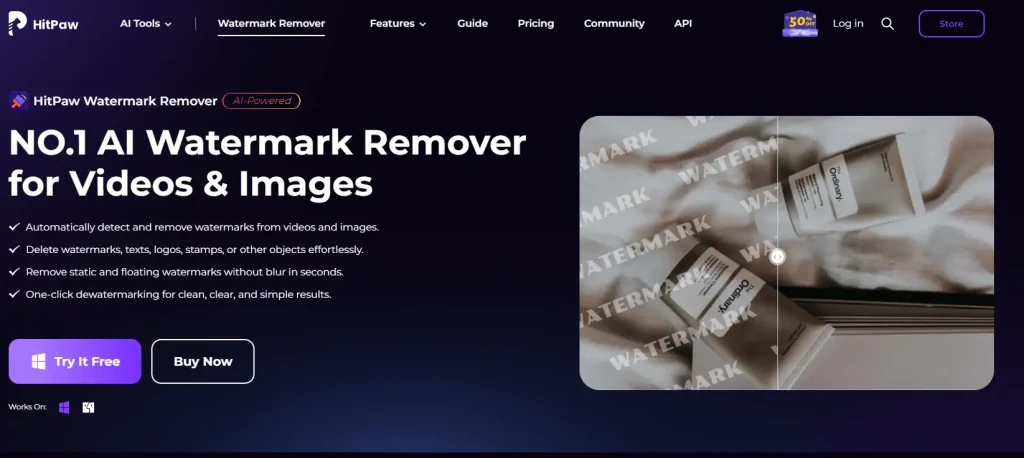
HitPaw Watermark Remover is an AI-driven tool that strips watermarks from both images and videos. Built by HitPaw — founded in 2019 in Guangdong, China — the product has over 23 million downloads and 7.3 million users across 160+ countries.
Company Background and Product Ecosystem
HitPaw’s product lineup often confuses buyers. VikPea handles video, FotorPea focuses on photos, Edimakor bundles everything into one editor, and the Online version offers browser access. The standalone “Watermark Remover” brand is merging into these newer products, so knowing which fits your workflow matters before buying.
Desktop vs. Online vs. Mobile — Which Version Should You Use?
The desktop version delivers full functionality: every removal mode, batch processing, and a perpetual license option. The online version skips installation but runs on a credit system with fewer features. The mobile app handles quick edits but lacks advanced modes. For regular use, desktop provides the best value.
Key Features and AI Removal Modes
What sets HitPaw apart from simpler watermark tools is its range of AI-powered removal algorithms for both photos and video.
Video Watermark Removal — 5 AI Modes Explained
The desktop software offers five video modes: AI Model (highest quality reconstruction), Matte Filling, Color Filling, Smooth Filling, and Gaussian Blur. Each targets different scenarios — AI Model handles complex backgrounds best, while Smooth Filling works quickly on solid-color areas. Important caveat: Mac users receive fewer modes than Windows users.
Image Watermark Removal — 3 Modes and Selection Tools
Photo removal includes Smooth Filling, Edge Filling, and Texture Repair. Three selection tools — Brush, Rectangular, and Freeform — allow precise watermark marking. Texture Repair generally produces the most natural-looking results on detailed backgrounds.
Moving and Floating Watermark Detection
HitPaw can auto-detect moving or floating watermarks in video — something most competitors cannot do. The AI tracks watermark positions across frames with reasonable consistency, though results degrade with dynamic backgrounds or face coverage.
Batch Processing and Supported Formats
Desktop users can process multiple files simultaneously. Supported formats include JPEG, PNG, BMP, and TIFF for images, plus MP4, MOV, and AVI for video. Runs on Windows 7+ or macOS 10.10+.
How to Use HitPaw Watermark Remover (Step-by-Step)
The interface keeps things straightforward for both media types.
How to Remove Watermarks from Images
Import your image, mark the watermark area using the brush, rectangle, or freeform selector, choose your removal mode, preview the output, and export. For patterned backgrounds, Texture Repair with a tight selection area yields the cleanest results.
How to Remove Watermarks from Videos
Import the video, outline the watermark region, select an AI mode, and start processing. For moving watermarks, activate auto-detection so the algorithm tracks the watermark across frames. Expect longer wait times with high-resolution and 4K content.
[Image: HitPaw Watermark Remover interface showing video watermark selection and AI mode options]
Real-World Test Results — Where HitPaw Excels and Where It Fails
Marketing demos always feature ideal conditions. Here is what happens across real-world watermark scenarios.
Simple Background Watermarks (Corner Logos, Solid Colors)
HitPaw delivers strong results here — corner logos on uniform backgrounds disappear cleanly with minimal artifacts. This is the scenario showcased in most promotional content, and the performance genuinely holds up.
Complex and Textured Background Watermarks
Performance drops when watermarks overlap busy textures, hair, or fine details. Visible traces, softening, and localized blurring become apparent. Choosing the right removal mode helps, but no setting eliminates artifacts completely in these cases.
Semi-Transparent Overlays and Watermarks Over Faces
This remains the toughest challenge for any removal tool. HitPaw struggles noticeably — the AI essentially fabricates what it thinks should be behind the watermark rather than recovering original content. Facial features frequently look unnatural after processing.
Video Watermark Removal Performance
Video removal is inherently harder than still images. Frame-to-frame consistency holds for static watermarks, but processing speed drops sharply with high-res content. Feedback on HitPaw’s own YouTube channel is mixed, with commenters reporting results that fell short on complex removals.
HitPaw Pricing Plans Breakdown (2026)
HitPaw offers multiple pricing tiers, but the details are worth examining closely.
Desktop Pricing — Windows vs. Mac
| Plan | Windows | Mac |
| Monthly | $9.99 | $12.99 |
| Yearly | $19.99 | $25.99 |
| Perpetual | $29.99 | $39.99 |
The perpetual license is a major selling point given widespread subscription fatigue. One Reddit commenter specifically highlighted HitPaw’s one-time purchase model as their reason for recommending it.
Online Credit-Based Plans
Online pricing is credit-based: 500 credits at $14.99/week, 1,200 at $35.99/month, or 5,000 at $135.99/year. For regular use, the desktop perpetual license offers far better value.
Free Version — What You Actually Get (and Why It’s Useless for Evaluation)
The free version stamps HitPaw’s own watermark on every export. This makes it nearly impossible to judge output quality before committing money — a meaningful barrier to trust that TotalMedia.ai’s review specifically called out.
Business and Team Licensing
Multi-device options start at $30.95/year for 5 PCs and $59.95 for 10 PCs. Licenses are tied to individual devices and are not cross-platform. Auto-renewal billing comes enabled by default — check your settings at purchase.
HitPaw vs. Top Alternatives — Head-to-Head Comparison
The right watermark remover depends heavily on your specific use case and budget.
HitPaw vs. WatermarkRemover.io
WatermarkRemover.io leads in SEO visibility and offers simple one-click removal — but it only handles images, with no video support. HitPaw wins on video capability and perpetual pricing. For quick image-only tasks without installing software, WatermarkRemover.io may be the more convenient pick.
HitPaw vs. GStory.ai — Browser-Based All-in-One Alternative
GStory.ai offers both video watermark removal and photo watermark removal entirely in the browser — no download needed. Its pay-per-use credits sidestep subscription concerns, and the platform bundles tools like video enhancement, background removal, and subtitles. Works on all operating systems including Linux.
HitPaw vs. Free Alternatives (GIMP, Photopea, IOPaint)
Budget-minded users have capable free options. GIMP with the resynthesizer plugin provides manual control but demands a learning curve. Photopea works as a free browser-based Photoshop alternative. IOPaint is open-source and runs locally. All three require more technical skill but cost nothing.
HitPaw vs. Professional Video Tools (Runway ML, After Effects)
For professional-grade video watermark removal, Runway ML and Adobe After Effects Content-Aware Fill produce superior results — at substantially higher price points. HitPaw fills the affordable middle ground between free tools and professional production suites.
Quick Comparison Table
| Tool | Price | Image | Video | Batch | AI | Free Tier | Platform |
| HitPaw | $9.99–$29.99 | Yes | Yes | Yes | Yes | Watermarked | Win/Mac |
| GStory.ai | Credit-based | Yes | Yes | Yes | Yes | 50 credits | Browser |
| WatermarkRemover.io | Free + paid | Yes | No | Limited | Yes | 1-2/day | Browser |
| Apowersoft | $5.99+/mo | Yes | Yes | Yes | Yes | Limited | Win/Mac/Web |
| Pixbim | Free | No | Yes | No | Yes | Full | Windows |
| GIMP | Free | Yes | No | No | No | Full | All desktop |
| Runway ML | Subscription | Yes | Yes | No | Yes | Limited | Browser |
What Real Users Say — Trustpilot and Sitejabber Reviews Analyzed
Independent review platforms reveal a more nuanced picture than affiliate-driven review sites.
Positive Feedback Patterns
Users consistently praise HitPaw’s intuitive interface, affordable perpetual pricing, and the uncommon combination of both image and video support within one tool. TenereTeam rates it 4.3/5 from 13 reviews, and Trustpilot shows 4.1/5 from 5 reviews.
Common Complaints and Issues
Sitejabber tells a different story at 2.8/5 across 55 reviews. Recurring grievances include refund difficulties, unexpected auto-renewal charges, uneven quality on complex backgrounds, and confusion about which HitPaw product to purchase. One Reddit commenter characterized the tool as simply “mid.”
Why Ratings Vary So Dramatically (4.1 vs. 2.8)
The gap likely stems from selection bias — satisfied users leave reviews where the brand solicits them, while frustrated customers seek out complaint platforms. The reality sits between the extremes.

Is It Legal to Remove Watermarks?
Legal context matters — the consequences of misuse can be severe.
When Watermark Removal Is Legal
You are generally safe removing watermarks from your own photographs, properly licensed content, paid photo sessions, public domain works, and AI-generated images you created yourself.
When Watermark Removal Is Illegal
Stripping watermarks from unlicensed stock photos (Getty, Shutterstock), copyrighted content without authorization, or in violation of platform terms is illegal under DMCA Section 1202. Statutory damages can reach $150,000 per infringement.
FAQs About HitPaw Watermark Remover
Is HitPaw Watermark Remover safe to download?
Yes — HitPaw is a legitimate company with 23 million+ downloads. Download only from the official site and avoid cracked versions, which often carry malware.
Does HitPaw Watermark Remover work on Mac?
Yes, though the Mac edition costs more ($12.99/month vs. $9.99) and includes fewer removal modes than Windows. It requires macOS 10.10 or later.
Can HitPaw remove watermarks from videos for free?
No — free exports carry HitPaw’s own watermark overlay. The most economical option for clean output is the Windows perpetual license at $29.99.
What’s the difference between HitPaw VikPea, FotorPea, and Edimakor?
VikPea specializes in video, FotorPea handles photos, and Edimakor combines everything into one editor. The standalone Watermark Remover product is progressively merging into these newer tools.
Is the perpetual license really a one-time payment?
Yes, but verify auto-renewal settings at checkout. The license covers the current major version — future major upgrades may cost extra, and each device needs its own license.
Can HitPaw remove moving or floating watermarks from video?
Yes — this is one of its distinguishing features. The AI Model mode tracks and removes shifting watermarks, though effectiveness depends on background complexity.
What’s the best free alternative to HitPaw Watermark Remover?
For images: Photopea (browser-based) or GIMP with the resynthesizer plugin. For video: Pixbim (free, Windows-only, has known saving bugs). For browser-based support covering both images and video, GStory.ai provides free starter credits.
Conclusion
HitPaw Watermark Remover holds its ground as a capable mid-range option. Strengths: an affordable perpetual license ($29.99 for Windows), dual image-and-video support, and five AI removal modes.
Limitations: poor performance on complex backgrounds and semi-transparent overlays, a confusing product lineup, and a free trial that blocks quality evaluation.
It fits users who need regular watermark removal from simple-to-moderate scenarios and prefer a one-time purchase over subscriptions. For demanding video work, Runway ML delivers better results at higher cost. For a browser-based approach, GStory.ai offers video and photo watermark removal plus a full AI editing suite — try it free with starter credits.
Leave a Reply