Last Updated on January 8, 2026 by Leslie
Artificial Intelligence is changing how people create videos. What used to take hours of editing, scripting, and shooting can now be done in minutes with the help of AI video tools. Whether you’re a YouTuber, marketer, student, or photographer, learning how to make an AI video can open up new ways to share stories, teach, or promote your work.
This guide will walk you through everything — from what an AI video actually is, to how you can create one yourself using free and paid tools.
What Is an AI Video?
An AI video is any video that’s created, edited, or enhanced with artificial intelligence. Instead of filming with a camera, you can simply write a script or upload an image, and AI tools will turn it into a realistic moving video — complete with voiceovers, animations, and music.
There are several kinds of AI videos:
- Text-to-video: You write a story, and the AI turns it into scenes and voiceovers (for example, Synthesia, Pika Labs).
- Image-to-video: You upload a photo, and the AI adds motion, depth, and effects (like Runway Gen-3 or Kaiber).
- Voice-to-video: You record audio and let AI build visuals that match your narration.
- Avatar videos: You pick a digital presenter who speaks your lines — perfect for tutorials or company training.
The goal of AI video creation is to make storytelling easy for everyone, not just for professional editors or filmmakers.
Why Create an AI Video?
AI videos have become one of the fastest-growing trends on YouTube, TikTok, and Instagram. Across creator communities like Reddit, more and more people are sharing how they use AI tools to make short, funny, or educational videos that attract millions of views.
So why is everyone doing it?
1. It saves time.
AI can automatically handle editing, transitions, captions, and even voiceovers. Tasks that once took three hours can now be done in ten minutes.
2. You don’t need technical skills.
Even if you’ve never used a video editor before, AI tools provide easy templates and visual previews that guide you step by step.
3. It’s affordable.
Many AI video generators offer free plans, and even premium options cost far less than hiring a professional editor or animator.
4. It’s perfect for content marketing.
Brands and creators can quickly make product explainers, social clips, or ad videos that look professional and engaging.
Communities of creators have noticed that AI isn’t replacing creativity — it’s making it faster and easier to express. The real advantage lies in saving time while unlocking more opportunities to share ideas and grow an audience.
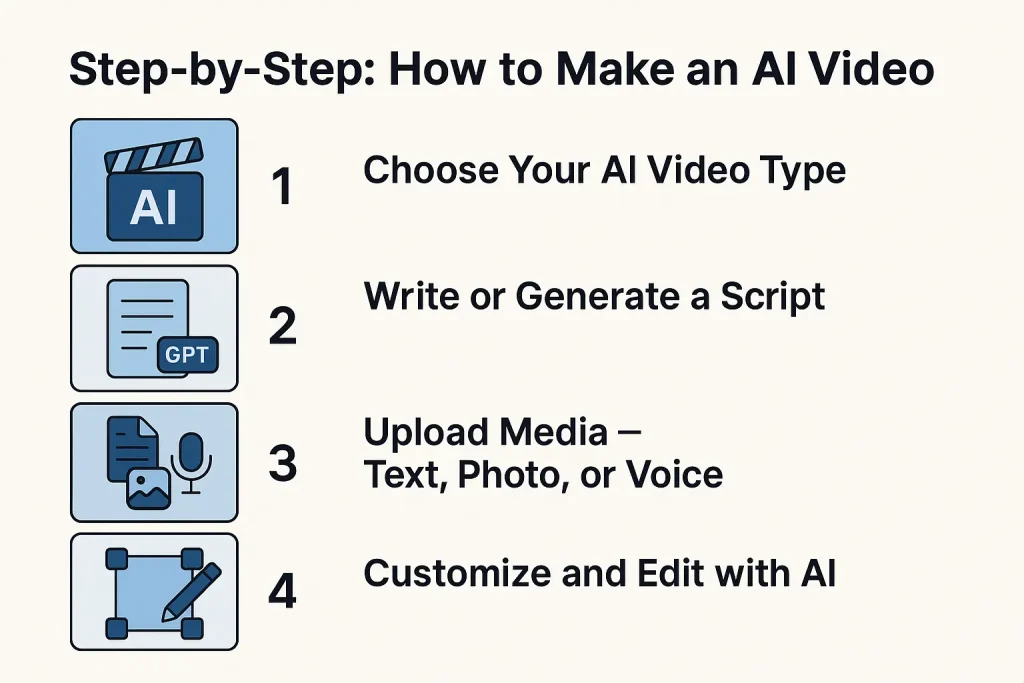
Step-by-Step: How to Make an AI Video
Now let’s go through the process of making your own AI video from start to finish. These steps work no matter what tool you choose.
Step 1: Choose Your AI Video Type
Start by deciding what kind of video you want to make.
- For storytelling or tutorials: Choose a text-to-video tool like Synthesia, InVideo AI, or Pika Labs.
- For animated photos or artistic visuals: Go with image-to-video tools like Runway Gen-3 or Kaiber.
- For business or education: Use avatar generators like DeepBrain AI or HeyGen for realistic talking presenters.
If you’re not sure, try free versions of each — most platforms allow you to experiment before paying.
Step 2: Write or Generate a Script
Your script is the foundation of your video. It doesn’t need to be long — even 3-4 short sentences per scene is enough.
You can write it yourself, or you can use ChatGPT to help brainstorm or polish your script. For example, you can ask:
“Write a short, friendly script explaining how AI turns photos into videos.”
Can ChatGPT make AI videos directly?
Not yet. ChatGPT can generate ideas, scripts, or prompts, but you still need to use a video tool like Runway or Synthesia to turn text into visuals.
Step 3: Upload Media — Text, Photo, or Voice
Depending on your chosen tool, you’ll now upload your base content:
- Text → for tools that build scenes automatically.
- Photo → if you want to make a photo-to-video animation (for example, CapCut AI can animate faces or landscapes).
- Voice recording → if you already have audio and want visuals to match.
You can also add background music or choose a tone (cinematic, fun, corporate, etc.). Some AI tools let you select a “style” — for instance, “in the style of Pixar” or “influencer vlog.”
Step 4: Customize and Edit with AI
After generating a first version, refine it. You can:
- Adjust scene order or timing.
- Change the AI voice or language.
- Add subtitles (most platforms auto-generate them).
- Include your logo or watermark.
- Insert real footage or B-roll to make it more authentic.
Even though the AI does most of the work, your creative touch makes the final video feel human.
Step 5: Export and Optimize for Platforms
Once you’re happy with your video:
- Export in the right format — usually MP4.
- Choose the aspect ratio (16:9 for YouTube, 9:16 for TikTok).
- Add an eye-catching title and thumbnail.
- Write an SEO-friendly description (for example: “Learn how to make an AI video using Runway and ChatGPT — beginner-friendly tutorial.”)
Is AI video allowed on YouTube?
Yes — as long as you follow YouTube’s guidelines. If your video includes synthetic or AI-generated people, you should label it clearly. Transparency helps build trust with your audience.
Top AI Video Generator Tools (2025 Edition)
There are hundreds of AI video tools available, but here are the ones that currently stand out.
| Tool | Best For | Free Plan | Key Feature |
| Runway Gen-3 | Cinematic image-to-video | Limited | Realistic motion and lighting |
| Synthesia | Corporate & tutorial videos | Yes (demo) | Talking AI avatars with natural voices |
| CapCut AI | Social-media content | Yes | Smart captioning & templates |
| InVideo AI | Marketing & text-to-video | Yes | Script-to-video automation |
| Kaiber / Pika Labs | Creative storytelling | Yes | Artistic visual style generation |
If you’re just starting, try CapCut AI for short videos or InVideo AI for complete script-to-video automation. Both have generous free options.
Common Questions About Making AI Videos
Can I create my own AI video?
Yes! Anyone can make one. Most AI video generators are online, with no installation required. You can sign up for free and start creating within minutes.
Can ChatGPT convert image to video?
No — ChatGPT can’t create visuals directly, but it can help you write prompts for tools like Runway or Kaiber that do convert images into motion.
How to create an AI video with a photo?
Upload your picture into an image-to-video tool like Runway Gen-3, Kaiber, or CapCut AI. Choose the animation style, add music, and let the AI handle transitions and motion effects.
Is making AI videos legal?
Yes. It’s completely legal as long as you own or have rights to the media you use. Avoid deepfakes or using real people’s faces without consent.
Is AI video allowed on YouTube?
Yes, but YouTube requires creators to disclose if their video contains AI-generated or synthetic content, especially if it shows realistic people or events.
What is the best free AI video generator?
CapCut AI, Pika Labs, and InVideo AI offer strong free versions. For professional avatars, Synthesia provides a trial demo.
Why do 85% of AI projects fail?
Because many people rush into tools without a clear plan or content goal. To succeed, start small — one short, focused video — and learn what works before scaling.
What is the 30% rule for AI?
It’s an informal guideline me aning: at least 30% of your content should come from human creativity — story, style, or emotion. AI is a helper, not a full replacement.
Tips for Making Better AI Videos
Even with powerful tools, the secret to great AI videos still lies in how you use them. AI can handle the editing and visuals — but your story, tone, and small creative touches are what make the video feel alive. Here are some ways to make your AI-generated videos more engaging and authentic.
Start by focusing on your idea, not the tool. Before you open any generator, be clear about what you want to say and who you’re speaking to. AI is great at visualizing, but only you can define the message.
Next, keep your videos short and dynamic. Online audiences have short attention spans, and the best AI clips often last between 30 and 90 seconds. Make every scene count — open with a strong hook, and end with a clear takeaway or call to action.
Add a personal touch wherever you can. Use your own photos, record your voice, or include real footage from your life or brand. These details instantly make an AI video feel more genuine and less robotic.
Don’t forget about accessibility. Subtitles aren’t just for people watching on mute — they also help with SEO and boost watch time. Most AI tools can generate captions automatically, so take advantage of that.
Finally, treat your video like a small experiment. Try different styles and tones — cinematic, minimalist, or vlog-like — and see what connects best with your audience. Then upload with a strong title, tags, and keywords to help search engines understand your content.
Final Thoughts — The Future of AI Video Creation
The future of video creation is fast, flexible, and powered by AI. With tools like Runway Gen-3, Synthesia, and CapCut AI, anyone can turn ideas into moving stories in minutes. But remember — great content still comes from human creativity. AI is just the brush; you are the artist.
If you want to experiment further, check out tools like:
- GStory AI Clip Maker – Turn images and clips into short cinematic videos.
- AI Subtitle Generator – Add automatic captions for better SEO.
- AI Video Translator – Translate videos to multiple languages for global reach.
Learning how to make an AI video isn’t about following trends — it’s about expanding your creative possibilities. Start small, keep it fun, and let AI help you tell your story to the world.
Leave a Reply