Last Updated on May 6, 2026 by
You just created a stunning AI video with Sora — but that animated cloud logo bouncing in the corner immediately kills the professional look. OpenAI’s official fix? Shell out $200 per month for the Pro plan. And even that doesn’t guarantee watermark-free output every time.
The good news: there are faster, cheaper ways to get clean Sora videos. Whether you need a polished clip for social media, client work, or your portfolio, this guide covers five proven removal methods ranked by quality, speed, and cost.
What Is the Sora Watermark and Why Does OpenAI Add It?
OpenAI adds watermarks to Sora-generated videos as a transparency measure, signaling that the content was made by artificial intelligence. But the system is more complex than most people realize.
The Visible Watermark: What It Looks Like and Where It Appears
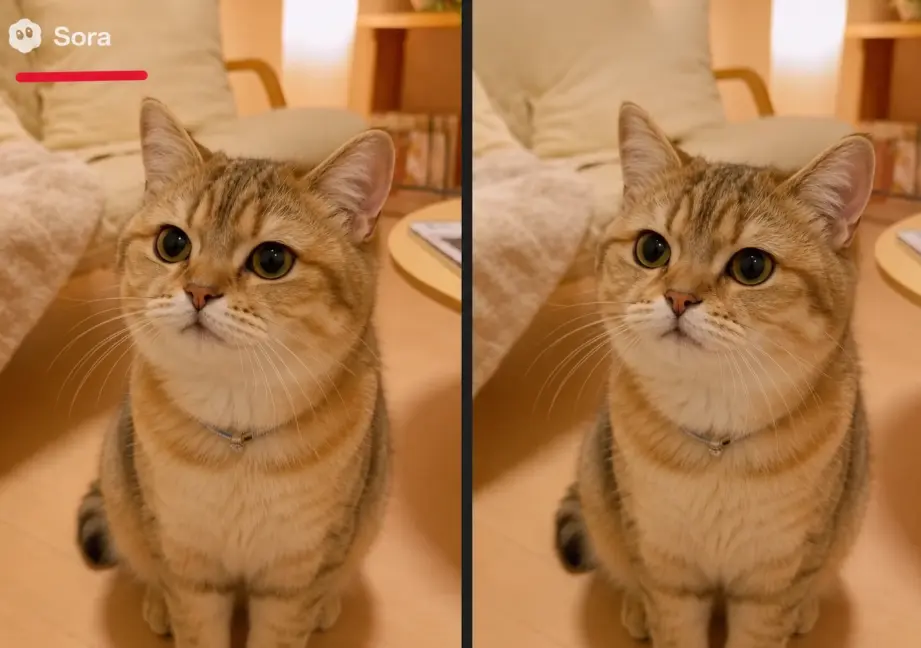
The Sora watermark is a dynamic, animated cloud logo that shifts position and opacity across video frames. Unlike a static logo sitting in one corner, it moves — making simple masking more difficult. Recent versions also display the creator’s account handle alongside the logo.
C2PA Invisible Metadata: The Hidden Layer Most People Miss
Beyond what you can see, Sora embeds C2PA provenance metadata directly into the video file. This invisible data records that the content was AI-generated, when it was made, and which model produced it. Removing the visible watermark does not strip this hidden layer — platforms and verification tools can still detect the video’s AI origin.
Research from the EA Forum found that OpenAI applies these inconsistently: Free/Plus users get the visible mark but often no C2PA, while Pro users get C2PA but no visible watermark.
Free Plan vs. Pro Plan: Who Gets Watermarked?
Here’s the pricing reality that drives demand for removal tools:
- Plus plan ($20/month): Always watermarked
- Pro plan ($200/month): Usually watermark-free, but still adds marks on image inputs, cameo features, and prompts involving public figures
That $180 gap is why removal tools flooded the internet within hours of Sora 2’s launch — something UC Berkeley professor Hany Farid called “entirely predictable.”
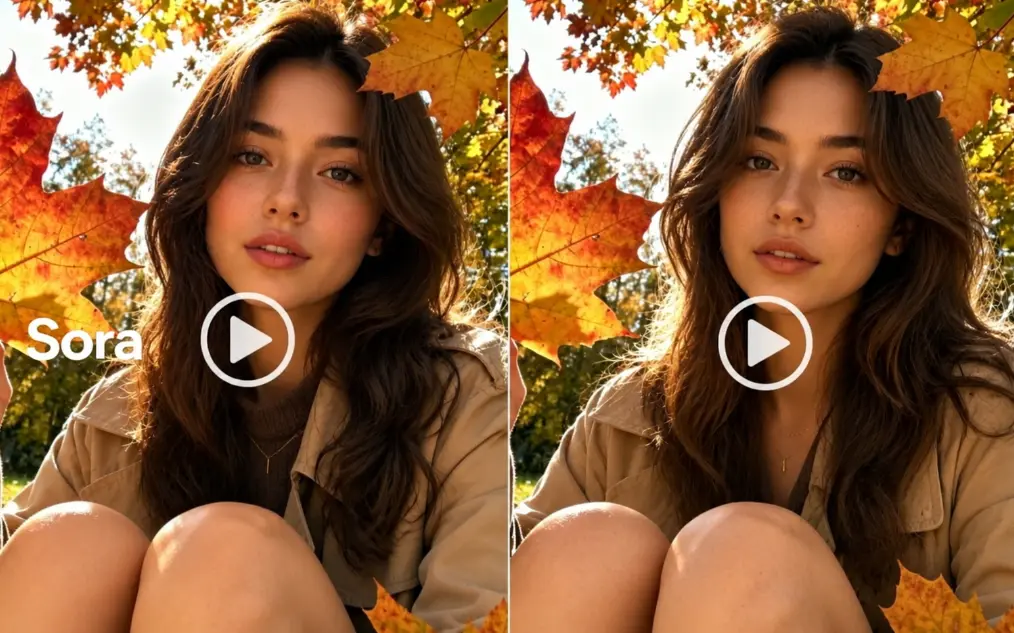
Method 1 — Use an AI Video Watermark Remover (Best Quality for Downloaded Files)
AI-powered watermark removers offer the most versatile approach — they work on any downloaded video file regardless of how you obtained it.
How AI Watermark Removal Works
These tools analyze pixels surrounding the watermark across multiple frames, using temporal data to reconstruct what should appear behind the logo. Rather than blurring or cropping, AI inpainting generates new pixels that blend with the surrounding scene.
Step-by-Step: Remove Sora Watermark with GStory.ai
- Visit GStory.ai Video Watermark Remover
- Upload your Sora video (supports MP4, WEBM, MOV, M4V, MKV — up to 5GB)
- Use the brush tool to paint over the watermark area
- Let AI process and reconstruct the covered region
- Download your clean result
The entire process runs in your browser with no software installation required. It works across all operating systems.
Other AI Watermark Remover Tools Worth Trying
- MagicEraser — Free tier limited to 5-second clips
- EzRemove.ai — No signup needed, supports up to 4K resolution
- Unwatermark.ai — Mobile app available for on-the-go editing
- BasedLabs — Manual mask and motion tracking controls for precision work
Quality Considerations with AI Inpainting
AI inpainting delivers excellent results on most footage, but complex moving backgrounds — water, crowds, rapid motion — can produce subtle artifacts. Sora’s dynamic watermark makes removal more challenging than fixed-position logos.
For best results: Use the highest quality source file and ensure your brush fully covers the watermark’s movement range.
Method 2 — Use a Link-Based Removal Tool (Fastest, Lossless)
Link-based tools take a fundamentally different approach: instead of reconstructing pixels, they fetch the original unwatermarked source directly from Sora’s servers.
How Link-Based Tools Work
These services reverse-engineer Sora’s internal API to access the clean video file that exists before the watermark overlay gets applied. The output is identical to the original — truly lossless with zero quality degradation.
Step-by-Step Process
- Make your Sora video public (share setting)
- Copy the public share link
- Paste the link into a removal tool
- Download the clean video (typically ~5 seconds)
Limitations and Reliability Issues
This method has a significant catch: OpenAI actively patches these API endpoints. Tools that function today may stop working tomorrow — this is the most commonly cited frustration across Reddit communities.
Additionally, your video must be set to public for link-based tools to work, which raises privacy concerns.
Method 3 — Crop and Reframe in a Video Editor
The simplest approach requires zero specialized tools — just trim the frame to exclude the watermark area.
When Cropping Is Enough
Cropping works best when:
- The watermark sits in corners with non-essential content
- Your video is destined for platforms that crop anyway (Instagram Stories, TikTok)
- A slight aspect ratio change is acceptable for your use case
How to Crop Using Free Video Editors
In CapCut (the most popular free option): open your video, select the crop tool, adjust the frame boundaries to exclude the watermark, then adjust the canvas or aspect ratio to fill the space. DaVinci Resolve and iMovie offer similar functionality.
Quality Trade-offs
Cropping removes 5-15% of the video frame depending on watermark position. Resolution decreases proportionally. Since Sora’s watermark moves across frames, you may need to crop more aggressively to cover all positions it occupies throughout the clip.
Method 4 — Cover with Overlays, Text, or Your Own Branding
Rather than removing the watermark, cover it with intentional design elements. This pragmatic approach turns a problem into a branding opportunity.
Using Your Own Branding as a Cover
Place your channel logo, brand mark, or consistent lower-third graphic over the watermark location. This reinforces your brand identity while eliminating the Sora mark — especially effective for recurring content series.
Text and Subtitle Overlays
For educational or tutorial content, position subtitles, captions, or call-to-action text over the watermark area. This works particularly well for content that requires captions anyway.
When This Method Makes Sense
Ideal for: Social media posts, branded content, short-form video with persistent lower-thirds.
Not ideal for: Cinematic content, stock footage, or B-roll where clean frames are essential.
Method 5 — Generate Without a Watermark (Skip Removal Entirely)
The most elegant solution avoids the watermark problem from the start by generating through channels that don’t apply one.
Using the OpenAI API Directly
The OpenAI API allows Sora video generation without the visible watermark (C2PA metadata still applies). This requires a developer account and pay-per-use billing but gives you the most control over output parameters.
Third-Party Platforms with Sora Access
Several platforms provide Sora model access through API wrappers and output watermark-free videos:
- ChatLLM Teams (Abacus.ai) — Full Sora 2 Pro access
- OpenArt AI — Alternative interface with clean exports
- GlobalGPT — No geographic restrictions, multiple AI models
Sora Alternatives That Don’t Add Watermarks
If you’re open to switching platforms entirely, consider Kling, Wan, Veo, Runway, or other AI video generators that either skip watermarking or offer simpler removal paths.
How to Remove C2PA Invisible Metadata
Even after removing the visible watermark, invisible provenance data may remain in your file.
What C2PA Metadata Contains
C2PA (Coalition for Content Provenance and Authenticity) metadata records that a video was AI-generated, the timestamp of creation, and which model produced it. It’s invisible to viewers but detectable by platforms and automated verification systems.
How to Strip Metadata via Re-encoding
Simply re-encode your video using Handbrake (free, GUI-based) or FFmpeg (command line). Any format conversion strips C2PA data. Use high bitrate settings to minimize the compression-related quality loss that re-encoding introduces.
Is It Legal to Remove the Sora Watermark?
Legal questions come up in virtually every discussion about watermark removal. Here’s what matters.
DMCA Section 1202: What It Actually Says
Under 17 USC Section 1202, removing “copyright management information” with intent to facilitate infringement carries penalties of $2,500–$25,000 per violation. However, this applies to copyrighted works, and the copyright status of AI-generated content remains legally unsettled.
OpenAI’s Terms of Service
OpenAI’s ToS grants users rights to their generated outputs but may restrict watermark removal. Violating ToS isn’t criminal — it could lead to account termination but doesn’t create legal liability.
When Removal Is Clearly Legal
You’re on safe ground when removing watermarks from your own AI-generated content for personal or portfolio use, editing for client work where you hold generation rights, or academic purposes. The key legal test is whether removal facilitates infringement of someone else’s rights.
Tips to Maintain Video Quality After Watermark Removal
Start with the Highest Quality Source
Always download at maximum resolution before processing. Never remove watermarks from already-compressed re-uploads or screen recordings — use the original Sora export.
Avoid Multiple Processing Steps
Each re-encode introduces generation loss. Plan your workflow to minimize processing rounds. If you need both watermark removal and metadata stripping, handle them in as few steps as possible.
Use AI Enhancement After Removal
If quality suffers during removal, an AI video enhancer can upscale and restore sharpness. Tools like GStory.ai’s Video Enhancer can upscale to 4K and reduce noise introduced during processing.
FAQs of Sora Watermark Removal
Can I remove the Sora watermark for free?
Yes. Cropping in free editors costs nothing. AI removal tools often provide free credits on signup, and link-based tools typically offer 2-3 free removals daily. The trade-off is usually between daily limits and output quality.
Does removing the watermark reduce video quality?
It depends on your method. Link-based tools produce lossless output identical to the original. AI inpainting may introduce subtle artifacts on complex backgrounds. Cropping reduces resolution by 5-15%. Overlays preserve full quality but only hide — they don’t remove.
Which Sora watermark remover is the fastest?
Link-based tools are fastest (~5 seconds) when functional. AI inpainting typically takes 30 seconds to 2 minutes depending on video length. Cropping is instant in any video editor.
Do these tools work on other AI video watermarks?
AI inpainting tools work on any video watermark regardless of source — Sora, CapCut, TikTok, Veo, Kling, and more. Link-based tools are Sora-specific and won’t function with other platforms.
Is the Sora watermark the same on all videos?
No. The Sora watermark is dynamic — it changes position and opacity across frames. It also now includes the user’s account handle. Pro plan users may see no visible watermark but still carry embedded C2PA metadata.
Conclusion
Each of the five methods suits different needs: AI removal tools deliver the best quality for downloaded files, link-based tools offer unmatched speed when available, cropping provides zero-cost simplicity, overlays turn the problem into branding, and watermark-free generation eliminates the issue entirely.
Choose based on what matters most for your workflow — quality, speed, or cost.
Ready to remove your Sora watermark? Try GStory.ai’s Video Watermark Remover — upload your video, brush over the watermark, and download a clean result in minutes. No signup wall, no software to install.
Leave a Reply