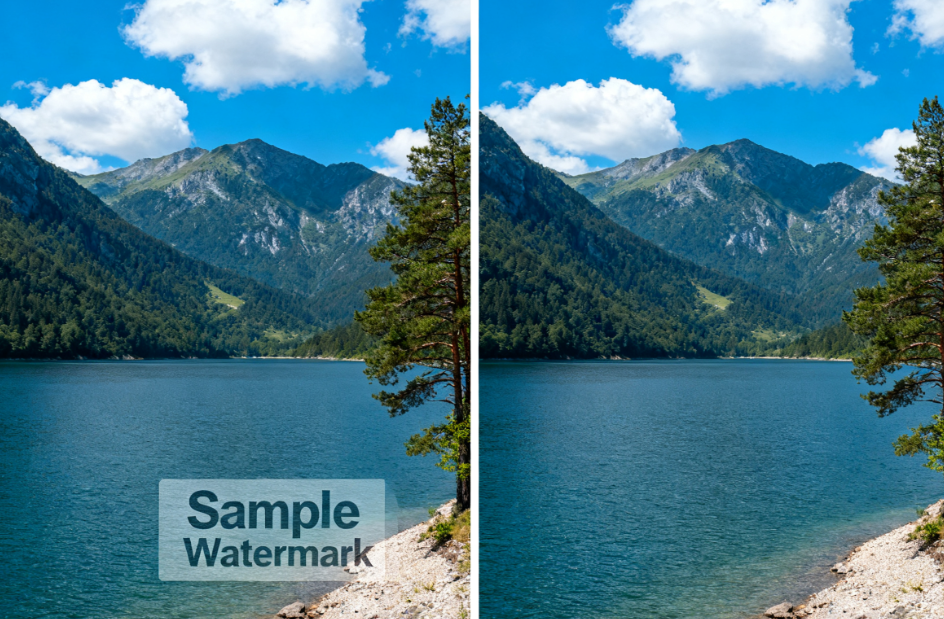
Last Updated on December 5, 2025 by gaojie
If you’ve ever downloaded a video from the internet — say from social media or a free video library — you might notice a watermark: a logo, a brand name, or a little text in the corner (or sometimes the center) of the video. That watermark can make the video look unprofessional or distract viewers when you want to reuse the video.
In this blog post, we will explain in plain English what watermark removal is, how you can do it quickly and safely, what tools exist, and what you should watch out for (especially copyright and ethics). By the end, you’ll know how to get a “clean” video — and when you shouldn’t remove a watermark.
1. What is a Watermark — and Why Do People Want to Remove It
A watermark is a visible mark placed on a video (or image) to show ownership or branding. It could be a logo, a company name, a timestamp, or a social-media handle. Sometimes watermarks are transparent; other times they are bold and in the middle of the screen.
Creators and companies often add watermarks to protect their content from being reused without permission. But there are times when you — as a content creator, teacher, student or marketer — might have the right (or need) to use a video without watermark. For example:
- You bought or licensed a video but lost the original file.
- You are editing your own footage but want a cleaner look.
- You want to repurpose an older video (e.g. for a presentation, school project, social-media reel) and the watermark distracts from your message.
In such cases, removing the watermark can make the video look much more professional and easier to share.
However — and this is very important — you must only remove watermarks when you have the rights to the original video (or permission from the copyright owner). Removing watermarks from other people’s content without permission can violate copyright laws and is generally unethical.
2. How Modern Tools Let You Remove Watermarks Quickly
In the past, removing a watermark often required manual editing: cropping out part of the video, or carefully using video-editing software to cover up the watermark frame by frame. That is slow, tricky, and often leaves ugly artifacts (blurry patches, distorted background).
Today, thanks to advances in AI and video–processing technology, there are tools that can automatically detect and remove watermarks — even complex ones like moving logos, semi-transparent text, or watermarks on dynamic backgrounds — while preserving video quality.
For example, the tool on the page you shared — GStory Video Watermark Remover — lets you:
- Upload a video (formats like MP4, MOV, MKV, WEBM, etc.) with a maximum size or duration.
- Use a “brush tool” or selection tool to mark where the watermark is (or let the tool auto-detect it).
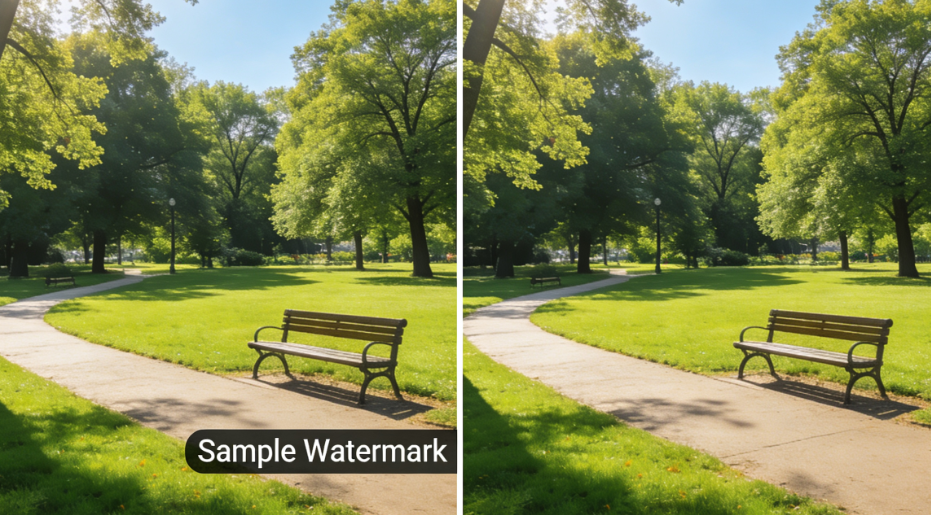
- Let AI process the video: the tool analyzes surrounding frames and reconstructs the background to “erase” the watermark.
- Download a new video that looks clean — no blur, no watermark, and (hopefully) no visible distortion.
Many other tools — online or offline — now offer similar features. Some are free, some paid; some work in a browser, others as desktop software.
The key benefit is simple: you don’t need to be a video-editing expert. Upload → click → download — the process can be much like using any simple online editor.
3. Step-by-Step: How to Remove a Watermark from a Video (Beginner-Friendly)
If you want to try removing a watermark yourself, here’s a general step-by-step workflow. I describe both a “quick online” approach and a “manual fallback” approach.
Quick, AI-powered approach (easy, fast)
- Choose a video watermark remover tool (for example, GStory, or any other AI-based remover).
- Upload your video. Most tools support common formats such as MP4, MOV, MKV, WEBM, etc.
- Select or mark the watermark area. Some tools auto-detect; others let you manually brush over the watermark.
- Let the AI process the video. The tool analyzes surrounding frames and tries to rebuild the background so that when watermark is removed, the video still looks normal.
- Preview the result. If it looks good (no blur, no weird artifacts), proceed to download.
- Save the video — now watermark-free — to your device. Use it only in ways you are allowed (see next section).
This method is generally fastest and works well when watermarks are simple (logo in corner, static).

Manual / fallback methods (for tricky cases)
Sometimes the AI method may not produce perfect results — especially when the watermark is large, covers important parts of the video, or is on a busy moving background. In those cases, consider:
- Cropping the video: If the watermark is at the border or corner, cropping that part out may be easier. This removes part of the frame but preserves quality.
- Blurring or covering the watermark: Instead of removing it entirely, you could blur it or cover it with something else (a box, a logo, a caption). This might be less clean, but safer and easier.
- Manual frame-by-frame editing: Using video-editing software (like those professionals use) to manually remove watermark — though time-consuming and requiring skills.
Manual methods are more work, but sometimes necessary for complex watermarks.
4. What to Do — and What to Avoid: Legal & Ethical Considerations
Removing watermarks isn’t always just a technical matter. It also comes with responsibilities.
What you can do (safely and ethically)
- Remove watermarks if you own the video, or you have explicit permission from the owner.
- Use watermark-free videos for personal projects, presentations, class assignments, internal use, or other contexts where distribution is limited.
- Use watermark removal when you originally had the clean video but lost it, or when the watermark is your own (for example, you recorded a video and added a watermark yourself).
What you should avoid — unless you have rights or permission
- Do not remove watermarks from videos that belong to someone else if you don’t have permission. Doing so can be a copyright violation.
- Avoid distributing or reposting watermark-removed videos publicly (on social media, websites, or for commercial use) without rights.
- Be careful: many “free online tools” may store, copy, or share your video. Always read the tool’s privacy terms before uploading.
Removing watermarks from protected content without permission is not only unethical — in many places, it may also be illegal. For creators and content owners, preventing unauthorized watermark removal is one reason watermarks exist in the first place.
5. Pros and Cons of Using AI Video Watermark Removal Tools
Pros
- Speed & convenience — you can get a clean video in minutes with no editing skills.
- Quality retention — modern AI tools try to preserve resolution, color, and video integrity while removing watermark.
- Accessibility — many tools are browser-based or online, so you don’t need heavy software or powerful hardware; works on smartphones or laptops.
- Good for simple needs — watermark in a corner, simple logo, or static watermark — most tools handle these well.
Cons / Limitations
- Not always perfect — if watermark covers complicated backgrounds or moves across frames, AI might struggle, producing visible artifacts.
- Potential legal/ethical issues — removing watermark without authorization may violate copyright.
- Dependence on upload/download — many online tools require uploading your video to their server; for private or sensitive videos, this may pose privacy concerns.
- Quality trade-offs for complex watermarks — sometimes removing watermark may cause slight blurring or unnatural use of background fill, especially around edges.
6. What to Watch Out For — Watermarks Aren’t Always Easy
Some watermarks are “easy”: a simple logo or text in a corner. But others are harder. For example:
- Dynamic watermarks — watermarks that move over time (a logo that slides, or a timestamp that updates).
- Semi-transparent or blended watermarks — text that’s faint, or blended with the background color or texture.
- Embedded / “burned-in” subtitles or overlays — sometimes the watermark is part of the video content itself (hardcoded).
Even powerful AI tools may struggle with these. When the watermark overlaps important parts of the video — faces, moving objects, busy backgrounds — removal can distort the background, blur details, or create unnatural artifacts.
In those cases, manual editing, cropping, or even re-recording may be the better choice.
7. When You Shouldn’t Remove Watermarks — Respecting Copyright & Integrity
This is perhaps the most important section. Just because you can remove a watermark doesn’t mean you should. Here are situations where you should avoid watermark removal:
- The video is owned by someone else, and you don’t have permission to edit or redistribute it.
- The watermark is part of a licensing agreement or copyright protection — removing it may break the license.
- You plan to share or monetize the video publicly (on social media, YouTube, website, etc.) without rights.
- The video contains sensitive or private content, or personal data, where upload to unknown servers may risk privacy.
If you are uncertain, the safest route is to contact the original owner and ask for a watermark-free version (or license to use). Or use properly licensed stock footage that doesn’t need watermark removal.
8. Example Tools (2025) — What’s Popular Right Now
Here are a few types of tools / approaches currently used to remove video watermarks (or logos), with their advantages and typical use-cases:
| Tool / Approach | What It Does / Good For | When to Use |
| AI-powered online remover (like GStory Video Watermark Remover) | Upload video → auto-detect watermark → AI removes it, reconstructs background → download clean video | When watermark is simple (corner logo, static text), and you want quick result without editing skills. gstory.ai |
| Manual video editing / cropping / blur / cover up | Use video editor to manually remove watermark (crop out, blur, cover with other graphic, or manually edit frames) | When watermark is complex, or AI fails, or video quality & background matter a lot |
| Open-source / local tools / scripts | Use free or open-source software (or code) to remove watermarks — sometimes frame-by-frame, sometimes algorithmically | For advanced users, or when working offline, or for privacy concerns. As in Python-based tools for subtitle / watermark removal. GitHub |
If you choose an online AI tool, always check the tool’s file size / duration limits, supported formats (MP4, MOV, MKV, etc.), and privacy terms.
9. Why This Topic is Still Important in 2025
With the explosion of video content online — social media, short-form video, teaching materials, marketing campaigns, stock footage — many people need to re-use or repurpose existing video clips. But watermark-protected clips often look less professional.
Therefore, demand for watermark removal remains high. At the same time, AI keeps improving: better background reconstruction, frame-by-frame intelligence, support for moving watermarks. This makes clean video reuse easier than ever.
That said — as more tools emerge — the legal and ethical dimension becomes even more important. Respect for creators, copyright, and transparency should go hand in hand with technical capability.
10. Responsible Use — How to Use Watermark Removal Ethically
If you decide to use watermark removal, here are some good practices:
- Always get permission first — if you didn’t create the video, ask the owner for a “clean version” or license.
- Keep records — keep a copy of the original video, license, or permission email, to prove you had the right.
- Don’t redistribute without rights — even if the watermark is removed, that doesn’t mean the video is “yours”.
- Use removal only when needed — for personal projects, internal use, content you own — not to “steal” other people’s work.
- Give credit if required — if the original owner asks for credit, mention them (even in watermark-free version).
By following these, you stay on the right side of law and ethics — and you build a reputation for respect and integrity.
Removing watermarks from video is a powerful capability — thanks to modern AI tools, you can get a clean, professional-looking video in just a few minutes. For many legitimate use cases (your own content, licensed clips, presentations, social-media marketing, school projects), this can save a lot of time and make the result look much better.
But with great power comes great responsibility. Always respect copyright and the rights of the original creators. Use watermark removal only when you have permission or ownership. If you’re unsure — ask.
If you follow the steps and ethical guidelines, watermark removal can be a useful tool in your video-editing toolbox, helping you create clean, polished videos without unnecessary visual clutter.
Leave a Reply