Last Updated on May 9, 2026 by
Every fursona starts as an idea — a species, a color palette, a personality. But turning that vision into a visual character design has traditionally required either years of drawing practice or hundreds of dollars in commissions, with waitlists stretching for months.
That’s where furry AI art generators come in. These tools let you type a description of your character and see it rendered in seconds, opening up fursona design to anyone in the fandom — not just artists. Whether you’re exploring species options for the first time or planning a full fursuit build, AI generators offer a fast, accessible way to visualize your ideas.
This guide covers what furry AI art generators are, why fans are using them, and over seven practical use cases that go far beyond simple image creation. You’ll also learn how to write better prompts, maintain character consistency, and navigate the community’s perspective on AI art.
What Is a Furry AI Art Generator?
A furry AI art generator is a tool that creates anthropomorphic character art from text descriptions. You type what you want — species, colors, pose, style — and the AI produces an image.
How AI Furry Art Generators Work
The process is straightforward: you write a text prompt describing your character (e.g., “a blue fox with galaxy-pattern fur, anime style, full body”), and the AI generates an image based on that description. Under the hood, these tools use models trained on large art datasets — some fine-tuned specifically on anthropomorphic and furry art for better species anatomy.
Why the Furry Fandom Benefits Most from AI Art Tools
The furry fandom is uniquely character-driven. Nearly every member designs a personal fursona, and visual representation is central to community participation. Unlike other fandoms where you might engage through discussion alone, furry identity is tied to original character design.
This makes accessible art tools especially valuable. AI generators don’t replace the community’s beloved artists — they add a new creative option for visualization and ideation, particularly for fans still exploring their character identity.
Why Furry Fans Are Using AI Art Generators
The appeal goes beyond saving money. AI furry art generators offer creative advantages that traditional commissioning can’t match.
Instant Fursona Visualization
The biggest draw is speed. Instead of waiting weeks for a commission slot, you can see your fursona concept rendered in seconds. This is especially valuable for newcomers still experimenting with different species, color schemes, and styles before committing to a final design.
No Drawing Skills Required
AI generators democratize fursona design. You don’t need drawing practice or expensive tablets — just the ability to describe what you want. This opens character creation to writers, cosplayers, roleplayers, musicians, and anyone whose creative strengths lie outside visual art.
Rapid Iteration and Creative Exploration
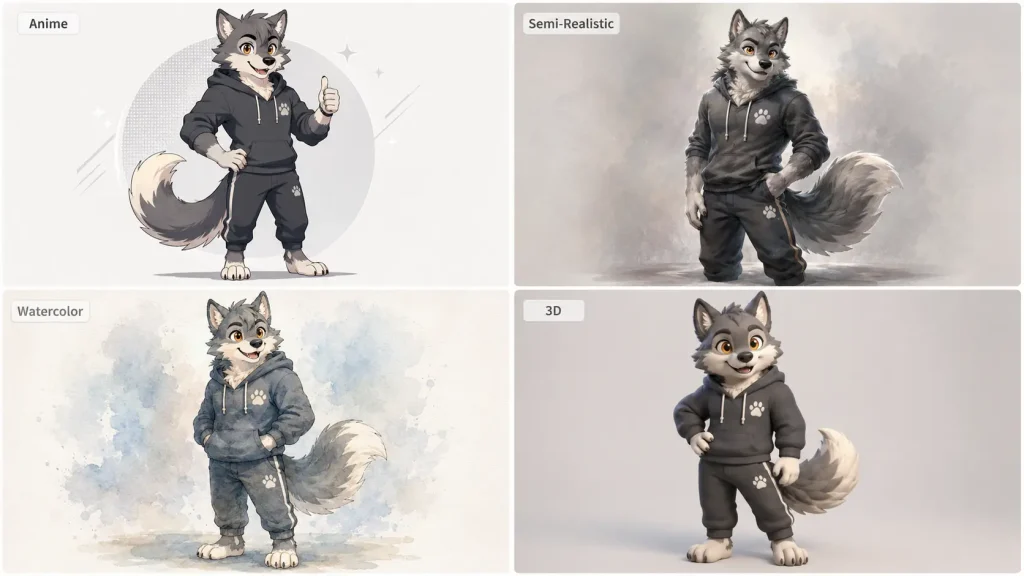
Unlike commissions where each revision costs time and money, AI lets you generate dozens of variations in minutes. Try your fursona as a wolf, then a dragon, then a protogen. Experiment with anime style, realistic rendering, and toony looks. Test different color palettes. This rapid iteration helps you refine your concept before investing in final artwork.
Creative Use Cases for Furry AI Art Generators
This is where AI furry art generators truly shine. Here are practical ways fandom members put these tools to work.
Visualize Your Fursona Concept Instantly
The most fundamental use case. A new fan can go from “I want a blue fox with galaxy-pattern fur” to seeing that character rendered in multiple styles within minutes. AI helps you test species options — canine, feline, avian, reptilian, hybrid, protogen, sergal — before settling on a final design.
Prompt tip: Describe species-specific features like ear shape, tail type, muzzle length, and paw style for more accurate results.
Create Fursona Reference Sheets
Reference sheets are the currency of furry commissions — they show your character from multiple angles with color callouts and markings. Traditional reference sheets cost $90-$300+ from human artists.
AI generators can produce front, side, and three-quarter views that serve as working draft references. Be aware that character consistency across angles remains challenging — AI struggles with exact reproduction. Workarounds include seed-based generation on Venice.ai or generating individual views and compositing them. AI reference sheets work best as draft refs to guide a human artist later.
Design Characters for Novels, Comics, and Visual Novels
The furry fandom has a thriving literary and comic community. Writers can use AI generators to visualize characters as they develop stories — seeing how a wolf protagonist looks in different outfits, expressions, and scenes. Visual novel creators benefit from generating character sprites in multiple poses and expressions, accelerating their creative pipeline.
Generate Multi-View Renders for Fursuit and Costume Design
Fursuits cost $1,500-$10,000+, making pre-visualization essential. AI generators can produce front, side, back, and three-quarter views that help fursuit makers understand your character’s proportions, color placement, and distinctive features.
Prompt tip: Use terms like “character turnaround sheet” or “orthographic character views” to get results useful for costume planning. Generate close-ups of head details — ears, muzzle, horns, markings — that are critical for fursuit head construction.
VRChat and Virtual World Avatar Concepts
VRChat is hugely popular in the furry community, and many players design custom 3D avatars. AI art generators help players conceptualize their avatar before investing in 3D modeling. Generate front, side, and back views with clean linework and clear color separation — the kind of reference a 3D modeler can work from directly.
Roleplay and Story-Based Character Visualization
Text-based roleplay on Telegram, Discord, and dedicated RP platforms is a major fandom activity. AI lets roleplayers generate scene illustrations that bring stories to life visually — a forest encounter, a cyberpunk cityscape, two characters in conversation. This adds a visual dimension to communities that traditionally relied on text alone.
Photo-to-Furry Transformation
Some tools offer image-to-image conversion that transforms real photos into anthropomorphic versions. ArtSmart supports text-to-image, image-to-image, and outpainting, while SeaArt offers a dedicated furry filter. Fun applications include turning your own photo into your fursona’s portrait or creating anthropomorphic versions of pet photos.
How to Get the Best Results from Furry AI Art Generators
Knowing which buttons to press is only half the battle. The quality of your output depends heavily on how you prompt and which settings you choose.
Write Effective Prompts for Anthropomorphic Characters
Structure your prompts with these elements in order:
- Species and body type: “anthro red fox, digitigrade legs, slender build”
- Colors and markings: “cream chest fur, dark brown ear tips, heterochromia blue and green eyes”
- Art style: “anime style,” “semi-realistic,” “toony,” or “kemono”
- Pose and expression: “confident stance, arms crossed, smirking”
- Clothing and accessories: “leather jacket, silver ear piercings, messenger bag”
- Negative prompts: Exclude common issues like “extra limbs, merged fingers, wrong tail type”
Key Takeaway: The more specific your species anatomy details, the better the result. “Wolf fursona” gives generic output; “anthro gray wolf, thick fur ruff, amber eyes, digitigrade stance, bushy tail” gives character.
Choose the Right Art Style for Your Purpose
Match your art style to your use case:
- Toony/cartoon: Social media avatars and badges
- Semi-realistic: Reference sheets and fursuit planning
- Anime/kemono: Novel and visual novel characters
- Realistic: VRChat concepts and dramatic portraits
Different generators excel at different styles. Perchance AI handles cartoon and anime well, while NightCafe produces higher-detail illustrations suitable for realistic styles.
Maintain Character Consistency Across Multiple Images
This is the #1 pain point users report. AI struggles to reproduce the same character identically across images. Practical approaches include:
- Seed-based generation: Venice.ai lets you lock a seed value to reproduce similar outputs
- LoRA training: On CivitAI or local Stable Diffusion, train a custom model on your specific character
- Detailed consistent prompts: Use the exact same character description across all generations
- Hero image workflow: Generate one “perfect” image, then use it as reference for additional views
Enhance and Upscale Your AI-Generated Furry Art
AI-generated images often benefit from post-processing to reach their full potential. Key enhancement steps include:
- Upscaling: Bring low-resolution outputs to 4K for print-ready quality using tools like GStory’s Photo Enhancer
- Background removal: Isolate your character for clean reference sheets, transparent PNGs for badges, or compositing onto custom backgrounds with GStory’s Photo Background Remover
- Color correction: Adjust the common warm yellow tint that many AI models produce
This “generate, then refine” workflow consistently produces the best results across all use cases.
AI Art and the Furry Community: What You Should Know
Using a furry AI art generator effectively means understanding the community context around these tools.
The Community’s Relationship with AI Art
Many furry community spaces — including FurAffinity, E621, most furry Discord servers, and r/furry — restrict or ban AI-generated art. The fandom deeply values its artists, who are considered the backbone of the community. Commission culture is integral to how the fandom operates. Understanding this landscape is important before sharing AI-generated work.
Using AI as a Creative Tool, Not a Replacement
The most community-friendly approach positions AI generators as complementary tools: use them for personal concept exploration, draft references for commissioning artists, design iteration, and private creative projects. The “AI sketch to human commission” pipeline respects both the technology’s strengths and the community’s values — you figure out what you want with AI, then commission an artist for the final polished piece.
Best Practices for Sharing AI-Generated Furry Art
If you share AI-generated furry art, follow these guidelines:
- Always label it as AI-generated — never pass it off as hand-drawn
- Check platform rules before posting on any furry community
- Don’t replicate another artist’s specific style without acknowledgment
- Consider private use as the default, with clearly-labeled sharing as the exception
- Explore welcoming spaces like r/aiArt or dedicated AI art communities
Conclusion
Furry AI art generators have opened a new creative pathway for fandom members — from visualizing your very first fursona concept to planning fursuit construction, designing characters for stories, and exploring species and styles you never imagined. Whether you use AI as your primary creative tool or as a stepping stone toward commissioning your dream art from a human artist, these generators put the power of character visualization in every furry fan’s hands.
Ready to bring your fursona to life? Start with a free generator to explore your character concept, then use GStory’s Photo Enhancer to upscale your favorite generations to crisp, print-ready 4K quality. Your fursona is just a prompt away.
GStory is launching an AI Image Generator soon—stay tuned!
Leave a Reply