Last Updated on May 19, 2026 by
AI image generators have reached a strange point. Many of them are powerful, fast, and visually impressive — but their outputs can also start to feel familiar. The same polished lighting. The same cinematic glow. The same “AI image” texture that looks good at first glance but becomes easy to recognize after a while.
That is why Krea 2 is worth paying attention to.
Launched on May 12, 2026, Krea 2 is Krea’s first foundation image model built completely from scratch. Unlike image models that mainly compete on photorealism or prompt accuracy, Krea 2 focuses on aesthetics, style transfer, and creative control. Krea’s own positioning is simple: image generation should not only answer “what should be in the image?” It should also give creators better control over “how the image should look.”
This review breaks down what Krea 2 actually does, where its benchmark results are impressive, where it may not be the best fit, and how it compares with a simpler everyday workflow like GStory AI Image Generator.
What Is Krea 2?
Krea 2 is not just another model option added to the Krea platform. It is Krea’s first in-house foundation image model, built from scratch by the Krea team and designed around visual style control.
That distinction matters. Krea has long been known as a creative AI platform with tools for image generation, video generation, editing, upscaling, and workflow automation. But Krea 2 represents a bigger shift: Krea is no longer only giving users access to external models. It is now building its own model with a clear creative philosophy.
Krea 2 is built for creators who care about visual direction. That could mean matching a client’s moodboard, blending several art styles, generating campaign concepts, or creating images that do not fall into the usual polished AI aesthetic.
Krea’s official announcement says the model was designed to render many types of visual styles, from grainy film photography and studio shots to cinematic stills, illustrations, complex digital paintings, and experimental directions. More importantly, Krea 2 includes a style transfer system that lets users pass reference images into the model, control how strongly those references affect the output, and combine multiple styles together.
In other words, Krea 2 is not only trying to make “good-looking” images. It is trying to make style more controllable.
Krea 2 Key Features That Actually Matter
Krea 2 has several features, but three are especially important if you are deciding whether it fits your creative workflow.
Style Transfer with Adjustable Influence
The headline feature of Krea 2 is style transfer. Instead of relying only on prompt words like “cinematic,” “editorial,” “vintage,” or “anime style,” users can upload reference images and let Krea 2 extract the visual language from those images.
That visual language may include color palette, lighting, grain, texture, composition, illustration style, brushwork, mood, and overall art direction. The user can then decide how strongly that style should influence the final result.
This is important because style words are often too vague. One person’s “cinematic” might mean moody low-key lighting. Another person might expect warm golden-hour color grading. A third person may want something closer to a fashion editorial still. Krea 2’s reference-based workflow gives creators a more direct way to guide the model.
For designers, art directors, and creative marketers, this is where Krea 2 becomes interesting. If a client sends a visual reference and says, “We want something with this feeling,” Krea 2 is designed for exactly that kind of brief.
Moodboard-Based Creative Direction
Krea 2 also supports a more moodboard-like approach. Instead of using one reference image, creators can combine multiple visual references and let the model understand the broader direction.
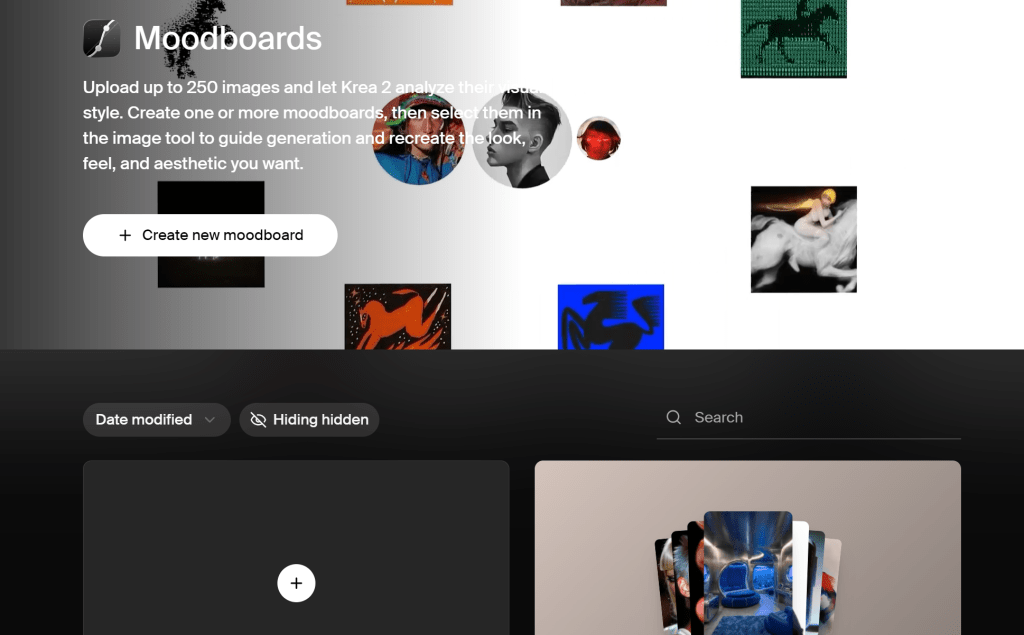
This makes sense for real creative work. A campaign moodboard rarely depends on one image. It may include a film still for lighting, a fashion shot for pose, a product image for texture, and an illustration for color. Krea 2 is designed to help users blend those influences rather than forcing everything into a single prompt.
This does not mean every output will be perfect on the first try. Style-heavy generation still requires testing. But the workflow is more practical for users who already have a visual direction and want to explore variations inside that direction.
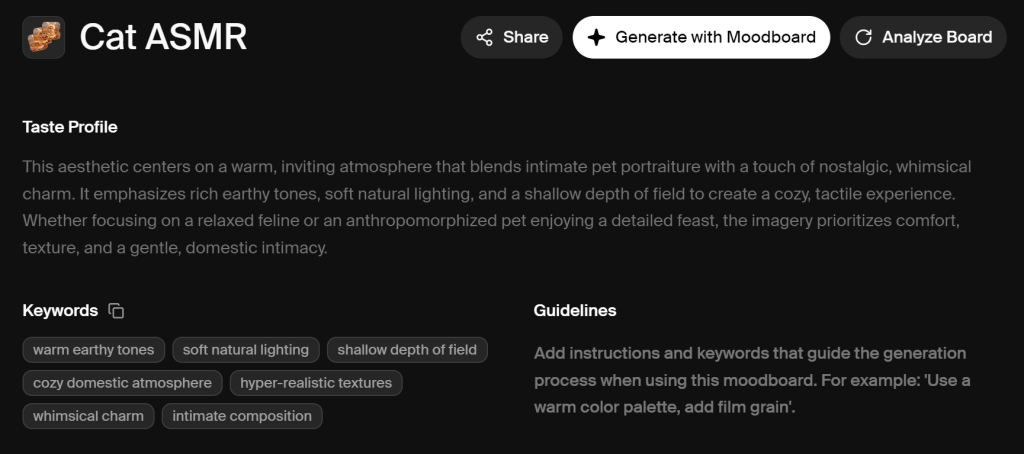
One nice point worth mentioning is that after uploading or updating a collection of images that match your aesthetic into the moodboard, you can click “Analyze Board” to generate a personalized “Taste Profile” along with relevant keywords. That way, you can easily reuse them directly in future prompts when generating new images.
At least, this helped me expand the prompt terminology library for my project.
Batch Exploration for Designers and Creators
Another useful feature is batch variation control. Krea 2 lets users control whether a batch should stay visually cohesive or explore a wider range of outputs.
This sounds small, but it matters in professional work. When a client asks for options, they usually do not want ten completely unrelated images. They want variations that still belong to the same campaign direction. A cohesion-versus-diversity control helps with that.
For example, a creator may want five YouTube thumbnail directions that share the same color mood but use different compositions. A brand team may want multiple ad concepts that feel connected but not repetitive. A designer may want to explore several illustration styles before choosing one for a landing page.
Krea 2 is strongest when the goal is not just “generate one image,” but “explore a visual system.”
Krea 2 Benchmark Results: Strong in Style Fidelity, Not Everything
The strongest public argument for Krea 2 comes from style-transfer benchmarking.
According to Krea’s blog, Contra Labs evaluated Krea 2 Large against GPT Image 2, Gemini 3 Pro Image Preview, and Seedream 5.0 Lite in a four-model style-transfer benchmark. Krea 2 Large ranked second for style fidelity and was reported to be only 0.14 points behind GPT Image 2. Krea also says Krea 2 Large was the only non-GPT model in the evaluation to clear the 3.0 style-fidelity threshold.
| Model | Style Transfer Result | What It Suggests |
| GPT Image 2 | Ranked #1 | Best style fidelity in this benchmark |
| Krea 2 Large | Ranked #2 | Very strong at preserving reference style |
| Gemini 3 Pro Image Preview | Lower in style fidelity | Strong model, but weaker in this specific test |
| Seedream 5.0 Lite | Lower in style fidelity | Less competitive for reference-style preservation |
The most interesting detail is not just that Krea 2 ranked second. It is that Krea 2 Large received the top style-fidelity rating on 23% of outputs, while GPT Image 2 received the top rating on 22%. At its best, Krea 2 can compete very closely with the frontier model in this specific task.
But this benchmark needs to be understood correctly.
It does not prove that Krea 2 is the best image model for every task. The benchmark mainly measures whether a model can preserve the style of a reference image. It does not fully measure product-image accuracy, readable text, photorealistic skin, anatomy, editing precision, or how good a model feels for fast everyday content.
That is why Krea 2 should not be judged as a general “Midjourney killer” or “best image model overall.” A more accurate takeaway is this: Krea 2 is especially strong when the reference image carries the creative direction.
Where Krea 2 Works Best
Krea 2 is not for every image generation task. Its value becomes clearest in workflows where style matters more than speed or simplicity.
Style Briefs from Clients
If you work with clients, you know that prompts are rarely enough. Clients often send references, moodboards, screenshots, campaign decks, or vague phrases like “premium but playful” and “editorial but not too fashion.”
Krea 2 is useful because it gives you a more visual way to respond to those briefs. Instead of trying to translate everything into text, you can use references to guide the model directly.
This makes it especially useful for designers, art directors, agencies, brand teams, and creative freelancers.
Campaign Visual Exploration
Krea 2 can also help during early campaign exploration. Before committing to a final direction, teams often need to test different moods, color systems, lighting styles, and compositions.
For example, a marketing team could explore several visual styles for a product launch: cinematic realism, editorial photography, dreamy illustration, surreal 3D, or retro film. Krea 2’s style-reference system makes this kind of exploration easier than relying only on text prompts.
Experimental Art Styles
Many creators are tired of AI images that look technically impressive but emotionally generic. Krea 2’s biggest appeal is that it tries to move away from that over-polished AI look.
If your goal is to create images that feel more unusual, expressive, raw, or art-directed, Krea 2 is more interesting than a model that simply tries to make everything clean and beautiful.
Pre-Production for Image-to-Video
Krea 2 also fits well into image-to-video workflows. A creator can first generate a strong stylized reference frame, then use that frame as the starting point for AI video generation.
This is useful for short films, music visuals, TikTok concepts, AI character accounts, and campaign teasers. The image becomes the visual anchor, and the video tool adds motion later.
For creators building highly stylized AI videos, Krea 2 can be a strong first step.
Where Krea 2 May Not Be the Best Choice
Krea 2 is exciting, but it is not the best tool for every creator.
First, it may be too complex for simple image needs. If you only need a blog cover, a social post image, an ecommerce visual, or a quick concept draft, Krea 2’s style-transfer workflow may be more than you need.
Second, style control often requires iteration. If you combine multiple references, adjust influence strength, and explore different batches, you should expect some testing. That is not a failure of the model. It is simply the nature of a more creative workflow.
Third, Krea 2 should not be confused with every complaint about the wider Krea ecosystem. Some older community complaints about Flux Krea Dev, platform credit usage, or editing behavior are not necessarily direct feedback on Krea 2 itself. Krea 2 is a newer foundation model, so it should be judged separately from older Krea-related models and tools.
Pricing also needs to be checked carefully before subscribing. Krea’s current pricing page shows that Basic, Pro, Max, Business, and Enterprise plans include access to Krea 2, with Basic starting at 5,000 compute units per month and higher plans offering more compute, video access, workflow automation, upscaling, concurrency, and team features.
This is different from some older third-party information online, so users should always check Krea’s official pricing page before making a decision.
Krea 2 vs GStory AI Image Generator: Which Workflow Fits You?
Krea 2 and GStory AI Image Generator are not trying to solve exactly the same problem.
Krea 2 is best understood as a style-control model for deeper creative exploration. GStory AI’ Image Fast v1.0 is better suited for users who want to create useful images quickly for content, marketing, ecommerce, social media, or daily creative work.
Use Krea 2 When Style Control Comes First
Krea 2 makes sense when your main problem is not “I need an image fast,” but “I need this image to follow a specific visual direction.”
Use Krea 2 when you need to:
- Match a complex style reference
- Explore a client moodboard
- Combine multiple visual influences
- Create experimental or non-generic AI art
- Build a strong reference frame for AI video
- Test campaign art direction before production
In these cases, the extra control is valuable. You are not just generating a picture. You are shaping a visual identity.
Use GStory When You Need Fast, Practical Images
GStory AI Image Generator is a better fit when you need usable visuals without building a complex style system first.
GStory positions its AI Image Generator around speed, quality, and ease of use. Its homepage describes the tool as a way to make AI images for content, work, or daily ideas in seconds, with use cases including ecommerce images, social media posts, AI headshots, blog and ad visuals, art concepts, and character design.
That makes GStory especially practical for creators and marketers who need images for real publishing tasks.
For example, a blogger may need a simple blog cover. An ecommerce seller may need product-style visuals. A TikTok creator may need character concepts or thumbnail ideas. A small business may need quick ad creatives. In those cases, the priority is not always advanced style transfer. The priority is speed, clarity, and usability.
This is where GStory can be easier to use than a more advanced creative-control model.
A Practical Workflow: Krea for Style Tests, GStory for Everyday Output
The smartest workflow is not choosing one tool for everything. It is choosing the right tool for the task.
If you are building a strong art direction, Krea 2 can help you explore style. If you are producing daily content, GStory can help you move faster. If you need to continue editing images, removing backgrounds, enhancing visuals, or preparing assets for marketing, GStory’s broader AI toolkit can also support the next step after image generation.
A practical workflow could look like this:
- Use Krea 2 when you need deep style exploration.
- Use GStory AI Image Generator when you need fast usable images.
- Use GStory’s editing tools when you need to enhance, clean up, or prepare visuals for publishing.
This keeps Krea 2 in its strongest role: creative direction. It also keeps GStory in its strongest role: fast, practical content production.
Final Verdict: Krea 2 Is Worth Watching
Krea 2 is one of the more interesting image model releases of 2026 because it does not only chase cleaner realism or sharper details. Its real focus is style control — helping creators guide the overall look and feel of an image with more intention. Still, Krea 2 is best understood as one useful option in a growing AI image workflow, not a single tool that replaces every other generator.
For many creators, the practical approach is to use different tools at different stages: explore style when needed, generate fast visual ideas when needed, and keep refining images until they are ready for real content use. In that kind of workflow, tools like Krea 2 and GStory can both play a useful role depending on the project.
Leave a Reply